
Infor CloudSuite Invoice Automation: How to Add AI Matching to Your Infor ERP
April 8, 2026To automate invoice matching in Infor CloudSuite (M3, LN, or SyteLine) for manufacturing and distribution businesses without customising ION, eZintegrations uses Goldfinch AI Document Intelligence to extract invoice data from any supplier PDF, calls the Infor ION API Gateway to retrieve purchase order and goods receipt data (M3: PPS100MI, PPS300MI; LN cloud and on-premises: ION BOD PurchaseOrder and ReceiptLine nouns), runs a configurable tolerance-based matching engine, and creates the matched supplier invoice via APS100MI (M3) or the SupplierInvoice BOD (LN/SyteLine). Both cloud and on-premises Infor LN deployments are supported via the ION API Gateway, which bridges external systems to the on-premises Infor environment through a secure tunnel.
TL;DR
Infor CloudSuite serves manufacturing and distribution businesses running M3, LN (formerly Baan), and SyteLine. Each product has native AP matching once invoices are in the system. What none of them provide: AI-powered extraction from supplier PDF emails before the data reaches the ERP. eZintegrations adds Goldfinch AI Document Intelligence above the Infor ION API Gateway, automating the PDF-to-Infor data flow without modifying ION workflows, BOD mappings, or any Infor configuration. On-premises Infor LN is fully supported.
The ION API Gateway bridges on-premises LN to eZintegrations via a secure outbound connection. No inbound firewall changes required. Manufacturing context: multi-plant PO matching, partial receipt handling (common in make-to-order and distribution), and goods receipt timing (when goods arrive at a receiving dock before the supplier’s invoice system processes the shipment) are all handled. Automation Hub templates for Infor M3, LN (cloud and on-premises), and SyteLine. 6-8 hours to go live.
Why Infor Manufacturing and Distribution AP Teams Struggle Most
Your Infor LN environment runs three manufacturing plants. Each plant has its own purchasing team raising purchase orders for raw materials, components, and MRO supplies. Invoices arrive from 180 active suppliers in a mix of formats: structured PDFs from large raw material suppliers, scanned invoices from smaller component vendors, multi-page invoices in euros from European suppliers, and complex freight invoices that reference multiple delivery notes rather than a single PO.
Your AP team sits in one location, processing invoices for all three plants. They navigate LN’s purchase invoice entry screen, enter each invoice manually, link to the purchase order, check the goods receipt, and post the voucher. For invoices that reference a PO that had a partial goods receipt (common in make-to-order manufacturing where components arrive in multiple deliveries), the AP team must manually reconcile which receipt lines the invoice is billing against.
At 400 invoices per month across three plants, your AP team spends 80-120 hours on invoice entry alone. Every hour spent on entry is an hour not spent on exception resolution, supplier statement reconciliation, or cash flow optimisation.
This is not an Infor problem. It is a document intelligence gap: Infor LN can match invoices against POs and receipts with precision, but it cannot read a PDF. eZintegrations fills that gap.

What Infor CloudSuite Provides for Invoice Matching
Infor CloudSuite serves manufacturing and distribution businesses across three primary ERP products, each with distinct AP capabilities.
Infor M3: Widely used in process manufacturing (food and beverage, chemical, pharmaceutical), distribution, and fashion industries. M3’s AP module handles purchase invoice entry, 2-way and 3-way matching, payment scheduling, and supplier ledger management. The APS100 (Supplier Invoice Entry), PPS100 (Purchase Order Inquiry), and PPS300 (Receipt Inquiry) programs manage the core AP matching workflow.
Infor LN (formerly Baan): The ERP of choice for complex discrete and engineer-to-order (ETO) manufacturers: aerospace, defence, industrial machinery, automotive components. LN’s procure-to-pay module uses a BOD (Business Object Document) architecture for integration, with the PurchaseOrder, ReceiptLine, and SupplierInvoice BOD nouns as standard data structures. LN has deep multi-site, multi-currency, and project-based costing capabilities that manufacturing businesses depend on.
Infor SyteLine (CloudSuite Industrial): Designed for discrete manufacturers: job shop, make-to-order, repetitive manufacturing. SyteLine’s AP module manages voucher entry, PO matching, and payment processing with ION-based integration connectivity.
Common gap across all three: none of the three Infor products read unstructured supplier PDF invoices. Invoice data entry is manual in all three. The matching logic runs after manual entry, not before. Data entry errors create AP holds that require separate investigation.
Infor LN: Manufacturing’s ERP and Its AP Gap
Infor LN deserves specific attention because of its importance to manufacturing and its distinct architecture.
Why manufacturers run LN: LN is built for the complexity of project-based and engineer-to-order manufacturing. A single sales order in LN can drive multiple production orders, multiple purchase orders to different suppliers, and a complex goods receipt chain as components arrive in stages. The AP team in an LN environment routinely handles: – Purchase invoices referencing a PO with 20-50 line items (multi-component assemblies) – Invoices where the supplier has shipped partial quantities against multiple PO lines (the assembly arrived in three deliveries, each triggering a partial receipt) – Invoices from foreign suppliers in currencies different from the legal entity’s accounting currency – Subcontractor invoices that reference both a purchase order and a production order
LN’s AP entry process: In LN, the AP clerk uses the Purchase Invoice Entry session to create an invoice, link it to the purchase order, and match it against the goods receipts. LN’s matching check verifies quantities received against the invoice, and price tolerance against the PO terms. When the invoice references a partial delivery (common in LN manufacturing), the AP clerk must manually identify which receipt lines the invoice covers.
The LN AP gap: LN’s AP matching is accurate once data is entered. The gap is identical to M3: the AP clerk reads the supplier PDF and manually enters the data. At 15-20 minutes per invoice for a complex LN manufacturing invoice (with multiple lines, partial receipts, and multi-currency), a team processing 400 invoices per month is spending 100-133 hours on data entry.
eZintegrations addresses this using all four platform levels: Level 1 (iPaaS Workflows) handles email ingestion, multi-plant routing by legal entity, and all ION API calls. Level 2 (Goldfinch AI Document Intelligence) extracts any supplier PDF without Infor-specific templates. Level 3 (AI Agents) retrieves LN PO and receipt BODs via the ION API Gateway, runs the manufacturing matching engine (partial receipt aggregation, freight invoice identification, multi-currency tolerance), and routes exceptions. Level 4 (Goldfinch AI) orchestrates the full workflow as a Workflow Node for autonomous end-to-end processing, and provides the Goldfinch AI Chat UI so AP managers can query the Infor LN invoice pipeline in natural language without navigating Infor reports.
The ION API: Authentication for Cloud and On-Premises LN
The Infor ION API Gateway works for both cloud-deployed and on-premises Infor LN. This is a critical point for manufacturing businesses that have not migrated to the cloud.
Cloud Infor (M3, LN Cloud, SyteLine Cloud)
For cloud-deployed Infor products, the ION API Gateway is accessible directly via the internet:
Credential file (.ionapi): Created in Infor OS Admin Console (Security > Service Accounts). The .ionapi file contains: – pu: base URL (https://{tenant}.mingle.infor.com) – oa: authorisation server path – ot: token endpoint path – ci: Client ID – cs: Client Secret – saak: Service Account Application Key (username) – sask: Service Account Secret Key (password)
OAuth 2.0 Resource Owner Grant (machine-to-machine):
POST https://{tenant}.mingle.infor.com/{tenant_id}/as/token.oauth2
Content-Type: application/x-www-form-urlencoded

grant_type=password
&client_id={ci}
&client_secret={cs}
&username={saak}
&password={sask}
&scope=openid
Response: { "access_token": "...", "expires_in": 7200 }. eZintegrations handles token refresh automatically.
On-Premises Infor LN
For on-premises Infor LN deployments, the ION API Gateway (part of the Infor OS on-premises stack, also called Infor OS CE for Cloud Edition when used in hybrid mode) provides the same OAuth 2.0 interface as cloud. The key difference: the ION API Gateway for on-premises deployments is hosted within the customer’s data centre or private cloud, and eZintegrations connects to it via the on-premises endpoint rather than a Infor-hosted cloud URL.
On-premises ION API endpoint pattern:
https://{on-prem-ionapi-server}:{port}/{tenant_id}/M3/m3api-rest/execute/...
or for LN:
https://{on-prem-ionapi-server}:{port}/{tenant_id}/ION/api/v1/BODService/GetBOD...
Network requirements: eZintegrations connects outbound to the on-premises ION API Gateway endpoint. For organisations with strict inbound firewall policies, the eZintegrations cloud agent initiates the connection outbound to the on-premises ION server. No inbound firewall rules from eZintegrations to the LN server are required. The ION API Gateway handles the authentication and routing to the underlying LN application.
Hybrid deployment option: Some Infor LN customers run LN on-premises but Infor OS (including ION) as a cloud service. In this configuration, the cloud-hosted ION API Gateway connects to the on-premises LN application via Infor’s secure connection service. eZintegrations calls the cloud-hosted ION endpoint (same as cloud Infor), and ION routes the request to the on-premises LN.
The .ionapi credentials file is the same format for both cloud and on-premises: your Infor OS administrator generates it regardless of deployment model.
M3 Invoice Automation: Programs, Parameters, and Payload
For Infor M3 environments, eZintegrations calls M3 directly via the m3api-rest interface, accessible through the ION API Gateway.
Purchase Order Header: PPS100MI/GetHead
GET https://{tenant}.mingle.infor.com/{tenant_id}/M3/m3api-rest/execute/PPS100MI/GetHead
  ?PUNO=PO-2026-2089
  &CONO=100

Authorization: Bearer {access_token}
Key response fields: SUNO (supplier number), CUCD (currency), PUST (PO status: 40 = receipt posted).
PO Lines: PPS200MI/GetLine
GET /M3/m3api-rest/execute/PPS200MI/GetLine
  ?PUNO=PO-2026-2089
  &PNLI=1
  &CONO=100
Returns ITNO (item), ORQT (ordered qty), PUPR (purchase price). Called per line number.
Goods Receipt: PPS300MI/GetLine
GET /M3/m3api-rest/execute/PPS300MI/GetLine
  ?PUNO=PO-2026-2089
  &PNLI=1
  &CONO=100
RVQA field: received quantity per line. If RVQA = 0: no receipt posted yet (Watcher activates).
Supplier Invoice Creation: APS100MI
Note: M3 uses YYYYMMDD numeric date format (e.g., 20260318 = March 18, 2026). Level 1 converts ISO dates automatically.
POST /M3/m3api-rest/execute/APS100MI/AddHead
Content-Type: application/json

{
  "SUNO": "100001",
  "SINO": "INV-2026-04721",
  "IVDT": "20260318",
  "CUCD": "USD",
  "IVAM": "37565.00",
  "TEPY": "N30",
  "CONO": "100"
}
Then per line:
POST /M3/m3api-rest/execute/APS100MI/AddLine
Content-Type: application/json

{
  "SINO": "INV-2026-04721",
  "PUNO": "PO-2026-2089",
  "PNLI": "1",
  "IVQA": "100",
  "PUPR": "42.50",
  "CONO": "100"
}
Duplicate Check
GET /M3/m3api-rest/execute/APS100MI/LstBySupplier
  ?SUNO=100001
  &SINO=INV-2026-04721
  &CONO=100
If result returned: potential duplicate, route to AP supervisor.
LN Invoice Automation: BOD-Based Matching for Manufacturing
For Infor LN (cloud and on-premises), eZintegrations uses the ION BOD service layer. This approach is ERP-agnostic within the Infor ecosystem: the same BOD noun names work for cloud LN and on-premises LN.
Purchase Order Retrieval (LN)
GET https://{ion-endpoint}/{tenant_id}/ION/api/v1/BODService/GetBOD
  ?bodNoun=PurchaseOrder
  &documentID=PO-2026-2089
  &logicalId={LN_LOGICAL_ID}

Authorization: Bearer {access_token}
Response: standard PurchaseOrder BOD containing header (supplier, currency, status) and line items (item, ordered quantity, unit price, delivery schedule).
Receipt Line Retrieval (LN)
GET /ION/api/v1/BODService/GetBOD
  ?bodNoun=ReceiptLine
  &purchaseOrderDocumentID=PO-2026-2089
  &logicalId={LN_LOGICAL_ID}
Returns all receipt lines against the PO with received quantities. For partial deliveries in manufacturing, multiple ReceiptLine BODs may exist for a single PO line.
Partial Receipt Handling in LN Manufacturing
This is the manufacturing-specific matching logic. When a supplier invoices for 600 of the 1,000 components on a PO line and two receipts exist (400 received in week 1, 200 received in week 2), the matching engine: 1. Aggregates total received quantity across all ReceiptLine BODs for the PO line: 400 + 200 = 600 2. Compares invoice quantity against aggregated received: match 3. Compares invoice price against LN PO unit price: within tolerance 4. Result: approved for invoice creation
Supplier Invoice Creation (LN)
POST /ION/api/v1/BODService/ProcessBOD
Content-Type: application/json

{
  "noun": "SupplierInvoice",
  "verb": "Process",
  "logicalId": "{LN_LOGICAL_ID}",
  "body": {
    "SupplierInvoice": {
      "Header": {
        "SupplierParty": {
          "PartyID": "100001"
        },
        "DocumentID": {
          "ID": "INV-2026-04721"
        },
        "DocumentDateTime": "2026-03-18T00:00:00",
        "TotalAmount": {
          "Amount": {
            "@currencyID": "EUR",
            "#text": "34200.00"
          }
        }
      },
      "Line": [
        {
          "LineNumber": "1",
          "PurchaseOrderDocumentID": "PO-2026-2089",
          "Quantity": {
            "@unitCode": "EA",
            "#text": "600"
          },
          "UnitPrice": {
            "Amount": {
              "@currencyID": "EUR",
              "#text": "57.00"
            }
          }
        }
      ]
    }
  }
}
This submits the SupplierInvoice BOD to LN through ION. LN’s internal processing takes over: it matches against the PO and receipts, applies tolerance rules, and routes through any existing LN approval workflows.
SyteLine (CloudSuite Industrial): ION API for Discrete Manufacturers
SyteLine serves job shop and make-to-order discrete manufacturers. The ION integration approach is identical to LN: BOD-based queries and invoice creation through the ION API Gateway.
SyteLine-specific considerations for AP automation: – Job-based costing: SyteLine purchase orders are often linked to production jobs. The AP team needs to confirm both the PO match and the job code for cost allocation. The matching engine extracts the job reference from the invoice (when present) and validates it against the SyteLine production order via the ProductionOrder BOD. – Outside processing (subcontract) invoices: SyteLine’s outside processing workflow generates a purchase order for subcontract services. The invoice from the subcontractor references this PO. The matching logic for outside processing invoices is 2-way (PO + Invoice, no physical goods receipt): the matching engine detects the SubcontractService line type and applies 2-way matching rather than 3-way for these lines. – Multi-warehouse receiving: SyteLine jobs can receive materials to multiple warehouse locations. The Watcher for receipt timing mismatches polls the ReceiptLine BOD for any warehouse location associated with the PO, not just the primary receiving location.
Manufacturing-Specific Challenges Handled
Challenge 1: Multi-Plant Invoice Routing
Manufacturing businesses running Infor across multiple plants need invoices routed to the correct company entity in M3 or legal entity in LN. The Level 1 routing logic in eZintegrations determines the correct company code (CONO in M3) or LN legal entity from the invoice billing address or vendor code, and routes each invoice to the appropriate Infor instance.
For M3: CONO (company code) is passed as a parameter on all API calls. A single M3 installation with multiple companies routes to the correct company per invoice.
For LN: the logicalId parameter on BOD queries identifies the LN logical entity (equivalent to business unit). Multi-entity LN environments map each invoice’s legal entity to the correct logicalId.
Challenge 2: Partial Receipts in Make-to-Order Manufacturing
In manufacturing environments where components arrive in multiple deliveries against a single PO line, the invoice may cover the partial quantity delivered so far. Standard invoice matching would flag this as an exception (invoice quantity less than PO ordered quantity). The manufacturing matching logic applies goods-receipt-quantity matching: the invoice is approved when invoice quantity = total received quantity across all receipt records, regardless of the original PO ordered quantity.
Challenge 3: Freight and Logistics Invoices
Distribution businesses receive freight invoices that reference multiple delivery notes or POs rather than a single PO. The Goldfinch AI Document Intelligence extraction identifies multi-PO freight invoices and routes them to a separate GL coding workflow: the freight cost is distributed across the referenced POs based on shipment weight or value (configurable apportionment rule), and posted as a landed cost or freight expense to the relevant cost centres in M3 or LN.
Challenge 4: Foreign Currency Invoices
Manufacturing businesses sourcing from European, Asian, and other international suppliers frequently receive invoices in currencies different from the entity’s functional currency. Goldfinch AI extracts the invoice currency code. The matching engine compares invoice amounts in the invoice currency against the PO price (which may be in the same foreign currency or in functional currency with a rate applied). The APS100MI AddHead call or the SupplierInvoice BOD includes the currency code and amount, and the Infor currency conversion rules apply.
Before vs After: Manual Infor AP vs Automated
| Process Step | Manual Infor CloudSuite AP | Automated with eZintegrations |
|---|---|---|
| Invoice capture | AP clerk monitors shared email inbox | Level 1 email connector routes attachments automatically |
| Multi plant routing | AP clerk identifies plant and navigates correct entity | Level 1 routes by billing address or vendor code to correct CONO or logicalId |
| M3 or LN invoice entry | AP clerk reads PDF and keys all fields manually | Level 2 Goldfinch AI extracts all fields in 8 to 12 seconds |
| PO lookup | AP clerk navigates PPS100 or LN PO inquiry | Level 3 PPS100MI or BOD GetBOD returns PO in 1 to 2 seconds |
| Receipt check | AP clerk navigates PPS300 or LN receipt inquiry | Level 3 PPS300MI or ReceiptLine BOD returns received quantities |
| Partial receipt handling | AP clerk manually aggregates across multiple receipt lines | Matching engine aggregates ReceiptLine BODs per PO line |
| Pre match tolerance | Not performed before Infor entry | Configurable matching engine validates before ION API call |
| M3 or LN invoice creation | AP clerk saves in APS100 or LN invoice entry | APS100MI AddHead AddLine or SupplierInvoice BOD via ION |
| On premises LN | Separate VPN based process | ION Gateway handles integration no inbound firewall changes required |
| Freight invoice handling | Manual GL coding and apportionment | Goldfinch AI identifies freight invoice type and applies apportionment rule |
| Multi currency | AP clerk manually verifies rate and recalculates | Currency extracted and passed to Infor with invoice amount |
| Receipt timing mismatch | M3 or LN hold and manual monitoring | Watcher polls PPS300MI or ReceiptLine BOD and resumes automatically |
| Exception investigation | AP clerk navigates multiple Infor screens | Pre populated exception report with invoice PO receipt and variance |
| AP manager visibility | Infor reports and manual navigation | Goldfinch AI Chat UI natural language Infor AP query |
| ION changes required | Not applicable | None uses published ION API endpoints as is |
Step-by-Step: A Supplier Invoice Through the Infor LN Matching Workflow
Here is the complete automated cycle for a component supplier invoice in an on-premises Infor LN manufacturing environment.
The scenario: Precision Components GmbH (German supplier) delivers 600 titanium brackets in two shipments (400 in week 1, 200 in week 2) against PO LN-2026-EU-4401. Their invoice covers both deliveries: 600 units at EUR 57.00 = EUR 34,200.00.
Step 1: Invoice arrives at 8:14 AM. eZintegrations email connector receives the 3-page PDF invoice from Precision Components GmbH. Routes to Goldfinch AI. Time: 2-3 seconds.
Step 2: Goldfinch AI extracts all fields. Extracted: Supplier: "Precision Components GmbH", LNSupplierCode: "EU-4041", InvoiceNumber: "PCG-2026-08847", Date: "2026-03-18", POReference: "LN-2026-EU-4401", Line 1: Item TF-7740, Qty 600 EA, Unit Price EUR 57.00, Total EUR 34,200.00, Currency: EUR. Invoice total: EUR 34,200.00. All fields above 0.93 confidence. Time: 11 seconds.
Step 3: Level 3 agent calls on-premises ION API for LN PO.
GET https://{on-prem-ion-server}:{port}/{tenant_id}/ION/api/v1/BODService/GetBOD
  ?bodNoun=PurchaseOrder
  &documentID=LN-2026-EU-4401
  &logicalId=lid://infor.ln.{ln-instance}

Authorization: Bearer {access_token}
Response: PO confirmed. Supplier EU-4041. Item TF-7740. Ordered quantity: 1,000 EA. Unit price: EUR 57.00. Currency: EUR. Status: partially received. Time: 1-2 seconds.
Step 4: Level 3 agent retrieves all receipt lines for this PO.
GET /ION/api/v1/BODService/GetBOD
  ?bodNoun=ReceiptLine
  &purchaseOrderDocumentID=LN-2026-EU-4401
  &logicalId=lid://infor.ln.{ln-instance}
Response: two receipt records. – Receipt 1 (March 10): Item TF-7740, Qty received: 400 EA – Receipt 2 (March 17): Item TF-7740, Qty received: 200 EA Total received: 600 EA. Time: 1-2 seconds.
Step 5: Partial receipt matching logic. Invoice quantity: 600 EA. Total received across both receipts: 400 + 200 = 600 EA. Match: exact. Invoice unit price EUR 57.00 = LN PO unit price EUR 57.00: exact match. Invoice total EUR 34,200.00 within tolerance. PO has 400 EA still open (to be invoiced when delivered). Duplicate check: no existing LN SupplierInvoice with number PCG-2026-08847 for supplier EU-4041. Match result: approved. Time: under 1 second.
Step 6: SupplierInvoice BOD submitted to LN via ION.
POST /ION/api/v1/BODService/ProcessBOD
Content-Type: application/json

{
  "noun": "SupplierInvoice",
  "verb": "Process",
  "logicalId": "lid://infor.ln.{ln-instance}",
  "body": {
    "SupplierInvoice": {
      "Header": {
        "SupplierParty": {
          "PartyID": "EU-4041"
        },
        "DocumentID": {
          "ID": "PCG-2026-08847"
        },
        "DocumentDateTime": "2026-03-18T00:00:00",
        "TotalAmount": {
          "Amount": {
            "@currencyID": "EUR",
            "#text": "34200.00"
          }
        }
      },
      "Line": [
        {
          "LineNumber": "1",
          "PurchaseOrderDocumentID": "LN-2026-EU-4401",
          "Quantity": {
            "@unitCode": "EA",
            "#text": "600"
          },
          "UnitPrice": {
            "Amount": {
              "@currencyID": "EUR",
              "#text": "57.00"
            }
          }
        }
      ]
    }
  }
}
ION routes the BOD to on-premises LN. LN processes the SupplierInvoice BOD: matches against the two receipt lines (400 + 200 = 600), confirms the price match, creates the AP voucher. Currency conversion to functional currency (e.g., USD) applies at the LN exchange rate configured for EUR on March 18. Time: 2-4 seconds.
Total elapsed time: 20-28 seconds from email arrival to LN AP voucher. Human involvement: zero. The on-premises LN environment was never touched by an inbound connection: the ION API Gateway on the customer’s network handled all routing.
Key Outcomes and Results
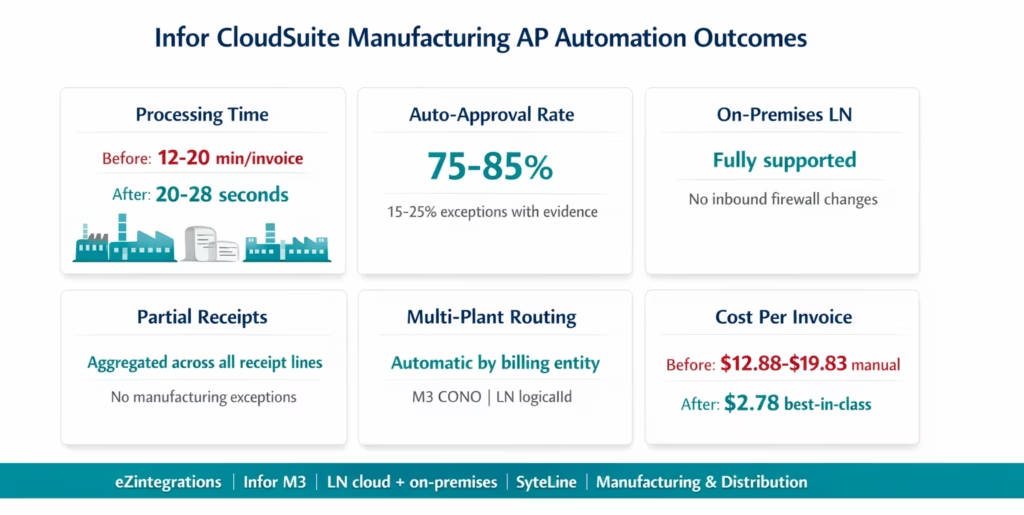
Processing time: 20-28 seconds from invoice PDF arrival to Infor M3/LN/SyteLine AP entry for auto-matched invoices. Compared to 12-20 minutes of manual Infor entry per invoice (longer for LN manufacturing invoices with multiple lines and partial receipts). At 400 invoices per month: 64-120 hours of AP team time recovered per month.
Auto-approval rate: 75-85% of invoices processed without AP team involvement. Manufacturing-specific exception types (partial receipt quantity below invoice, freight invoices requiring GL coding, foreign currency tolerance) are handled with pre-populated evidence, reducing investigation from 15-20 minutes to 3-5 minutes.
On-premises LN support: the ION API Gateway bridges on-premises LN to eZintegrations without inbound firewall changes. The on-premises deployment model is transparent to the matching engine: the same BOD-based queries and SupplierInvoice BOD creation work identically for cloud and on-premises LN.
Partial receipt handling: manufacturing invoices covering partial deliveries (invoice qty less than PO qty, matching across multiple receipt lines) are matched correctly using receipt aggregation logic. This eliminates the largest single source of exception rate inflation in manufacturing AP environments.
Multi-plant routing: invoices for multiple plants or legal entities route to the correct M3 company or LN entity automatically. No manual routing by the AP team.
Freight invoice handling: multi-PO freight invoices are identified by Goldfinch AI and routed to the GL coding workflow with the apportionment rule applied. No manual freight invoice coding.
Cost per invoice: best-in-class automated AP teams achieve $2.78 per invoice versus $12.88-$19.83 manual (APQC 2025). For 400 Infor invoices per month, annual savings: $97,440-$163,584.
How to Get Started
Step 1: Identify Your Infor Product and Deployment
Determine whether you are running M3, LN, or SyteLine, and whether the deployment is cloud or on-premises. For on-premises LN: confirm that the Infor OS ION API Gateway is running and accessible on your network (your Infor OS administrator can confirm this). Note the ION API Gateway host address and port for the credentials configuration.
Step 2: Create an Infor OS Service Account and Download .ionapi Credentials
In the Infor OS Admin Console (Security > Service Accounts), create a service account for the eZintegrations integration. Assign the required API access: – M3: read access to PPS100MI, PPS200MI, PPS300MI; write access to APS100MI – LN: BOD read access for PurchaseOrder, ReceiptLine; BOD write access for SupplierInvoice – SyteLine: equivalent BOD access
Download the .ionapi credentials file. For on-premises deployments, the .ionapi file contains the on-premises ION API Gateway URL in the pu field. Setup: 30-45 minutes with your Infor OS administrator.
Step 3: Import the Infor CloudSuite AP Invoice Processing Template
Go to the Automation Hub and import the Infor CloudSuite AP Invoice Processing template for your product (M3, LN cloud, LN on-premises, or SyteLine). The template includes Goldfinch AI Document Intelligence, the ION API OAuth 2.0 authentication flow, the relevant PO and receipt retrieval calls, the manufacturing-specific matching engine (with partial receipt aggregation), the AP supervisor exception routing, and the Watcher for receipt timing mismatches.
Step 4: Configure Credentials, Supplier Mapping, and Tolerances
Upload the .ionapi file to the eZintegrations credential vault. For M3: add the company code (CONO). For LN: add the logical ID (lid://infor.ln.{instance}). Import the supplier number mapping from a CSV export of the M3 or LN supplier master. Configure matching tolerance per supplier category. For manufacturing environments: configure the partial receipt aggregation rule (sum all ReceiptLine BODs per PO line) and the freight invoice identification rule.
Step 5: Test with Representative Manufacturing Invoices and Promote
Run test invoices covering all invoice types your environment encounters: standard PO-matched, partial receipt, multi-currency, multi-plant, and freight. For on-premises LN: confirm the ION API Gateway connection is stable and that the SupplierInvoice BOD creates correctly in the LN environment. Promote to production.
Total time: 6-8 hours configuration. On-premises LN adds 1-2 hours for network connectivity verification.
FAQs
Add AI to Infor Without Changing ION. On-Premises or Cloud.
Infor M3, LN, and SyteLine handle purchase orders, goods receipts, and supplier invoices with precision once the data is in the system. The manual work your AP team does is in the steps before that: reading supplier PDFs, entering data into M3’s APS100 screen or LN’s purchase invoice form, navigating to check PO and receipt data, and manually aggregating partial receipt lines for manufacturing invoices.
eZintegrations adds the AI extraction and pre-matching layer above the ION API Gateway. Goldfinch AI reads any supplier PDF format, including multi-line manufacturing invoices, freight invoices, and multi-currency European supplier invoices. Level 3 agents retrieve PO and receipt data via M3 programs or LN BOD queries. The manufacturing matching engine handles partial receipts, multi-plant routing, and freight allocation. Matched invoices post to M3 via APS100MI or to LN via the SupplierInvoice BOD.
On-premises LN: fully supported. Cloud LN: same API surface, same templates. No ION workflow changes. No Infor implementation engagement.
Import the Infor CloudSuite AP Invoice Processing Template from the Automation Hub. M3, LN cloud, LN on-premises, and SyteLine templates are all available. Or book a free demo with your Infor product, deployment type (cloud or on-premises), plant count, and invoice volume. We will walk through the ION API configuration for your specific Infor environment in the session.
For the broader AP automation context, see the enterprise AP automation guide and the AI document intelligence guide.

