
Enterprise AI Agents: Build Autonomous Workflows Across Any System
March 10, 2026Enterprise AI agents are autonomous software components that make human-like decisions at specific steps within a business workflow. Unlike rule-based automation, AI agents use tools including vector search, document intelligence, data analytics, web crawling, and API calls to evaluate context, reason across millions of records, and decide what to do next without human intervention.
TL;DR
AI agents are not the same as workflow automation. They make human-like decisions at specific workflow steps, not just move or transform data. The eZintegrations automation maturity model has four levels: Workflows (iPaaS), AI Workflows, AI Agents, and Agentic AI. Each level handles a different type of complexity. eZintegrations AI Agents use nine native tools: Knowledge Base Vector Search, Document Intelligence, Data Analysis, Data Analytics with Charts and Dashboards, Web Crawling, Watcher Tools, API Tool Calls, Integration Workflow as a Tool, and Integration Flow as MCP. AI agent decisions can span multiple steps in a single workflow. One workflow can have three or four agent decision points, each using different tools. The world’s largest FMCG company, a global Industrial Goods leader, and a recognized global Pharma company all run AI agent workflows on eZintegrations today.
What Are Enterprise AI Agents? A Precise Definition
An enterprise AI agent is an autonomous software component that uses tools to evaluate context, reason across data, and make a human-like decision at a specific step within a business workflow, without requiring a human to make that decision manually.
This definition matters because it separates AI agents from everything else your team has probably already evaluated. A traditional automation rule says “if invoice amount matches PO, approve.” An AI agent says “the invoice amount is 4% over the PO, the variance is within this vendor’s historical pattern, the goods receipt confirms delivery, and the contract allows for fuel surcharges up to 5%, so approve and log the exception.” That reasoning chain, executed autonomously, is what an AI agent delivers.
According to Gartner, by 2026 over 40% of large enterprises will have deployed AI agents to automate at least one critical decision workflow that previously required human judgment. The shift is driven by a simple business reality: humans are the bottleneck in most enterprise processes, not because they lack capability, but because decision volume has outpaced human capacity.
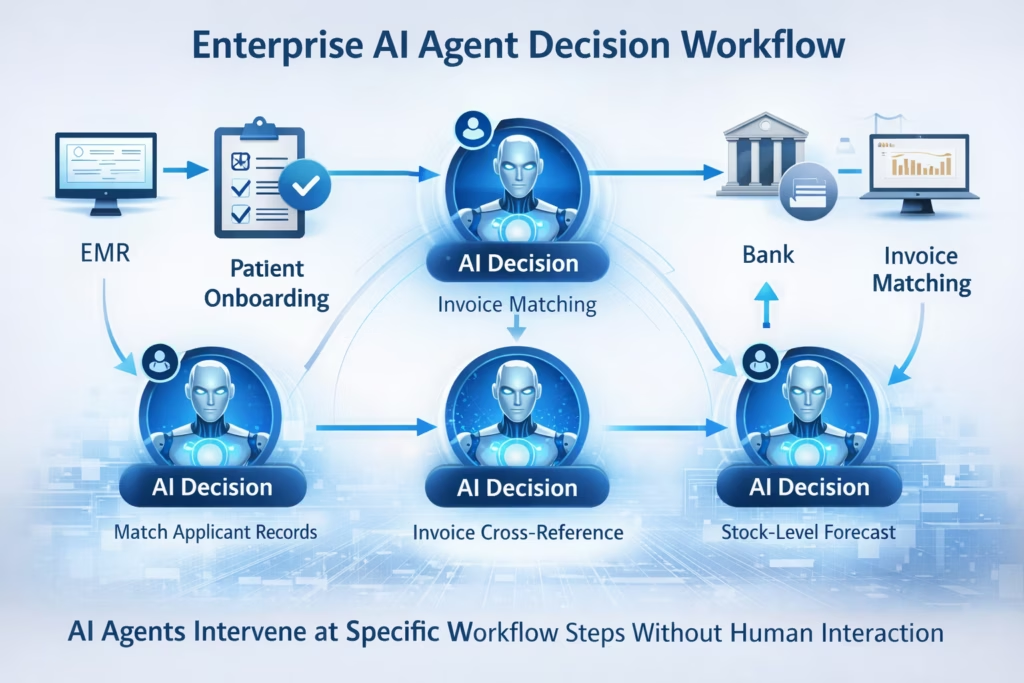
eZintegrations AI Agents operate at the workflow step level. Your integration pipeline runs normally across connected systems. At the step where a decision is needed, an AI agent activates, uses its tools to gather and analyze the relevant context, makes the decision, and the workflow continues. One workflow can contain multiple agent decision steps, each using different tools and reasoning logic.
The Four Levels of Enterprise Automation: Where AI Agents Fit
Understanding where AI agents fit in enterprise automation requires a clear model of what each automation level actually handles, because the four levels are not interchangeable and each solves a different type of problem.
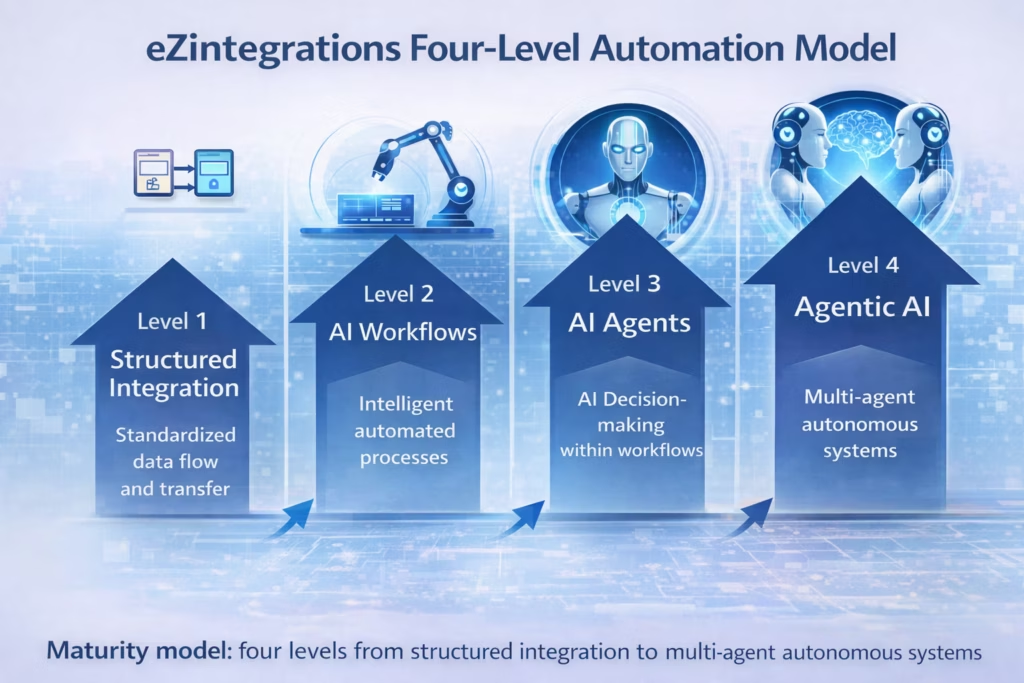
eZintegrations is built on a four-level automation maturity model. Most enterprises operate at Level 1 today and are trying to reach Level 3. Here’s what each level means in practice:
Level 1: Workflows (iPaaS) — Structured to Structured
This is standard enterprise integration. System A sends structured data. The pipeline transforms it according to fixed rules. System B receives clean structured data. Your SAP ERP syncs with your Salesforce CRM. Your WMS sends inventory records to your demand planning system. The data is always structured, the rules are always defined, and the automation runs reliably when nothing changes.
This is the foundation. It’s where every enterprise automation program starts, and it’s what the enterprise iPaaS platform guide covers in depth.
Level 2: AI Workflows — Unstructured to Structured (or Vice Versa)
When one or more steps in your workflow need to handle unstructured data, you’re at Level 2. A supplier sends an EDIFACT file. A procurement manager sends a purchase order by email. A vendor submits an invoice as a PDF. None of those inputs are structured data your ERP can consume directly.
AI Workflows handle the conversion step. Document Intelligence extracts structured fields from the unstructured input, validates the data, and passes clean records downstream. The workflow continues as a Level 1 pipeline before and after the AI conversion step.
Level 3: AI Agents — Human-Like Decisions at Workflow Steps
When one or more steps in your workflow require judgment rather than just data transformation, you’re at Level 3. The pipeline has all the data it needs. But deciding what to do with that data requires reasoning, context evaluation, and a choice between possible actions.
That’s what AI agents do. They activate at the decision step, use their tools to gather and analyze context, and make the call. The workflow doesn’t pause for human input. It continues with the agent’s decision logged, justified, and auditable.
Level 4: Agentic AI — Multiple Agents in Parallel
When a complex outcome requires multiple agents working simultaneously, each using their own tools, collaborating to deliver a finished result, you’re at Level 4.
How Enterprise AI Agents Make Decisions: The Tool Architecture
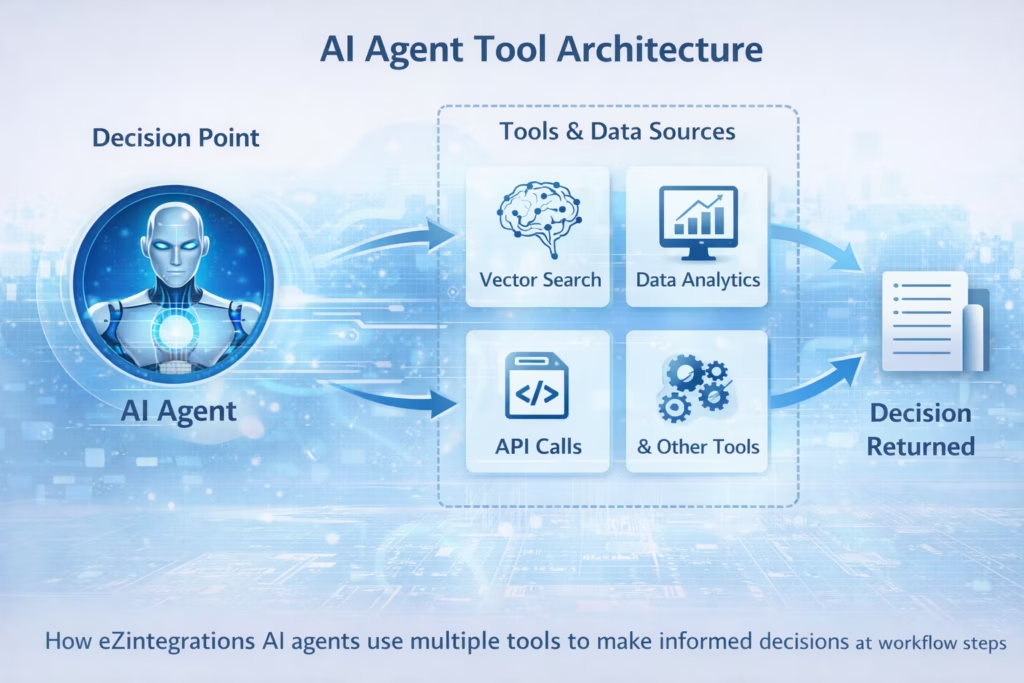
Enterprise AI agents make decisions by combining a reasoning model with a set of callable tools that retrieve, analyze, and evaluate information relevant to the decision at hand.
Here’s how the decision architecture works at a practical level. When the workflow reaches an agent decision step, the agent receives the current workflow context: the data processed so far, the state of connected systems, and the decision parameters defined when the workflow was built. The agent then calls whatever tools it needs to gather additional context, runs its reasoning logic across all available information, and returns a decision with a confidence score and a justification log.
The quality of an AI agent’s decision is directly proportional to the quality of its tools and the breadth of information those tools can access. An agent with access to only one data source makes narrow decisions. An agent with access to a knowledge base, a data analytics engine, web crawling, and live API calls makes decisions that reflect the full context of your business.
eZintegrations gives every AI agent access to nine native tools without requiring external configuration, third-party AI service subscriptions, or custom development. Those tools cover every information retrieval and analysis scenario your enterprise workflows encounter.
According to IDC, enterprises deploying AI agents with multi-tool architectures achieve 3.5 times higher decision accuracy compared to single-tool agent implementations. The difference is context breadth: more tools mean more relevant information, and more relevant information means better decisions.
The Nine Native Agent Tools in eZintegrations
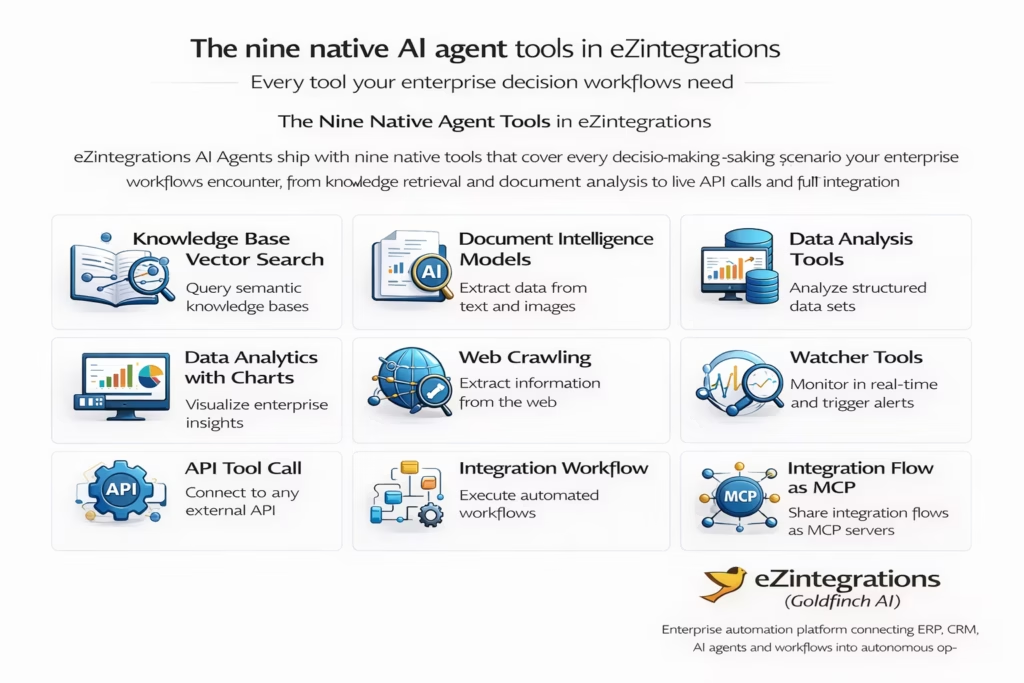
eZintegrations AI Agents ship with nine native tools that cover every decision-making scenario your enterprise workflows encounter, from knowledge retrieval and document analysis to live API calls and full integration workflow execution.
No external AI service configuration. No additional licensed modules. No custom development. Every tool is available as a native agent component on the workflow canvas.
Tool 1: Knowledge Base Vector Search
The agent searches a vector-indexed knowledge base to find semantically relevant information for the decision at hand. Use this when decisions require context from policy documents, product catalogs, compliance rules, or historical records. A patient onboarding agent searches the knowledge base to verify insurance coverage terms before deciding whether to proceed with registration.
Tool 2: Document Intelligence Models
The agent runs Document Intelligence against unstructured inputs at the decision step. Use this when the decision depends on information locked in a PDF, scanned document, or image file. A procurement agent runs Document Intelligence on a vendor certificate to verify compliance status before approving a new supplier.
Tool 3: Data Analysis Tools
The agent runs structured data analysis across connected datasets to surface patterns relevant to the decision. Use this when the decision depends on comparing current data against historical baselines. A quality control agent analyzes current defect measurements against 90-day production history before deciding whether to halt a manufacturing line.
Tool 4: Data Analytics with Charts, Graphs, and Dashboards
The agent queries millions of records across enterprise data sources, runs statistical analysis, and generates visual outputs including charts, graphs, and dashboards as part of the decision justification. Use this when the decision needs to be reported to a human reviewer with supporting evidence. A financial agent runs analytics across 12 months of vendor payment history, generates a payment pattern chart, and attaches it to an exception escalation email automatically.
Tool 5: Web Crawling
The agent crawls specified web sources to retrieve current external information relevant to the decision. Use this when decisions depend on real-world context that isn’t inside your enterprise systems. A supplier qualification agent crawls the supplier’s website, public filings, and industry databases to verify business status before approving a new vendor.
Tool 6: Watcher Tools
The agent monitors specified data sources continuously and triggers decisions when defined thresholds or patterns are detected. Use this for ongoing surveillance workflows rather than single-trigger decisions. An inventory watcher agent monitors warehouse stock levels across all SKUs, detects when any item crosses the reorder threshold, analyzes supplier lead times, and decides whether to auto-generate a purchase order or escalate for manual review.
Tool 7: API Tool Call
The agent makes authenticated API calls to any external or internal system as part of its decision process. This covers all standard authentication methods natively: Basic authentication, OAuth 1.0, OAuth 2.0, Custom Signature, and full pagination support. This tool is architecturally separate from MCP. Use this when the decision requires live data from a system that doesn’t have a pre-built connector. An agent verifying a customer’s credit limit calls your credit bureau API directly, handles OAuth 2.0 authentication, paginates through the response, and incorporates the result into its approval decision.
Tool 8: Integration Workflow as a Tool Call
A complete integration workflow built in eZintegrations can be registered as a callable tool for an AI agent. The agent invokes the entire workflow as a single tool call, receives the output, and incorporates it into its decision logic. Use this when a decision requires data that’s produced by a multi-step integration process. An agent deciding on order fulfilment priority calls a live inventory-sync workflow as a tool, gets the current stock position across all warehouses, and makes its routing decision based on real-time data.
Tool 9: Integration Flow as MCP
Any eZintegrations integration flow can be converted into an MCP (Model Context Protocol) server, making it callable by external AI agents, LLM-powered applications, and other AI systems. Other AI agents in your ecosystem can call your eZintegrations workflows as MCP tools. Your eZintegrations agents can call external MCP servers in return. This creates a composable agent ecosystem where eZintegrations workflows become reusable intelligence components across your entire AI infrastructure.
Ready to see AI agent tools in action? Explore 1,000+ AI agent workflow templates including pre-built decision workflows for procurement, healthcare, manufacturing, and more
How AI Agents Differ from RPA, Traditional Automation, and AI Workflows
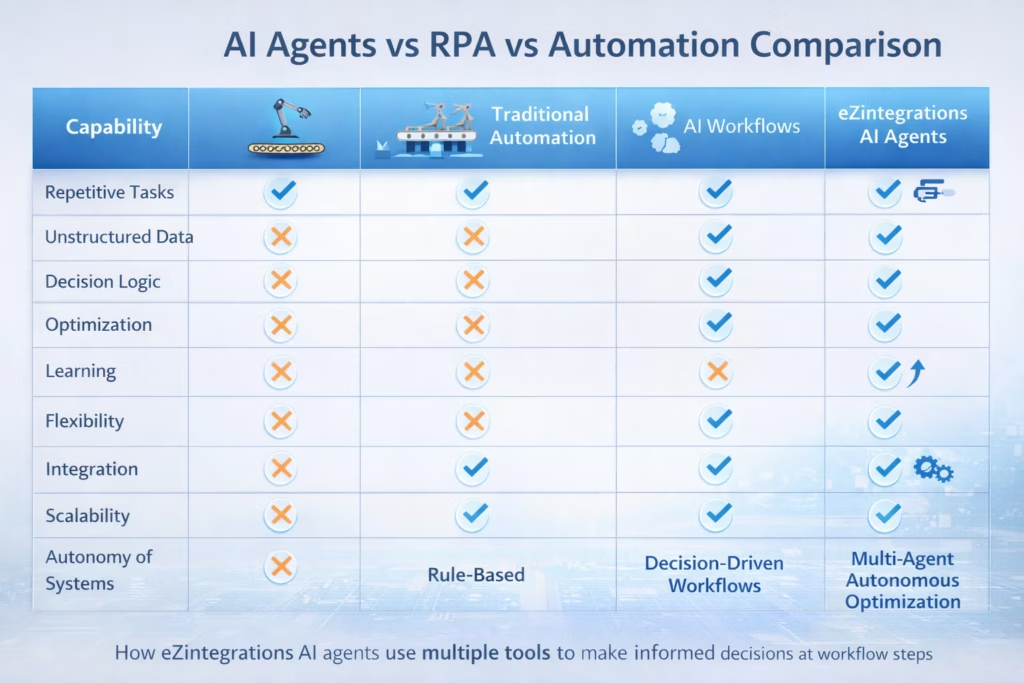
The clearest way to understand what AI agents do is to contrast them with what they are not, because RPA tools, traditional automation platforms, and AI workflows each solve a genuinely different problem.
Most enterprise teams have experience with at least one of these alternatives. Understanding where each one hits its ceiling is the fastest way to identify where AI agents add value.
Here’s a direct comparison across the dimensions that matter most for enterprise decision workflows:
| Capability | RPA (UiPath / AA) | Traditional Automation | AI Workflows | eZintegrations AI Agents |
|---|---|---|---|---|
| Handles structured data | Yes | Yes | Yes | Yes |
| Handles unstructured data | Limited | No | Yes | Yes |
| Makes decisions | No | No | No | Yes |
| Uses tools to gather context | No | No | No | Yes (9 native tools) |
| Reasons across millions of records | No | No | No | Yes |
| Adapts to new data patterns | No | No | Partially | Yes |
| Auditable decision log | No | No | No | Yes |
| Calls external APIs natively | Limited | Limited | Yes | Yes (all auth types) |
| Callable as MCP by other agents | No | No | No | Yes |
| Maintenance required | High | High | Low | None (Bizdata managed) |
RPA tools like UiPath and Automation Anywhere are excellent at mimicking human clicks and keystrokes in UI-based systems. They break when UIs change and they can’t reason. They follow scripts, not logic.
Traditional automation platforms execute defined workflows reliably when inputs are predictable. They can’t handle the step where someone needs to decide whether a $47,000 invoice discrepancy should be auto-approved, escalated, or investigated.
AI Workflows handle the data transformation step: converting unstructured inputs to structured records. But they don’t make decisions. An AI Workflow converts a vendor’s EDIFACT file to JSON perfectly. It doesn’t decide whether that vendor’s delivery confirmation is acceptable given a 3-day delay and a pending contract renewal negotiation.
AI agents handle that decision. They’re the layer between data transformation and autonomous action.
According to Forrester Research, enterprises that deploy decision-capable AI agents report 67% reduction in manual decision-making time for high-volume operational workflows within the first six months of deployment.
Real-World AI Agent Decision Workflows Across Five Industries
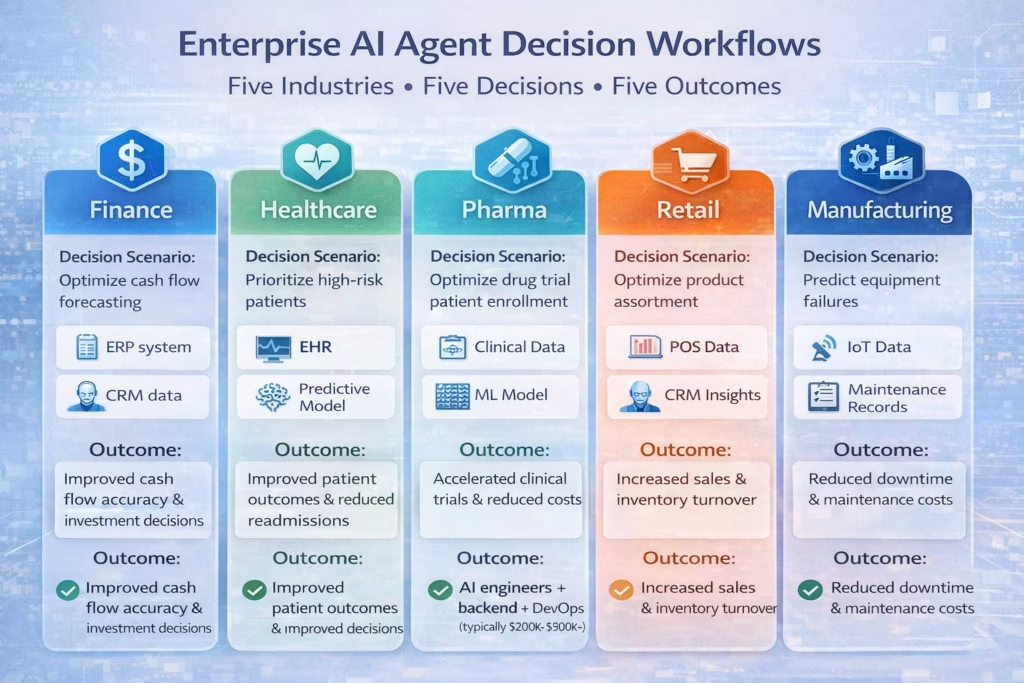
The best way to understand what enterprise AI agents actually deliver is to see the specific decisions they make inside real workflows, across the industries where eZintegrations is deployed today.
Each example below shows the workflow context, the decision step, the tools the agent uses, and the outcome.
Finance and Procurement: 2/3-Way Match Exception Decision
Workflow context: A 3-way invoice matching workflow has run successfully. The invoice amount is 4.2% over the approved PO. The goods receipt confirms delivery.
The decision step: Does this invoice get auto-approved, escalated to the AP manager, or sent back to the vendor with a dispute notice?
Tools the agent uses: Data Analytics (queries 24 months of payment history with this vendor), Knowledge Base Vector Search (retrieves contract terms for allowable variance), API Tool Call (checks current contract renewal status from the vendor management system).
Agent decision: The vendor’s historical variance is within normal range. The contract allows up to 5% variance for fuel surcharges. Contract renewal is 60 days away. The agent auto-approves the invoice, logs the exception with full justification, and flags the contract team with an analytics chart showing the vendor’s 24-month variance trend.
Outcome: Finance team handles the exception in 0 minutes. A human would have taken 45 minutes to gather the same context and reach the same decision.
Healthcare: Patient Onboarding Identity and Coverage Decision
Workflow context: A new patient onboarding workflow has received a registration request with SSN, driving license image, and insurance card image.
The decision step: Is the patient’s identity verified, is their insurance coverage valid for the requested service, and should onboarding proceed or escalate?
Tools the agent uses: Document Intelligence (extracts and validates SSN format, driving license data fields, insurance card details), Knowledge Base Vector Search (checks insurance coverage terms against the requested service codes), Data Analysis (cross-references extracted identity data against existing patient records to detect duplicates).
Agent decision: Identity fields are consistent across all three documents. Insurance coverage is active and covers the requested service at 80%. No duplicate patient record exists. The agent proceeds with onboarding, creates the patient record, and triggers the appointment scheduling workflow.
Outcome: Onboarding that took a front-desk team 15 minutes per patient now completes in under 60 seconds per patient, with a full audit trail on every identity and coverage verification decision.
Pharma: Clinical Data Anomaly Review Decision
Workflow context: A clinical trial data monitoring workflow has detected an anomalous reading in a batch of submitted patient data. The reading is 2.3 standard deviations outside the expected range.
The decision step: Is this anomaly a data entry error, a genuine clinical signal requiring regulatory notification, or an expected variation within protocol tolerances?
Tools the agent uses: Data Analytics (queries the full trial dataset across all sites to calculate whether the anomaly is isolated or systemic), Knowledge Base Vector Search (retrieves protocol tolerance thresholds and regulatory notification requirements), Document Intelligence (re-processes the source data submission to check for extraction errors).
Agent decision: The anomaly is isolated to a single site and matches a known data entry pattern at that site. The source data submission shows a transcription error. The agent flags the record for correction, notifies the site coordinator automatically, and logs the decision with full supporting analytics for the trial audit file.
Outcome: Regulatory review team receives only genuine signals. Data entry corrections are handled at the source without escalating to central review.
Retail and FMCG: Inventory Reorder Decision
Workflow context: A Watcher Tool agent is monitoring warehouse stock levels continuously. A key SKU has crossed the reorder threshold across three regional distribution centers simultaneously.
The decision step: Should the system auto-generate purchase orders for all three locations, or are there supplier or demand factors that require human review before committing?
Tools the agent uses: Watcher Tool (detected the threshold breach), API Tool Call (queries the supplier’s availability API to check lead times and current stock), Data Analytics (runs demand forecast analysis across the last 90 days of sales velocity data for this SKU), Web Crawling (checks for any public supply disruption news for this supplier or product category).
Agent decision: Supplier lead time is 12 days, within normal range. Demand forecast shows stable velocity with no spike expected. No supply disruption signals found. The agent auto-generates purchase orders for all three locations, attaches the demand forecast chart to the order documentation, and notifies the procurement manager with a summary.
Outcome: Inventory replenishment runs without procurement team involvement for standard reorder scenarios. The team focuses on exceptions: unusual demand spikes, supplier disruptions, and strategic sourcing decisions.
Industrial Manufacturing: Quality Control Production Decision
Workflow context: A quality monitoring workflow has received a batch of defect measurements from a production line. The defect rate in the current batch is 2.1%, against a target of 0.8%.
The decision step: Should the production line be halted immediately, should process parameters be adjusted, or is this within an acceptable short-term variance that should be monitored but not interrupted?
Tools the agent uses: Data Analytics (queries 90-day defect history for this line and product type, generates a trend chart), Knowledge Base Vector Search (retrieves quality control protocol thresholds for this product category and customer contract SLA requirements), Integration Workflow as a Tool Call (calls the ERP integration workflow to check whether this production batch has committed customer orders with near-term delivery dates).
Agent decision: The defect rate is elevated but the 90-day trend shows a similar pattern after scheduled maintenance cycles that self-corrects within 4 hours. No committed customer orders are due within the next 8 hours. The agent adjusts two process parameters within their allowed range, sets a Watcher Tool to alert if the defect rate exceeds 3% in the next 2 hours, and logs the decision with the trend chart attached.
Outcome: Production line continues. Unnecessary halts avoided. If the defect rate deteriorates further, the Watcher agent escalates automatically with full context for the production manager.
How to Build an AI Agent Workflow on eZintegrations (No Code Required)
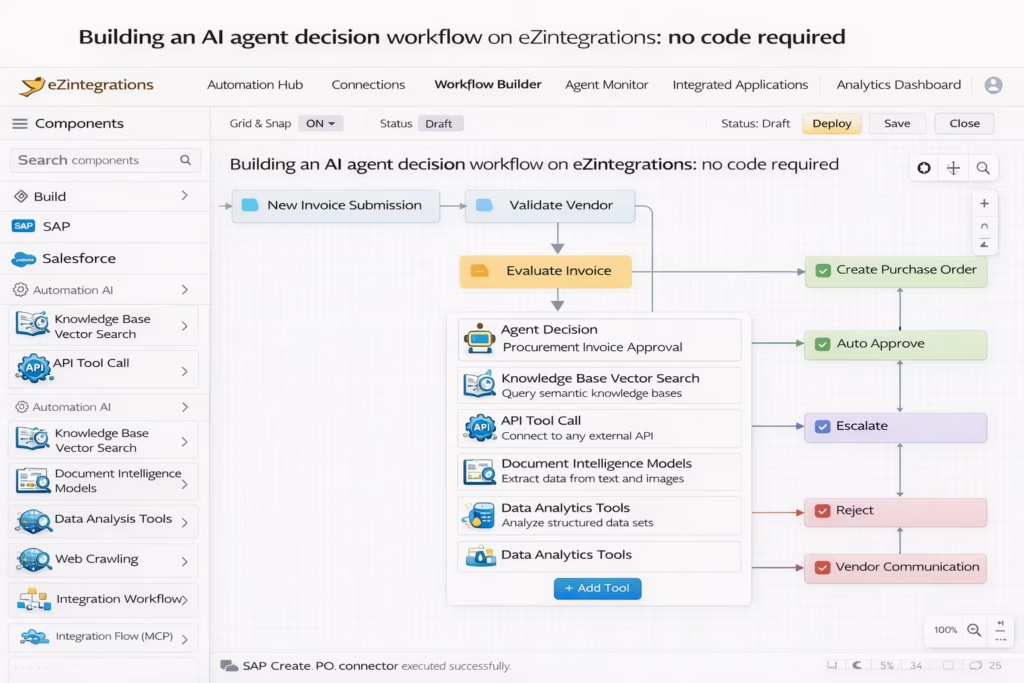
Building an AI agent workflow on eZintegrations follows five steps, and none of them require writing code, training a model, or configuring an external AI service.
eZintegrations AI Agents are built on the same no-code canvas as standard integration workflows. The difference is that at any step in the workflow, you can place an Agent Decision component, configure which tools it uses, define its decision parameters, and set the routing logic for each possible outcome.
Here’s how the build process works:
Step 1: Build the base integration workflow Start with a standard iPaaS workflow that connects your source and destination systems. This is your Level 1 foundation: data flows from System A to System B through defined connectors.
Step 2: Identify the decision steps Walk through the workflow and identify every step where a human currently makes a judgment call. That’s where an agent goes. A workflow can have one agent decision step or five. Each one is independent.
Step 3: Configure the agent and its tools At each decision step, place an Agent Decision component. Select which tools the agent needs: Vector Search, Data Analytics, Web Crawling, API Tool Call, or whichever combination fits the decision context. Define the input data the agent receives and the decision outputs it can return.
Step 4: Set decision routing Define what happens for each possible agent decision. Auto-approve routes to the next workflow step. Escalate routes to a notification workflow. Reject triggers a vendor communication workflow. Each branch is a standard workflow connection.
Step 5: Deploy and monitor Deploy the workflow. Every agent decision is logged with full context: the tools used, the data evaluated, the decision reached, and the confidence score. Your team monitors exception rates, not individual decisions.
The Automation Hub contains over 1,000 pre-built templates including complete AI agent decision workflows for procurement, healthcare, manufacturing, and supply chain. Most teams start from a template rather than building from scratch.
How Fast Can Enterprise AI Agents Be Deployed?
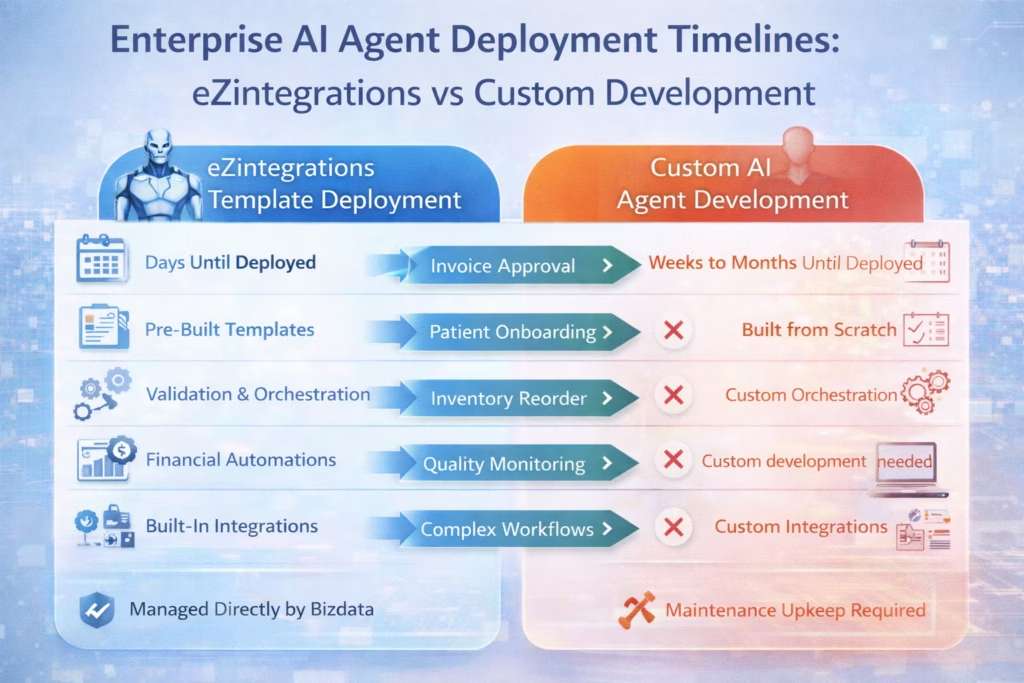
Enterprise AI agent deployment on eZintegrations takes days to weeks for most standard decision workflows, compared to 3 to 9 months for custom-built agent solutions on legacy platforms.
The speed advantage comes from three things working together. Pre-built agent templates eliminate the workflow construction time. Native tool integrations eliminate the external AI service configuration time. Full management by Bizdata eliminates the infrastructure setup time.
Here’s what realistic deployment timelines look like:
| Agent Decision Workflow | Custom Build / Legacy Platform | eZintegrations |
|---|---|---|
| Single-step invoice approval agent | 8 to 12 weeks | Days |
| Patient onboarding identity agent | 10 to 16 weeks | Days to 1 week |
| Multi-tool inventory reorder agent | 12 to 20 weeks | 1 to 2 weeks |
| Manufacturing quality decision agent | 16 to 24 weeks | 1 to 3 weeks |
| Multi-step workflow with 3 agent decisions | 6 to 9 months | 2 to 4 weeks |
The Watcher Tool and Data Analytics tool combinations are particularly fast to deploy because eZintegrations ships pre-built monitoring templates for the most common enterprise surveillance scenarios: inventory thresholds, invoice aging, quality metrics, and SLA compliance.
For teams that have never deployed AI agents before, eZintegrations recommends starting with a single high-volume, low-risk decision step: the invoice variance approval decision is the most common first deployment. It’s a contained decision with clear parameters, high volume (meaning the time savings are immediate and measurable), and a well-understood escalation path.
What Does an Enterprise AI Agents Platform Actually Cost?
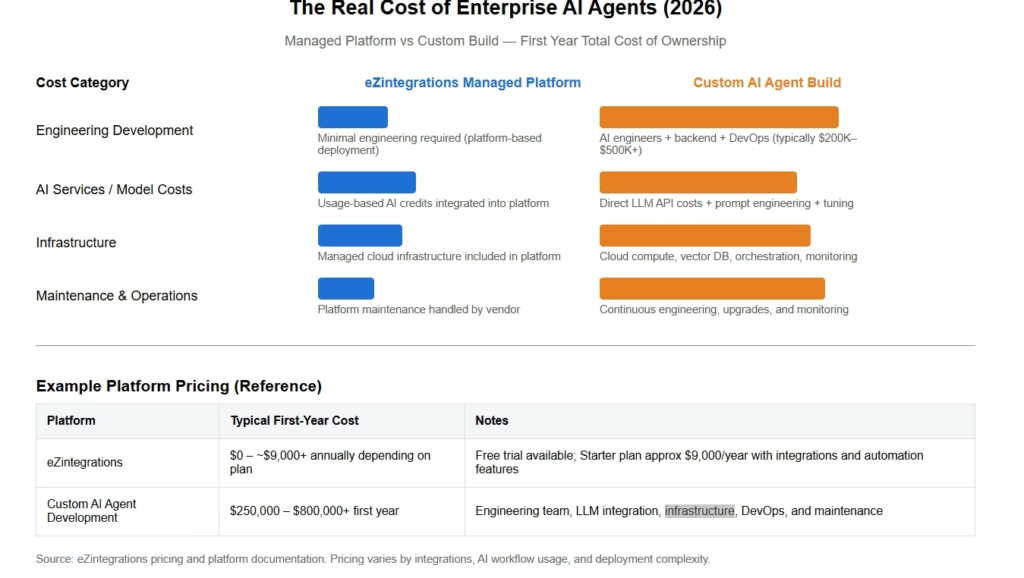
The total cost of an enterprise AI agents platform depends almost entirely on whether you’re building agents from scratch on a legacy platform or deploying pre-built agents on a managed platform with native tool support.
Building AI agents on MuleSoft, Oracle OIC, or a custom LLM framework requires: an AI/ML engineering team to build and train agent logic, external AI service subscriptions (OpenAI, Azure AI, Google Vertex), separate vector database infrastructure for Knowledge Base Search, custom API integration for each tool the agent needs, and ongoing model maintenance as data distributions change.
Here’s a realistic cost comparison:
Custom AI Agent Build on Legacy Platform: – AI/ML engineering team: $300,000 to $600,000 per year – External AI service subscriptions: $50,000 to $150,000 per year – Vector database infrastructure: $20,000 to $80,000 per year – Custom tool integration development: $50,000 to $200,000 per agent workflow – Ongoing model maintenance: 30 to 40% of engineering team time – Realistic first-year TCO for 3 to 5 agent workflows: $600,000 to $1,200,000
eZintegrations AI Agents: – All nine agent tools included in platform pricing – No external AI service subscriptions required – No vector database infrastructure to manage – 1,000+ pre-built templates replace custom development – Fully managed by Bizdata: zero model maintenance overhead – 99.9% uptime SLA with zero downtime updates – Transparent pricing at ezintegrations.ai/pricing
According to G2 reviews of enterprise AI agent platforms, the total cost of ownership gap between managed platforms and self-built solutions widens significantly after year one, when ongoing model maintenance and infrastructure costs accumulate on self-built deployments while managed platform costs remain stable.
Want to understand the real cost for your team? View eZintegrations pricing and compare the true total cost of ownership before your next platform decision.
FAQs
1. What is an enterprise AI agent
An enterprise AI agent is an autonomous software component that makes human like decisions at specific steps within a business workflow. It uses tools including vector search document intelligence data analytics web crawling and API calls to gather context reason across available information and decide what to do next without requiring human input at that step.
2. How are AI agents different from AI workflows
AI workflows handle data transformation by converting unstructured inputs such as emails and EDI files into structured records. AI agents handle decisions by evaluating context reasoning across data and choosing between possible actions. A workflow moves and transforms data while an agent decides what to do with it.
3. How many agent decision steps can one workflow have
A single eZintegrations workflow can contain one or multiple agent decision steps depending on the process requirements. Each decision step operates independently can use different tools and can route to different downstream workflow branches based on its decision output.
4. What is MCP and how does eZintegrations support it
MCP or Model Context Protocol is a standard that allows AI agents to call external tools and services. eZintegrations allows any integration flow to be converted into an MCP server making it callable by external AI agents and LLM powered applications so workflows can act as reusable intelligence components across the AI ecosystem.
5. Do AI agents on eZintegrations require model training or data science expertise
No eZintegrations AI Agents use pre built tool components that teams configure through the no code canvas. No model training data science expertise or AI engineering background is required for standard enterprise decision workflows because Bizdata manages the underlying model infrastructure.
6. How is eZintegrations AI Agent different from RPA tools like UiPath or Automation Anywhere
RPA tools mimic human user interface interactions using scripts and often break when interfaces change. eZintegrations AI Agents make decisions by querying live data analyzing patterns and evaluating context through APIs and integration workflows rather than relying on scripted UI automation.
7. What happens when an AI agent makes a wrong decision
Every agent decision on eZintegrations is logged with full context including the tools used the data evaluated the decision reached and the confidence score. If a decision has low confidence it can automatically be routed for human review before execution and teams can monitor audit logs to refine decision parameters over time.
Conclusion: The Decision Bottleneck Is Solvable
Your integration pipelines run. Your data transforms correctly. But somewhere in every critical workflow, there’s a step where a human has to look at the data, evaluate the context, and make a call. Multiply that step by 500 invoices, 200 patient onboardings, 50 trading partner EDI files, and 1,000 inventory reorder triggers per week. That’s where your team’s time disappears.
AI agents are not a future capability. They’re deployed today at the world’s largest FMCG company, at a global Industrial Goods leader, and at a recognized global Pharma company, all running on eZintegrations.
The eZintegrations AI Agent platform gives your team nine native decision tools: Knowledge Base Vector Search, Document Intelligence, Data Analysis, Data Analytics with Charts and Dashboards, Web Crawling, Watcher Tools, API Tool Calls with all authentication types, Integration Workflow as a Tool, and Integration Flow as MCP. All of them available without external AI service subscriptions. All of them fully managed by Bizdata on a 99.9% uptime SLA. All of them deployable from production-ready templates in days, not months.
Your workflows already move data correctly. The next step is making them decide correctly too.
Book a Free Demo at ezintegrations.ai/book-a-demo
Or start by exploring 1,000+ production-ready AI agent workflow templates and see how fast your first autonomous decision workflow can go live.

