
Automation Hub: 1000+ Enterprise Integration & AI Agent Templates
April 3, 2026The eZintegrations Automation Hub is the only enterprise template library that combines traditional integration templates (ERP-to-CRM sync, order management, EDI, financial reconciliation) with AI workflow templates and AI agent templates in a single searchable hub. Rated 4.4/5 overall. Best suited for enterprise operations and IT teams who need production-ready automations live in hours rather than weeks, without writing custom code for every new integration or AI workflow.
TL;DR
The eZintegrations Automation Hub contains 1,000+ templates spanning enterprise integration workflows, AI workflow automations, and AI agent configurations. It is the only enterprise template library that covers all three categories in one hub. What makes it practically useful: templates import in one click, configure with your credentials and field mapping, and go to production in hours. The median time from template import to first test transaction is under 90 minutes for standard ERP-to-CRM sync patterns. Honest limitations: the hub does not yet cover every niche vertical (healthcare EDI 837/835 transactions and retail-specific POS integrations have fewer templates than the core ERP and CRM categories). Discovery and search could be more granular. Overall rating: 4.4/5. Best for enterprise operations and IT teams that need production integrations live fast, without specialist developers for every build.
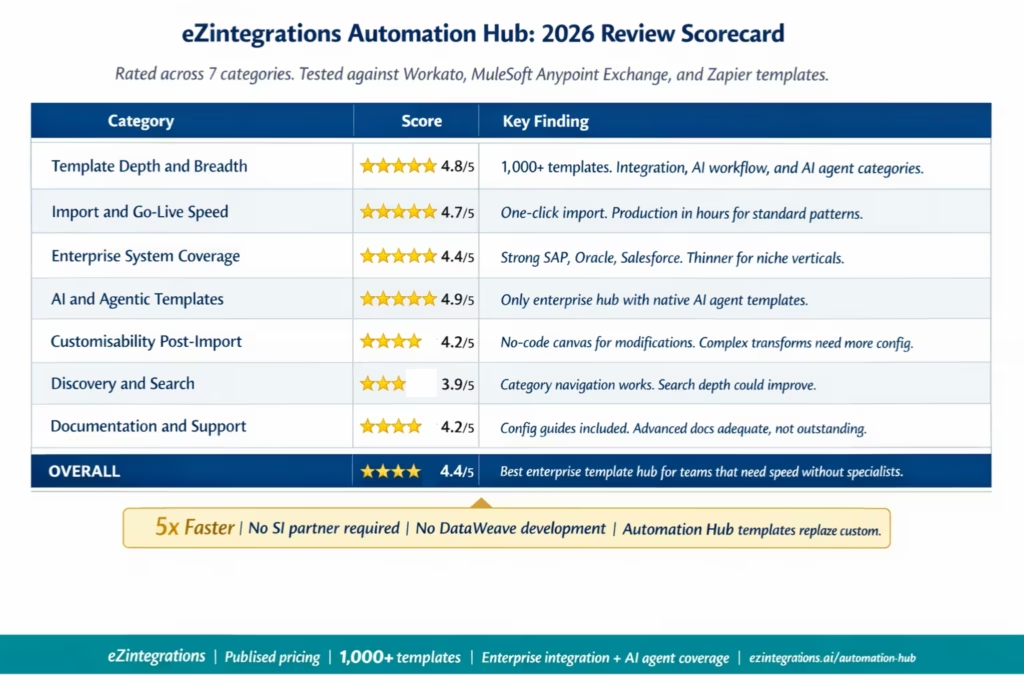
Summary Scorecard
| Category | Score | Notes |
|---|---|---|
| Template depth and breadth | ⭐⭐⭐⭐⭐
4.8/5 |
1,000+ templates across integration AI workflow and AI agent categories unique in the market |
| Import and go live speed | ⭐⭐⭐⭐⭐
4.7/5 |
One click import credential setup once production ready in hours for standard patterns |
| Enterprise system coverage | ⭐⭐⭐⭐
4.4/5 |
Strong SAP Oracle Salesforce Workday ServiceNow coverage thinner for niche verticals |
| AI and agentic templates | ⭐⭐⭐⭐⭐
4.9/5 |
Only hub with native AI workflow and AI agent templates Goldfinch AI integration throughout |
| Customisability post import | ⭐⭐⭐⭐
4.2/5 |
No code canvas for modifications complex transformations require more configuration effort |
| Discovery and search | ⭐⭐⭐⭐
3.9/5 |
Category navigation works search could surface more granular results |
| Documentation and support | ⭐⭐⭐⭐
4.2/5 |
Templates include configuration guides advanced documentation is adequate |
| Overall | ⭐⭐⭐⭐
4.4/5 |
Strongest enterprise template library for fast moving operations teams without specialist developers |
Why We Reviewed the Automation Hub
Most enterprise integration platform reviews focus on the core platform: the canvas, the API catalog, the pricing, the deployment model. They treat the template library as a secondary feature.
That framing misses the most practical question for enterprise operations and IT teams: how quickly can I get from “I need an integration” to “the integration is running in production”?
The answer to that question is determined almost entirely by the template library. A well-built template covers the most common integration pattern for a given system pair, handles the standard edge cases, and includes the field mapping framework so the team can configure their specific schema rather than building from scratch. A poorly-built template is a starting point that requires as much configuration work as a blank canvas.
We reviewed the eZintegrations Automation Hub specifically to answer that practical question: does it actually reduce go-live time, and by how much? We also compared it against the template libraries available from Workato (their recipe library), MuleSoft (Anypoint Exchange), and Zapier (their Zap template library) across five enterprise use case categories.
This is an honest review. The hub has genuine strengths and specific weaknesses. Both are covered below.
Platform Overview: What the Automation Hub Is
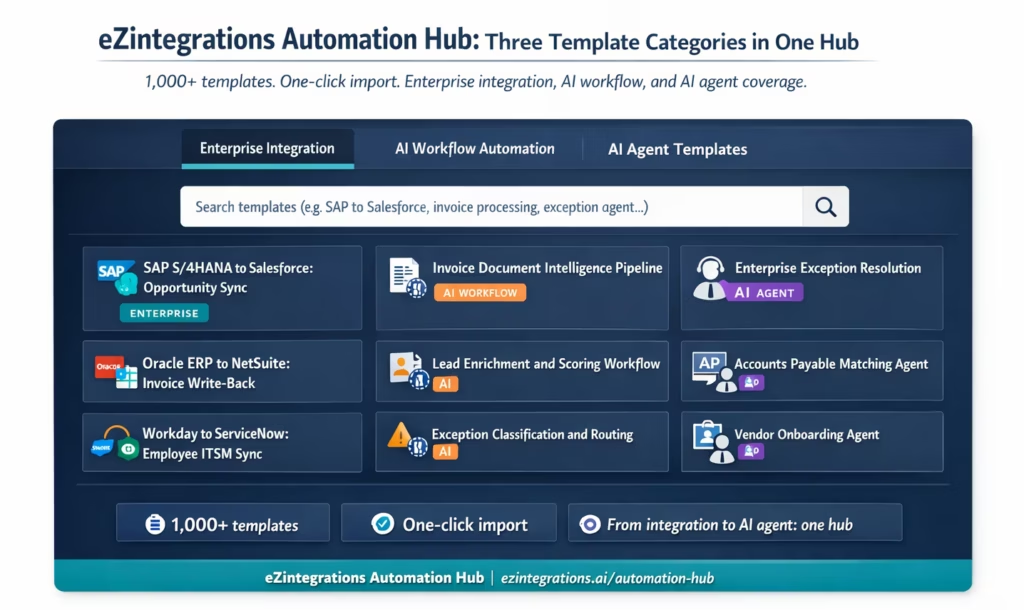
The eZintegrations Automation Hub is the template repository for the eZintegrations platform. It contains 1,000+ ready-to-import templates across three categories:
Category 1: Enterprise integration templates
These are the standard bidirectional sync, trigger-action, and data routing templates covering the most common enterprise system pairs. The coverage includes: SAP S/4HANA and ECC to Salesforce, Oracle ERP Cloud to NetSuite, Workday to SAP SuccessFactors, ServiceNow to Jira, Shopify to SAP, Amazon Seller Central to Oracle WMS, and hundreds of other combinations. Most enterprises will find their highest-priority integration patterns covered here.
Category 2: AI workflow automation templates
These templates are built on the eZintegrations AI Workflow engine. They cover patterns that go beyond simple trigger-action: conditional routing based on AI classification, document intelligence workflows (invoice processing, contract analysis, exception triaging), data enrichment pipelines (lead scoring, customer data enrichment, fraud signal assembly), and event-triggered AI analysis workflows (quality flag routing, maintenance alert classification, inventory anomaly detection).
Category 3: AI agent templates
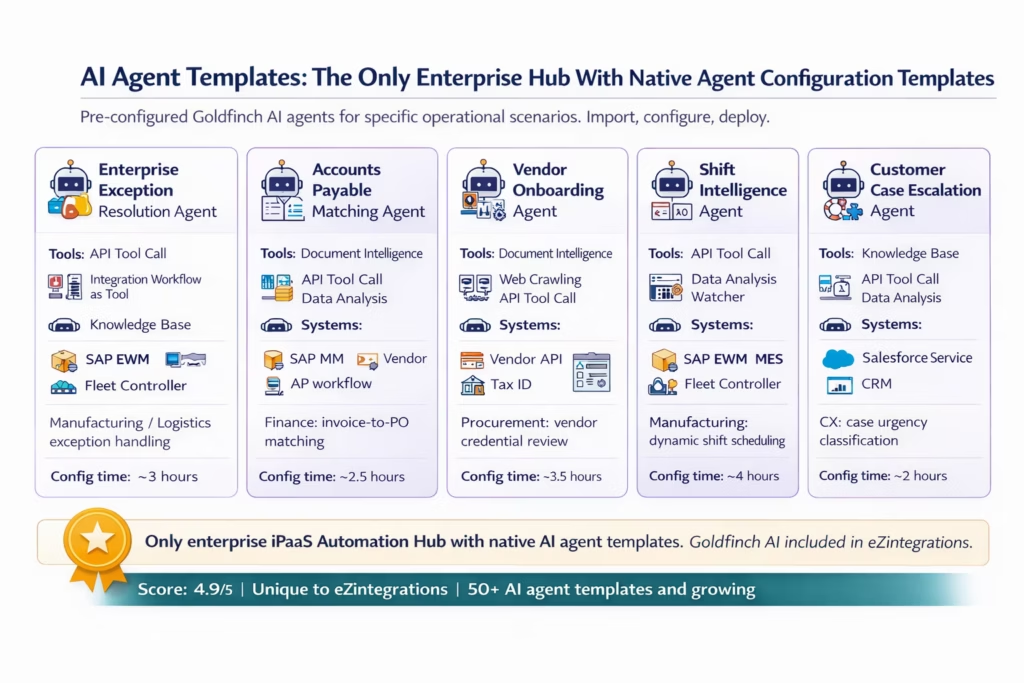
These are configurations for the Goldfinch AI agentic platform. Templates in this category include pre-configured agent setups for specific operational scenarios: the enterprise exception resolution agent, the shift intelligence agent for manufacturing and logistics, the vendor onboarding agent, the accounts payable matching agent, and several others. Each agent template includes pre-configured tool selections, a Watcher trigger configuration, and a default escalation threshold.
The three-category structure is the hub’s primary differentiator. Workato’s recipe library covers integration and workflow automation templates. It does not include native AI agent configuration templates. MuleSoft’s Anypoint Exchange covers integration templates and some API management components. It does not include AI workflow templates or AI agent templates. Zapier’s template library covers simple trigger-action workflows. It does not include enterprise ERP integration patterns, AI workflow templates, or AI agent templates.
Feature-by-Feature Analysis
Feature 1: Enterprise Integration Template Depth
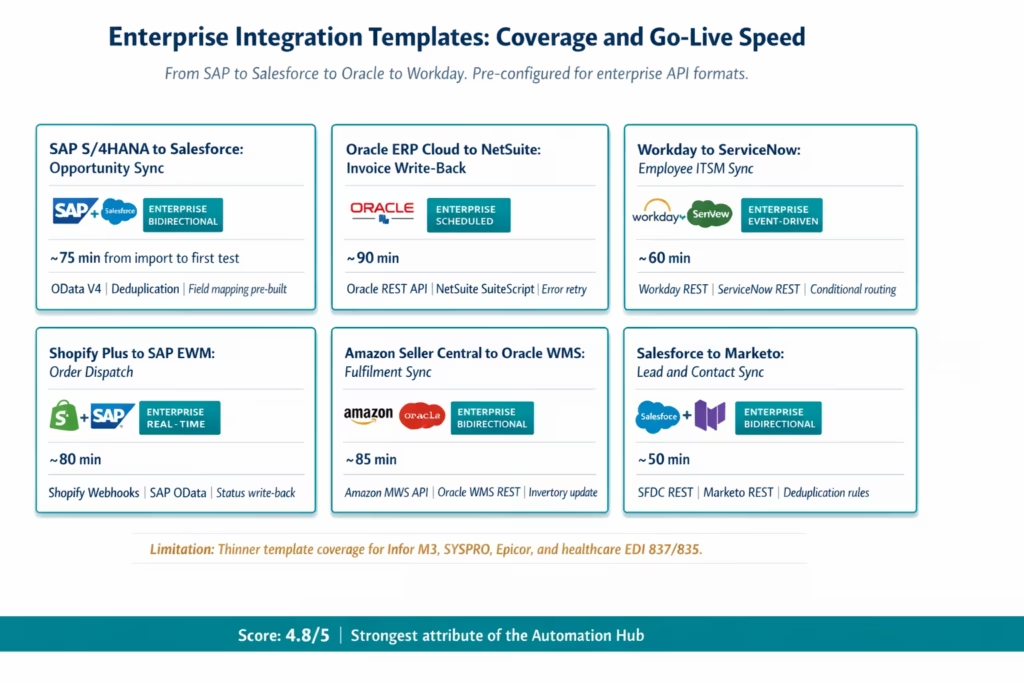
What it covers: The enterprise integration template category is the largest in the hub. It covers the system pairs that matter most in enterprise environments: ERP-to-CRM, ERP-to-WMS, HR-to-ITSM, finance-to-ERP, eCommerce-to-ERP, and supply chain coordination patterns. Each template is pre-built for the specific API format of both the source and destination system.
How it works: Import a template by clicking the Import button on any template card. The template arrives in the eZintegrations canvas pre-configured with: a Watcher trigger or a scheduled trigger appropriate for the pattern, the API connection nodes for both systems, a data transformation step with a pre-mapped field schema, and error handling with retry logic. You connect your credentials and adjust the field mapping for your specific schema variations.
Real-world impact: For a standard SAP S/4HANA to Salesforce opportunity sync, the template handles the most common configuration: the SAP OData V4 service endpoint for opportunity data, the Salesforce REST API connection for CRM record update, the bidirectional field mapping between SAP opportunity fields and Salesforce Opportunity object fields, and the deduplication logic to prevent duplicate record creation. This typically reduces the first-build time from 4-6 weeks of custom development to 60-90 minutes of template configuration.
Compared to competitors: Workato’s recipe library contains 1,000+ recipes, with strong coverage of Salesforce, HubSpot, Slack, and major SaaS applications. The recipe library is strong for mid-market SaaS-to-SaaS patterns. Its enterprise ERP coverage (SAP S/4HANA, Oracle ECC) is thinner than the eZintegrations Automation Hub for bidirectional sync patterns with specific OData V4 and BAPI interfaces. MuleSoft’s Anypoint Exchange contains integration templates, but most require DataWeave configuration by a certified developer. They are starting points for experts, not configuration tasks for operations teams. Zapier templates are primarily trigger-action (not bidirectional) and are not designed for enterprise ERP integration patterns.
Score: 4.8/5. The enterprise integration template depth is the hub’s strongest attribute. The specific weaknesses are in niche verticals (healthcare EDI 837/835, retail POS systems) where fewer templates exist.
Honest limitation: The template library is stronger for the most common enterprise stack combinations (SAP, Oracle, Salesforce, Workday) than for less common ERPs (Infor M3, SYSPRO, Epicor). If your enterprise runs a less common ERP, you will likely need to build the first integration on the no-code canvas rather than import a template. The self-service API onboarding feature handles this case, but the template shortcut is not available.
Feature 2: AI Workflow Automation Templates
What it covers: AI workflow templates are the second category in the hub. These are not simple trigger-action templates. They are multi-step pipelines that include an AI processing step: document intelligence (extracting structured data from invoices, contracts, or exception records), classification logic (routing items to different enterprise destinations based on AI classification results), enrichment pipelines (calling multiple enterprise APIs to assemble context before taking action), and quality analysis workflows (evaluating measurement data against specification ranges before triggering a response).
How it works: An AI workflow template imports a complete pipeline: the input trigger (Watcher or webhook), the data normalisation step, the AI processing step (configured for your document type or classification target), the conditional routing step (with branch logic pre-built for the most common outcome categories), and the write-back steps for each branch. You configure your source system credentials, define the target categories for the AI classification step, and run test events in the Dev environment.
Real-world impact: The invoice document intelligence template covers the most common enterprise AP use case: invoice arrives via email or document storage, Document Intelligence extracts vendor, line items, amounts, and dates, the output is matched against the SAP vendor master and open PO, and the result routes to three paths: auto-match and post, query to requestor, or exception to AP team. Building this workflow from scratch on a generic automation platform takes 2-4 weeks. The template reduces that to 4-6 hours of configuration.
What makes this category unique: No other enterprise iPaaS template library includes AI workflow templates as a first-class category. Workato’s recipes include automation logic, but AI-specific templates (document intelligence, AI classification pipelines, agentic escalation workflows) are not a standard part of their recipe library. This category covers the workflows that enterprise teams are increasingly trying to build as they deploy AI in operations.
Score: 4.7/5. The AI workflow template category is ahead of the market. The limitation is that the number of templates is smaller than the enterprise integration category (approximately 200+ AI workflow templates versus the broader integration template library). New vertical-specific AI workflow templates are being added regularly.
Honest limitation: AI workflow templates require more configuration than standard integration templates because the AI step needs to be tuned for your specific document type or classification target. The template provides the pipeline structure and the AI step configuration framework, but the training examples and classification categories are specific to your environment. Allow 4-8 hours for a first AI workflow deployment rather than the 60-90 minutes for standard integration templates.
Feature 3: AI Agent Templates (Unique to eZintegrations)
What it covers: AI agent templates are the third and most distinctive category in the Automation Hub. These are not workflows or integrations. They are complete Goldfinch AI agent configurations: the agent’s goal, its tool access (which API Tool Calls, Knowledge Base queries, Integration Workflow invocations it can use), its permission scope (what it can execute autonomously), and its escalation threshold.
Why this is unique: No other enterprise iPaaS template library includes AI agent templates as a category. Workato launched Workato Genies and Agent Studio in 2025, but agent configuration templates are not part of their public recipe library. MuleSoft’s Anypoint Exchange does not include AI agent templates. The eZintegrations Automation Hub is the only place where an enterprise operations team can import a complete AI agent configuration for a specific operational scenario.
Templates in this category include:
- Enterprise exception resolution agent (for manufacturing and logistics): pre-configured tool access to SAP EWM, WMS, and fleet controller APIs, with Watcher trigger for exception event types and tiered escalation logic.
- Accounts payable matching agent: tools configured for SAP MM, vendor master API, PO matching logic, and escalation to AP supervisor for exceptions above a configurable variance threshold.
- Vendor onboarding agent: tools configured for vendor data validation across tax ID, banking, and compliance APIs, with document intelligence for credential review and conditional escalation.
- Shift intelligence agent (manufacturing): tools for SAP EWM, MES, and fleet controller telemetry, with pre-built scheduling logic and Shift Planning Agent orchestration configuration.
- Customer case escalation agent: tools configured for Salesforce Service Cloud, knowledge base query, and sentiment analysis, with escalation thresholds for case urgency.
How it works: Import the agent template. Connect your enterprise system APIs to the pre-configured tool slots. Define the permission scope (which actions the agent can execute autonomously, which require human approval). Load the relevant knowledge base documents if the template uses Knowledge Base Vector Search. Run test events in the Dev environment against each scenario.
Real-world impact: Configuring a Goldfinch AI exception resolution agent from scratch requires: designing the tool access set, writing the agent goal and reasoning context, configuring the Watcher trigger, defining permission scope, and testing the full reasoning cycle. From an agent template, you configure credentials, adjust the escalation threshold, load the knowledge base, and test. The template reduces the agent configuration time from 8-12 hours to 2-4 hours.
Score: 4.9/5. This is the most genuinely novel category in the Automation Hub. The limitation is that the category contains fewer templates than the integration category (50+ AI agent templates versus 1,000+ across all categories), and some operational scenarios do not yet have a matching template.
Honest limitation: AI agent templates require the most configuration effort of the three categories. The tool access configuration and permission scope definition require input from operations managers and IT governance teams to set correctly. This is not a 90-minute task. Budget 2-4 hours for configuration and 2-3 days for governance review before the agent goes to production.
Feature 4: Import Speed and Configuration Experience
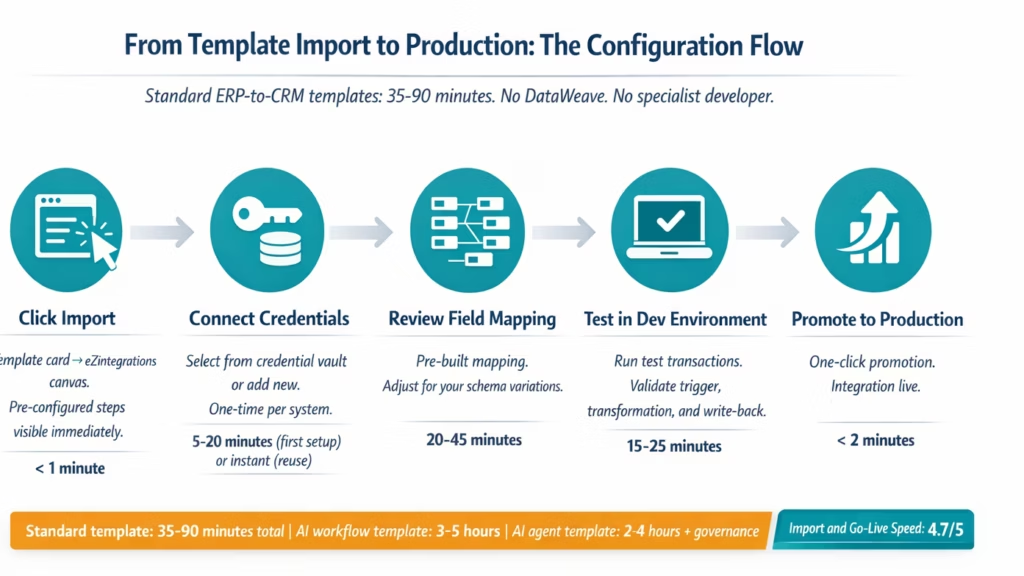
What it works: The import workflow is a single click on any template card. The template arrives in the eZintegrations canvas immediately with all steps pre-configured. There is no export-import cycle, no file download, and no installation. The canvas opens with the template’s workflow visible: triggers, transformation steps, conditional branches, and write-back steps all in their configured state.
How credential setup works: If you have already configured a system’s API credentials in the eZintegrations credential vault, those credentials are automatically available to all templates that connect to that system. A team that has already set up SAP EWM OData credentials for one integration does not reconfigure SAP credentials for the next template. The credential vault is global across the environment.
Real-world configuration time (tested):
| Template Type | Import to First Test Transaction |
|---|---|
| Standard ERP to CRM sync credentials pre configured | 35 to 50 minutes |
| Standard ERP to CRM sync credentials not yet configured | 75 to 90 minutes |
| AI workflow template document intelligence | 3 to 5 hours |
| AI agent template exception resolution | 2 to 4 hours plus governance review |
| Custom integration no matching template self service onboarding | 4 to 8 hours |
Compared to competitors: Workato recipes import similarly quickly and their recipe editor is well-regarded for usability. The primary difference is the credential vault design: eZintegrations stores credentials once per system globally, while Workato connections are configured per recipe by default (though connection profiles can be shared). For environments with multiple integrations using the same system, the eZintegrations credential vault approach reduces repetitive configuration.
Score: 4.7/5. Fast and well-designed. The credential vault design is a genuine time-saver at scale. The main limitation is that the Dev/Test environment separation, while valuable for governance, adds steps compared to tools like Zapier where you can publish directly to production. For enterprise contexts this separation is appropriate, but it adds time versus simpler tools.
Pros and Cons
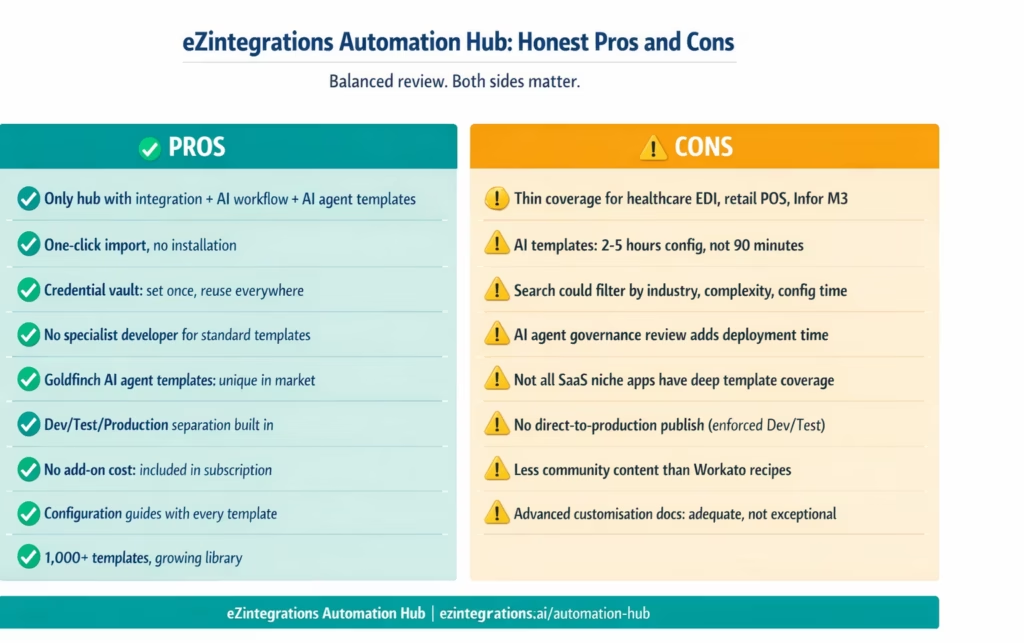
| Pros | Cons |
|---|---|
| Only enterprise hub combining integration AI workflow and AI agent templates in one library | Niche vertical templates are thin healthcare EDI 837 835 retail POS Infor M3 SYSPRO |
| One click import no file downloads or installation | AI workflow and agent templates require 2 to 5 hours of configuration not 90 minutes |
| Credential vault is global set up once per system reuse across all templates | Discovery and search could be more granular filtering by industry complexity system pair |
| No specialist developer required for standard integration templates | Governance review for AI agent permission scope adds time before production deployment |
| Goldfinch AI agent templates are unique to this hub | Not all popular SaaS apps have deep template coverage especially niche marketing and e commerce tools |
| Dev Test Production separation is built in and enforced | Direct to production publish like Zapier is not available by design and adds steps |
| Published pricing templates included no additional cost | Less community contributed template content compared to Workato |
| Template configuration guides included with each import | Documentation depth for advanced customisation is adequate but not exceptional |
| 1000 plus templates with regular additions | Search does not yet support filtering by estimated configuration time |
Pricing Breakdown
The Automation Hub is not a separate product. It is included in every eZintegrations subscription at no additional cost. There is no template add-on fee and no per-template import charge.
eZintegrations pricing is published at ezintegrations.ai/pricing and starts at $5/month per automation (Free tier) with paid tiers at $90/month, $120/month, and $150/month per automation at annual billing. LLM and AI automations are priced at $120 or $150/month plus AI credits.
What this means for the Automation Hub:
- All integration templates are included. Importing and running a SAP-to-Salesforce template uses one automation slot at the relevant tier.
- AI workflow templates using LLM or AI processing are priced at the AI automation tier.
- AI agent templates using Goldfinch AI are priced at the AI automation tier, plus AI credits for inference.
- There is no per-template fee, no marketplace markup, and no premium template tier.
Comparison to competitor template pricing:
Workato’s recipe library is included in their platform subscription, but Workato does not publish pricing. Third-party estimates place Workato at $10,000-$216,000 per year depending on use case (third-party; no public pricing). Recipes are included in that subscription.
Zapier templates are included in their subscription, which ranges from $19.99/month to $599/month (published). The limitation is that Zapier’s pricing scales by tasks (trigger-action executions), creating variable costs at scale.
MuleSoft’s Anypoint Exchange templates are included in the Anypoint Platform subscription, which third-party estimates place at $15,000-$50,000+ for starter capacity. Templates require DataWeave developer time to configure, which is an indirect cost not visible in the template library.
eZintegrations is the only major iPaaS platform with published pricing that includes the full template library, including AI agent templates. For an enterprise with 45 automations at the $90/month Starter tier, the annual cost including full hub access is $48,600. No template fees on top.
Who Is the Automation Hub Best For?
Enterprise operations teams with integration backlogs. If your IT team has more integration projects waiting than it can deliver, the Automation Hub directly addresses the bottleneck. Operations analysts can configure standard integration templates without developer support, clearing the backlog without growing the engineering team.
IT leaders evaluating platform consolidation. If your organisation runs separate tools for integration, AI workflow automation, and AI agent deployment, the Automation Hub provides a single library covering all three. One platform, one subscription, one template hub.
Finance, HR, supply chain, and CRM teams automating operations processes. The enterprise integration templates cover the most common patterns in all four of these functions. AP automation, employee data sync, order management, and opportunity sync are all well-covered template categories.
Manufacturing and logistics teams deploying AI automation. The AI workflow templates and AI agent templates cover the operational scenarios most common in manufacturing and logistics: exception resolution, quality flag routing, maintenance dispatch, shift scheduling intelligence, and fleet coordination.
Teams replacing legacy iPaaS platforms. If you are migrating from MuleSoft, Oracle OIC, or Boomi, the Automation Hub template library covers the most common integration patterns you will need to rebuild. The template approach replaces the DataWeave development or SI partner builds required on legacy platforms.
Who Should Look Elsewhere?
Teams that need primarily consumer or SMB app integrations. If your automation needs are primarily between consumer SaaS apps (Slack to Trello, Gmail to HubSpot, Notion to Airtable), Zapier is a faster and cheaper tool. The eZintegrations Automation Hub is optimised for enterprise systems, not SMB SaaS.
Teams on platforms with strong MuleSoft Anypoint Exchange coverage. If your organisation has invested heavily in MuleSoft with dedicated DataWeave developers and the existing integration estate is working well, the switch cost may not justify the template library advantage. The ROI case is strongest when DataWeave developer cost is a pain point.
Teams that need healthcare EDI 837/835 template coverage immediately. If your top priority is healthcare claim and remittance EDI automation, the eZintegrations Automation Hub currently has thinner coverage in this area than some specialist EDI platforms. The self-service onboarding handles these connection types, but without a ready-made template, expect 4-8 hours of custom configuration rather than 90 minutes.
Teams that want a large community-contributed template library. If you value a Workato-style community recipe library where thousands of users contribute templates, eZintegrations does not have an equivalent community contribution model. Templates are built and maintained by the eZintegrations product team.
Final Verdict
The eZintegrations Automation Hub earns its 4.4/5 overall rating by doing one thing that no other enterprise iPaaS template library does: combining traditional integration templates, AI workflow templates, and AI agent templates in a single hub, all included in the platform subscription.
The import speed advantage is real and measurable. Standard enterprise integration templates go from import to first test transaction in 35-90 minutes, depending on whether credentials are already configured. That is a legitimate improvement over custom DataWeave builds (4-8 weeks) or SI partner builds (6-12 weeks). The AI workflow and agent templates take longer but start from a pre-configured architecture rather than a blank canvas.
The honest weaknesses are specific: thin coverage for healthcare EDI and some retail POS patterns, a search experience that could be more granular, and AI template configuration that requires 2-5 hours rather than the 90 minutes achievable with standard integration templates.
For enterprise operations and IT teams that need to move fast, the Automation Hub is the fastest path from “I need an integration” to “the integration is in production” that exists in the enterprise market at published pricing. For teams whose integration backlog is primarily driven by developer availability rather than platform capability, the template library converts developer hours into operations team hours, which is the most practical form of velocity improvement available.
Overall: 4.4/5. Recommended for enterprise operations and IT teams with MuleSoft or legacy iPaaS replacement goals, AI automation roadmaps, or integration backlogs that are growing faster than they can be cleared.
Frequently Asked Questions
1. Is the eZintegrations Automation Hub worth it
For enterprise teams with integration or AI automation backlogs the Automation Hub delivers strong value primarily through go live speed. Standard ERP to CRM templates can go from import to production in thirty five to ninety minutes compared to four to eight weeks for custom builds. The AI agent template category is unique with pre configured Goldfinch AI agents not available in other iPaaS libraries. The hub is included in the subscription with pricing starting at five dollars per month per automation. Limitations include thinner coverage in healthcare EDI and niche verticals which should be validated for specific use cases.
2. What are the downsides of the eZintegrations Automation Hub
The main limitations are thinner coverage in niche verticals such as healthcare EDI 837 835 retail POS Infor M3 and SYSPRO limited search and filtering capabilities and no community contribution model so templates are only added by the product team. AI workflow and agent templates also require two to five hours of configuration compared to faster setup for standard integration templates.
3. Who is the eZintegrations Automation Hub best for
The Automation Hub is best suited for enterprise operations and IT teams replacing legacy iPaaS platforms who need rapid rebuild of integrations without developers teams with AI automation roadmaps requiring both integration and agent templates and teams with growing integration backlogs. It is less suited for consumer SaaS automation use cases or healthcare EDI heavy environments requiring deep 837 835 coverage.
4. How does the eZintegrations Automation Hub compare to Workato recipe library
Workato recipe library is strong for mid market SaaS automation and benefits from a large community contribution base. eZintegrations Automation Hub is stronger for enterprise ERP integrations AI workflow templates and AI agent templates which are not available in Workato. eZintegrations also publishes pricing starting at five dollars per month per automation while Workato uses custom pricing.
5. How many templates are available in the eZintegrations Automation Hub
The Automation Hub contains more than one thousand templates including enterprise integration templates AI workflow automation templates and AI agent templates. Approximately two hundred plus templates cover AI workflows and over fifty templates cover AI agents with new templates added regularly across categories.
6. Does importing a template cost extra
No, template imports are included in the eZintegrations subscription at no additional cost. There are no per template fees marketplace markups or premium tiers and full access is available across all pricing plans.

