

Amazon Seller Central and SAP S/4HANA Integration for Beauty Brands: No Custom ABAP Required
April 12, 2026To integrate Amazon Seller Central with SAP S/4HANA for a beauty brand without custom ABAP, eZintegrations uses the Amazon SP-API (GET /orders/v0/orders polling every 2-5 minutes) to ingest orders, maps each Amazon order’s ASIN to the corresponding SAP Material Number via a cross-reference table, and creates a SAP sales order using the OData V4 API_SALES_ORDER_SRV (POST /A_SalesOrder with header, items, and partner data). For inventory sync, it reads SAP available stock from API_MATERIAL_STOCK_SRV and pushes updated quantities to Amazon via the SP-API Feeds API. For FBM shipment confirmation, SAP goods issue via API_OUTBDLVRY_SRV triggers the SP-API POST /orders/v0/orders/{orderId}/shipment call automatically. No ABAP development in SAP. No SAP consulting engagement for the integration layer.
TL;DR
- SAP S/4HANA and Amazon Seller Central speak different languages: SAP uses OData V4 REST APIs and IDoc/BAPI; Amazon uses SP-API REST with OAuth 2.0. Connecting them without custom development requires a middleware layer that handles both protocols and the data transformation between them.
- The four integration flows beauty brands must automate: order sync (Amazon SP-API to SAP sales order), inventory sync (SAP available stock to Amazon listing), FBM fulfilment and shipment confirmation (SAP goods issue to Amazon SP-API), and returns (Amazon return to SAP return sales order).
- SAP S/4HANA APIs used:
API_SALES_ORDER_SRV(OData V4, sales order creation),API_MATERIAL_STOCK_SRV(inventory query),API_OUTBDLVRY_SRV(outbound delivery/goods issue),BAPI_SALESORDER_CREATEFROMDAT2(alternative for on-premise environments). - “No ABAP” positioning: eZintegrations uses only SAP’s published OData V4 APIs and standard BAPIs. No custom ABAP code is written inside the SAP system. No SAP implementation partner required for the integration layer.
- ASIN-to-Material mapping: the cross-reference table that maps Amazon ASINs to SAP Material Numbers is the most critical configuration element and the most common source of errors in Amazon-SAP integrations.
- Automation Hub template covers both FBA and FBM flows for SAP S/4HANA. 4-6 hours to configure.
Why Amazon-SAP Integration Is Harder Than It Looks
Your SAP S/4HANA environment is the backbone of your beauty brand’s operations. Every order, every invoice, every goods movement, every customer record flows through SAP. It handles your Walmart EDI, your 3PL warehouse movements, your AP matching, your financial close. It does all of this with precision.
And then there is Amazon. 200 orders per day. Products identified by ASIN, not SAP Material Number. Orders that include individual customer shipping addresses (no SAP sold-to party master exists for most of them). FBA orders that Amazon fulfils directly (no goods issue needed in SAP). FBM orders that need a SAP delivery and goods issue. Settlement reports that aggregate fees across hundreds of transactions in a format SAP cannot natively parse. Returns that arrive from Amazon with a return reason code that does not map to anything in SAP.
Your SAP team looks at Amazon and sees chaos. Amazon does not speak IDoc. Amazon does not have a plant code. Amazon does not know what a distribution channel is.
The integration challenge is not just connectivity. It is transformation: making Amazon’s data model speak SAP’s language, and making SAP’s data model speak Amazon’s language, without writing a single line of custom ABAP.
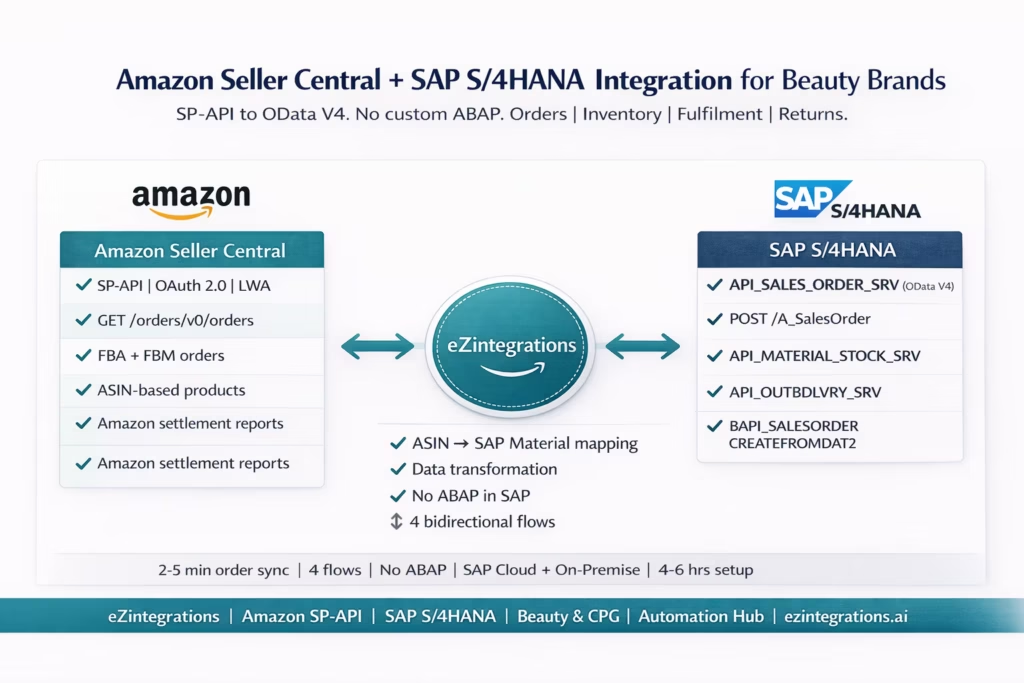
The Four Integration Flows for Beauty Brands
The Amazon-SAP integration for a beauty brand requires four flows that cover the full order-to-cash cycle.
Flow 1: Order Sync (Amazon SP-API to SAP Sales Order) Amazon orders (both FBA and FBM) ingested from SP-API must create SAP sales orders. Each Amazon order item (identified by ASIN) maps to a SAP Material Number. The SAP sales order uses the customer’s shipping address (from the Amazon order) as the ship-to party. For FBA orders, the sales order is created for revenue and COGS accounting but no delivery or goods issue is needed (Amazon handles fulfilment). For FBM orders, the SAP sales order triggers a delivery and goods issue.
Flow 2: Inventory Sync (SAP to Amazon) SAP’s available-to-promise stock for each material must be pushed to Amazon’s listing quantity. SAP API_MATERIAL_STOCK_SRV provides unrestricted stock per plant and storage location. The SP-API Feeds API receives the inventory update. This sync runs after every SAP goods movement that affects available stock.
Flow 3: FBM Fulfilment and Shipment Confirmation (SAP to Amazon) For FBM orders, SAP creates an outbound delivery from the sales order. When the warehouse posts the goods issue in SAP (via API_OUTBDLVRY_SRV), the delivery date and carrier tracking number must be sent to Amazon via SP-API POST /orders/v0/orders/{orderId}/shipment. This closes the Amazon order and triggers customer notification.
Flow 4: Returns (Amazon to SAP) Amazon returns (from both FBA and FBM channels) create return sales orders in SAP. The Amazon return notification (via SP-API or Seller Central report) provides the ASIN, quantity, return reason, and return condition. These map to a SAP return sales order (BAPI_SALESORDER_CREATEFROMDAT2 with document type RE) or a credit memo.
eZintegrations handles all four flows using the full platform: Level 1 (iPaaS Workflows) manages SP-API polling, ASIN-to-Material translation, SAP OData V4 API calls, and 3PL/warehouse connectivity. Level 2 (AI Workflows) handles Amazon settlement report extraction, GL account mapping, and non-standard ASIN formats from new product launches. Level 3 (AI Agents) monitors FBA fulfillable quantity for replenishment alerts, detects inventory discrepancies between SAP and Amazon, and routes return exceptions. Level 4 (Goldfinch AI) orchestrates the complete order-to-cash cycle as a Workflow Node and provides the Goldfinch AI Chat UI for SAP and ops teams: “What Amazon orders are pending SAP goods issue today?”, “Show me all FBA sell-through postings this week”, or “Which ASINs have inventory mismatches between SAP and Amazon?”
SAP S/4HANA API Architecture: What eZintegrations Uses
SAP S/4HANA exposes functionality through four API types. Understanding which eZintegrations uses (and why) is important for the “no ABAP” positioning.
OData V4 APIs (Preferred)
OData V4 is SAP’s preferred modern API format for S/4HANA. Published on the SAP API Business Hub, these APIs are REST-based, use standard HTTP methods (GET, POST, PATCH, DELETE), and are designed for external system integration without ABAP development.
Key OData APIs for Amazon integration:
API_SALES_ORDER_SRV: creates and reads sales orders. This is the primary API for creating Amazon orders as SAP sales orders.API_MATERIAL_STOCK_SRV: reads material stock levels per plant and storage location. Used for inventory sync.API_OUTBDLVRY_SRV: manages outbound deliveries and goods issue. Used for FBM fulfilment confirmation.API_BUSINESS_PARTNER: creates or reads customer master records (for one-time Amazon customers).
Authentication: SAP BTP Communication Arrangement with OAuth 2.0. For S/4HANA Cloud (public or private), the Communication Arrangement SAP_COM_0109 (Sales Orders) and SAP_COM_0184 (Inventory Management) are the standard communication scenarios. For on-premise, the equivalent is a service binding in the S/4HANA ABAP backend with HTTP endpoint exposure.
BAPI (Alternative for On-Premise)
BAPIs (Business Application Programming Interfaces) are the legacy SAP API format, callable via RFC (Remote Function Call) over TCP/IP. For on-premise SAP environments where OData is not configured or where specific business processes require BAPI-level control, eZintegrations uses:
BAPI_SALESORDER_CREATEFROMDAT2: creates a sales order from external data. RequiresBAPI_TRANSACTION_COMMITcalled immediately after to commit the work.BAPI_MATERIAL_AVAILABILITY: checks material availability (ATP) for a plant and date.BAPI_GOODSMVT_CREATE: posts goods movements (alternative to OData goods issue for on-premise).
No ABAP required: calling a standard SAP BAPI via RFC does not require writing ABAP code inside SAP. The BAPI already exists as a standard function module in SAP. eZintegrations calls it externally via RFC over a secure connection. The “no ABAP” positioning means no custom ABAP development is needed inside the SAP system.
IDoc (for EDI/Batch Scenarios)
IDocs (Intermediate Documents) are SAP’s EDI-oriented data exchange format. For Amazon integration, IDocs are less common than OData/BAPI because Amazon is not an EDI trading partner. However, for SAP on-premise environments that prefer IDoc-based integration for outbound inventory updates or goods receipt confirmations from third-party systems, eZintegrations can generate and receive IDocs. The primary IDoc type for sales orders is ORDERS05.
The ASIN-to-SAP Material Number Mapping
This is the most critical configuration element in the Amazon-SAP integration and the most common source of errors. Amazon identifies every product by ASIN. SAP identifies every product by Material Number. These are completely different identifiers with no inherent relationship.
The cross-reference structure:
| Amazon Field | SAP Field | Notes |
|---|---|---|
| ASIN | SAP Material Number | One-to-one for most beauty products |
| Seller SKU | SAP Material variant | For configurable products (e.g., different shades) |
| FNSKU | SAP Batch or Serial number | For FBA lot tracking |
| Amazon Marketplace | SAP Sales Organisation | e.g., amazon.com → Sales Org 1000 |
| FBA or FBM flag | SAP Item Category | FBA → TAQ (no delivery), FBM → TAN (standard with delivery) |
For beauty brands with shade variants: A foundation with 12 shades is 12 separate ASINs on Amazon. In SAP, these may be a single Material Number with 12 variants (configurable material) or 12 separate Material Numbers. The mapping table must account for both cases. For a beauty brand with 80+ ASINs, this mapping table has 80+ rows.
The mapping table in eZintegrations: The ASIN-to-Material mapping is stored as a reference dataset in eZintegrations. It is imported from a combined export: Amazon inventory export (ASINs and Seller SKUs) joined with an SAP material master export (Material Numbers and descriptions). When a new shade launches or a new ASIN is created in Amazon, the mapping table is updated before the first order arrives.
Consequences of mapping errors: If an ASIN maps to the wrong SAP Material Number, the wrong product is ordered in SAP. The inventory for the correct product does not decrease. The COGS posting is on the wrong material. Settlement reconciliation fails. For a beauty brand with frequent new product launches (seasonal shades, reformulations), maintaining this mapping table is an ongoing operational task.
Flow 1: Amazon Orders to SAP Sales Orders
SP-API Order Polling
eZintegrations polls Amazon SP-API every 2-5 minutes:
GET https://sellingpartnerapi-na.amazon.com/orders/v0/orders
  ?MarketplaceIds=ATVPDKIKX0Der
  &OrderStatuses=Unshipped
  &CreatedAfter={timestamp}

Authorization: Bearer {lwa_access_token}
For each order, a second call retrieves the order items:
GET /orders/v0/orders/{orderId}/orderItems
Authorization: Bearer {lwa_access_token}
SAP Sales Order Creation via OData V4
For each Amazon order, eZintegrations creates a SAP sales order using API_SALES_ORDER_SRV:
POST https://{sap-instance}/sap/opu/odata/sap/API_SALES_ORDER_SRV/A_SalesOrder
Authorization: Bearer {sap_btp_token}
Content-Type: application/json

{
  "SalesOrderType": "ZAM",
  "SalesOrganization": "1000",
  "DistributionChannel": "10",
  "Division": "10",
  "SoldToParty": "AMAZON-US",
  "PurchaseOrderByCustomer": "{AmazonOrderId}",
  "to_Item": [
    {
      "SalesOrderItem": "000010",
      "Material": "{sap_material_number}",
      "RequestedQuantity": "2",
      "RequestedQuantityUnit": "EA",
      "to_PricingElement": [
        {
          "ConditionType": "PR00",
          "ConditionRateValue": "{item_price}",
          "ConditionCurrency": "USD"
        }
      ]
    }
  ],
  "to_Partner": [
    {
      "PartnerFunction": "WE",
      "CustomerName1": "{buyer_name}",
      "StreetName": "{shipping_address_line1}",
      "CityName": "{shipping_city}",
      "Region": "{shipping_state}",
      "PostalCode": "{shipping_zip}",
      "Country": "US"
    }
  ]
}
Key field mappings:
SalesOrderType: "ZAM": a custom SAP sales order document type for Amazon orders (configured once in SAP Customising, does not require ABAP).SoldToParty: "AMAZON-US": a single generic Amazon customer master record in SAP (avoids creating a new customer record per Amazon order).PurchaseOrderByCustomer: stores the Amazon Order ID as a reference. Used for return and dispute reconciliation.to_PartnerwithPartnerFunction: "WE"(ship-to): individual delivery address per Amazon order, passed as a one-time address rather than requiring a permanent SAP customer master.
FBA vs FBM Handling
For FBA orders (FulfillmentChannel: AFN):
- The
SalesOrderTypeis set to a FBA-specific type (e.g.,ZAFB) that has no delivery requirement. - SAP creates the sales order for financial accounting only (revenue, COGS, receivables).
- No outbound delivery or goods issue is created.
For FBM orders (FulfillmentChannel: MFN):
- The
SalesOrderTypeis set to a FBM type (e.g.,ZAMB) that automatically creates an outbound delivery. - SAP creates the sales order, which triggers delivery creation.
- Goods issue is posted when the 3PL or warehouse ships the order.
Flow 2: SAP Inventory to Amazon Listing
eZintegrations reads available stock from SAP using API_MATERIAL_STOCK_SRV:
GET https://{sap-instance}/sap/opu/odata/sap/API_MATERIAL_STOCK_SRV/A_MatlStkInAcctMod
  ?$filter=Material eq 'LGLOSS-04-ROSE'
           and Plant eq '1000'
           and StorageLocation eq 'FBM1'

Authorization: Bearer {sap_btp_token}
Key response field: MatlWrhsStkQtyInBaseUnit (unrestricted stock available for fulfilment).
For a beauty brand running hybrid FBA/FBM, the inventory query covers the FBM plant/storage location only. FBA inventory (at Amazon FCs) is tracked in a separate SAP plant (AMZFC) and is not pushed to Amazon as available FBM stock.
The retrieved quantity is pushed to Amazon via SP-API Feeds:
POST https://sellingpartnerapi-na.amazon.com/feeds/2021-06-30/feeds
Content-Type: application/json

{
  "feedType": "POST_INVENTORY_AVAILABILITY_DATA",
  "marketplaceIds": [
    "ATVPDKIKX0Der"
  ],
  "inputFeedDocument": {
    ...
  }
}
The inventory feed document format (tab-delimited): sku\tquantity\tfulfillment-channel where sku is the Amazon Seller SKU (mapped from SAP Material Number), quantity is the SAP unrestricted stock, and fulfillment-channel is DEFAULT for FBM.
Trigger conditions for inventory sync:
- SAP goods issue posted (inventory decreases): triggers immediate sync.
- SAP goods receipt posted (inventory increases): triggers immediate sync.
- SAP inventory adjustment: triggers sync.
- Scheduled: every 4 hours as a safety net.
Flow 3: FBM Fulfilment and Shipment Confirmation
For FBM orders, the SAP delivery and goods issue process drives the Amazon shipment confirmation.
SAP goods issue via API_OUTBDLVRY_SRV: When the warehouse ships an FBM order (either directly from SAP-managed warehouse or via 3PL), the goods issue is posted:
POST https://{sap-instance}/sap/opu/odata/sap/API_OUTBDLVRY_SRV/A_OutbDelivery
  ('{delivery_number}')/com.sap.API_OUTBDLVRY_SRV.PostGoodsIssue

Authorization: Bearer {sap_btp_token}
The goods issue posting generates a material document in SAP (movement type 601: goods issue for delivery), decrements the SAP plant inventory, and generates the outbound accounting entry.
Triggered Amazon shipment confirmation: When SAP posts the goods issue, eZintegrations receives the event (via SAP Change Data Capture or polling the delivery status) and immediately calls SP-API:
POST https://sellingpartnerapi-na.amazon.com/orders/v0/orders/{orderId}/shipment
Content-Type: application/json

{
  "packageReferenceId": "pkg-001",
  "carrierCode": "{carrier_scac}",
  "trackingNumber": "{tracking_number}",
  "shipDate": "{goods_issue_date}",
  "orderItems": [
    {
      "orderItemId": "{id}",
      "quantity": 2
    }
  ]
}
The carrier and tracking number come from the SAP delivery document (populated by the warehouse management system or 3PL via the integration). This closes the Amazon FBM order and triggers customer notification.
Late Shipment Rate protection: the SP-API confirmation fires within minutes of the SAP goods issue posting. Amazon’s LSR (Late Shipment Rate) defect threshold is 4% of orders. Manual confirmation delays during high-volume periods push beauty brands over this threshold. Automated SAP goods issue → SP-API confirmation eliminates this risk.
Flow 4: Amazon Returns to SAP Return Sales Order
Amazon returns arrive as notifications in SP-API (via the GET /orders/v0/orders/{orderId} with IsReplacementOrder: false flag or via Seller Central returns reports). eZintegrations processes these returns and creates SAP return documents.
SAP return sales order creation:
For FBM returns (customer sends back to your 3PL):
POST /sap/opu/odata/sap/API_SALES_ORDER_SRV/A_SalesOrder
Content-Type: application/json

{
  "SalesOrderType": "RE",
  "SalesOrganization": "1000",
  "DistributionChannel": "10",
  "Division": "10",
  "SoldToParty": "AMAZON-US",
  "PurchaseOrderByCustomer": "{original_AmazonOrderId}_RETURN",
  "to_Item": [
    {
      "SalesOrderItem": "000010",
      "Material": "{sap_material_number}",
      "RequestedQuantity": "{return_quantity}",
      "ReferenceSDDocument": "{original_sap_sales_order}",
      "ReferenceSDDocumentItem": "000010"
    }
  ]
}
SalesOrderType: "RE" is SAP’s standard return order document type. Referencing the original SAP sales order via ReferenceSDDocument links the return to the original sale for proper revenue reversal and COGS credit.
For FBA returns (Amazon handles return receipt at FC):
- The FBA return appears in the SP-API
afnUnsellableQuantityfield (customer-damaged or warehouse-damaged units). - eZintegrations creates a SAP credit memo request or journal entry for the FBA return, without a physical goods receipt in the FBM warehouse.
Return reason mapping: Amazon provides return reason codes (e.g., CUSTOMER_REJECTED_ITEM, FOUND_BETTER_PRICE, DEFECTIVE). These are mapped to SAP return reason codes in the return sales order ReasonForRejection field.
FBA Specifics: How SAP Tracks Amazon FC Inventory
As described in the FBA replenishment guide, FBA inventory at Amazon FCs is tracked in a dedicated virtual plant in SAP (e.g., AMZFC). This plant-based approach is the recommended SAP architecture for FBA inventory.
FBA sell-through in SAP: When Amazon ships an FBA order, the afnFulfillableQuantity decreases in the SP-API FBA summaries. eZintegrations detects this decrease and posts a SAP goods issue from the AMZFC plant:
POST /sap/opu/odata/sap/API_GOODSMVT_SRV/A_GoodsMovement
Content-Type: application/json

{
  "GoodsMovementCode": "01",
  "items": [
    {
      "Material": "LGLOSS-04-ROSE",
      "Plant": "AMZFC",
      "StorageLocation": "FBA1",
      "Quantity": "{units_shipped}",
      "MovementType": "601",
      "SalesOrder": "{sap_sales_order}",
      "SalesOrderItem": "000010"
    }
  ]
}
This movement type 601 goods issue closes the FBA sales order delivery and accurately reflects the inventory movement from Amazon FC stock.
FBA inbound (replenishment) goods receipt: When Amazon FCs receive inbound replenishment stock, movement type 101 posts the goods receipt to the AMZFC plant (described in detail in the Amazon FBA inventory replenishment guide).
Beauty Brand-Specific SAP Configuration
SAP Document Type for Amazon Orders
A dedicated SAP sales order document type for Amazon (e.g., ZAM for FBM, ZAFB for FBA) is configured once in SAP Customising (transaction VOV8). This document type:
- Sets the billing type to Amazon-appropriate billing.
- Controls whether a delivery is automatically created (yes for FBM, no for FBA).
- Sets the pricing procedure for Amazon-specific pricing (which may differ from retail pricing).
- This is standard SAP Customising configuration: no ABAP required.
SAP Customer Master: Generic Amazon Customer
Rather than creating a SAP customer master for every Amazon buyer (millions of records), a single generic customer master is created for “AMAZON-US” (and “AMAZON-CA”, “AMAZON-UK” for other marketplaces). The individual buyer’s shipping address is passed as a one-time address on the ship-to partner function. This keeps SAP’s customer master clean while capturing each order’s delivery destination.
ASIN-to-Material Mapping for Beauty Variants
For beauty brands with configurable products (shade variants), the mapping table handles the SAP-specific variant structure:
| Amazon ASIN | Amazon Seller SKU | SAP Material | SAP Variant | Description |
|---|---|---|---|---|
| B09X4JT2Z1 | LGLOSS-04-ROSE | LGLOSS-04 | 01 | Rose Gloss |
| B09X4JT2Z2 | LGLOSS-04-BERRY | LGLOSS-04 | 02 | Berry Gloss |
| B09X4JT2Z3 | LGLOSS-04-NUDE | LGLOSS-04 | 03 | Nude Gloss |
For non-configurable materials (separate SAP Material Numbers per shade), the mapping is one-to-one.
SAP Condition Type for Amazon Pricing
Amazon orders carry the item price from the SP-API response. This price is mapped to the SAP pricing condition PR00 (basic price) in the sales order. For promotional Amazon prices (lightning deals, coupons), a separate condition type (e.g., ZAM1 for Amazon promotion) is used to record the promotional discount while preserving the list price for management reporting.
Before vs After: Manual Amazon-SAP vs Automated
| Process Step | Manual Amazon-SAP | Automated with eZintegrations |
|---|---|---|
| Amazon order capture | Seller Central export; manual SAP SD entry | SP-API poll every 2–5 min → SAP API_SALES_ORDER_SRV |
| ASIN-to-Material mapping | Manual: ops looks up material number | Reference dataset: auto-applied per order item |
| SAP customer for each order | Manual creation or selection | Generic “AMAZON-US” customer with one-time ship-to address |
| FBA vs FBM routing | Manual: different SAP entry per type | FulfillmentChannel drives SalesOrderType automatically |
| SAP inventory to Amazon | Manual spreadsheet upload, daily or weekly | SAP goods movement triggers SP-API Feeds update |
| FBM shipment confirmation to Amazon | Manual after SAP goods issue; risk of LSR | SAP goods issue event → SP-API POST /orders/{id}/shipment |
| Amazon LSR defect risk | Manual confirmation delays cause defects | Near-zero: automated confirmation within minutes |
| Returns to SAP | Manual: return order entry in VA01 | SP-API return notification → SAP RE return order |
| FBA sell-through in SAP | End-of-day manual MIGO entry or missed | SP-API FBA summaries → SAP goods issue (movement type 601) |
| ASIN variant mapping | Spreadsheet, breaks on new launches | Reference dataset updated when new ASINs launch |
| Settlement reconciliation | Manual: Amazon report vs SAP AR | Level 2: settlement report extraction → SAP journal entry |
| Amazon promotional pricing in SAP | Manual: price override per order | Condition type ZAM1 applied automatically from SP-API price |
| ABAP development in SAP | Required with traditional approaches | Not required: OData V4 and standard BAPIs only |
| SAP implementation partner needed | Often required for integration layer | Not required: eZintegrations handles integration layer |
Step-by-Step: A Beauty Brand’s Amazon Order Through SAP S/4HANA
Here is the complete automated cycle for one Amazon FBM order at Lumière Cosmetics.
Setup: Lumière uses SAP S/4HANA Cloud Private Edition. Amazon Sales Organisation is 1000. FBM distribution channel is 10. SAP document type ZAMB (Amazon FBM) auto-creates a delivery. 3PL is Kenco Atlanta.
Step 1: Amazon order arrives. (2:14 PM) Customer places an order for 2 units of Rose Gloss (ASIN B09X4JT2Z1, Seller SKU LGLOSS-04-ROSE) at $14.99 each. SP-API poll detects the order at 2:17 PM.
Step 2: ASIN mapped to SAP Material. (2:17 PM) eZintegrations looks up B09X4JT2Z1 in the reference dataset: maps to SAP Material LGLOSS-04, variant 01 (Rose). Material confirmed active in SAP Plant 1000, storage location FBM1. Available stock: 326 units.
Step 3: SAP sales order created via API_SALES_ORDER_SRV. (2:17 PM)
POST /sap/opu/odata/sap/API_SALES_ORDER_SRV/A_SalesOrder
Content-Type: application/json

{
  "SalesOrderType": "ZAMB",
  "SalesOrganization": "1000",
  "DistributionChannel": "10",
  "SoldToParty": "AMAZON-US",
  "PurchaseOrderByCustomer": "114-7284912-1234567",
  "to_Item": [
    {
      "Material": "LGLOSS-04",
      "RequestedQuantity": "2",
      "to_PricingElement": [
        {
          "ConditionType": "PR00",
          "ConditionRateValue": "14.99"
        }
      ]
    }
  ],
  "to_Partner": [
    {
      "PartnerFunction": "WE",
      "CustomerName1": "Sarah M.",
      "StreetName": "247 Maple Ave",
      "CityName": "Austin",
      "Region": "TX",
      "PostalCode": "78701",
      "Country": "US"
    }
  ]
}
SAP response: Sales Order 201900047112 created. Outbound delivery 802900018441 automatically created by the ZAMB document type. Time: 2-3 seconds.
Step 4: SAP inventory sync to Amazon. (2:17 PM) SAP sales order creation triggers an inventory availability check. API_MATERIAL_STOCK_SRV returns 326 unrestricted units. After this order’s 2-unit commitment: 324 available. SP-API Feeds update sent to Amazon: LGLOSS-04-ROSE: 324 units. Time: 3-4 seconds.
Step 5: Fulfilment request routed to Kenco. (2:17 PM) Level 1 routes the fulfilment order to Kenco Atlanta (the FBM 3PL for DTC orders). Kenco receives the order via REST API integration.
Step 6: Kenco ships. (4:38 PM) Kenco picks and ships 2 units. Carrier: UPS Ground. Tracking: 1Z9W4872…. Kenco push API fires shipment event at 4:38 PM.
Step 7: SAP goods issue posted. (4:38 PM) Level 1 receives Kenco shipment event. Calls SAP to post goods issue on delivery 802900018441:
POST /API_OUTBDLVRY_SRV/A_OutbDelivery
  ('802900018441')/com.sap.API_OUTBDLVRY_SRV.PostGoodsIssue

Authorization: Bearer {sap_btp_token}
SAP posts goods issue. Material document 4900001827 created. SAP Plant 1000 inventory decremented: 326 – 2 = 324. COGS posting: movement type 601. Time: 2-3 seconds.
Step 8: Amazon shipment confirmation. (4:38 PM) SAP goods issue event triggers SP-API shipment confirmation:
POST /orders/v0/orders/114-7284912-1234567/shipment
Content-Type: application/json

{
  "carrierCode": "UPS",
  "trackingNumber": "1Z9W4872...",
  "shipDate": "2026-03-30T16:38:00Z",
  "orderItems": [
    {
      "orderItemId": "...",
      "quantity": 2
    }
  ]
}
Amazon marks the order as shipped. Customer Sarah M. receives tracking notification. Time: 2-3 seconds.
Step 9: SAP billing document created. (End of day) SAP billing run creates invoice for the SAP sales order. Revenue posted to the Amazon-US account. Amazon referral fee is recorded as a marketing expense from the settlement reconciliation flow.
Total ops team involvement: zero manual touchpoints. SAP sales order, delivery, goods issue, and Amazon confirmation all automated.
Key Outcomes and Results
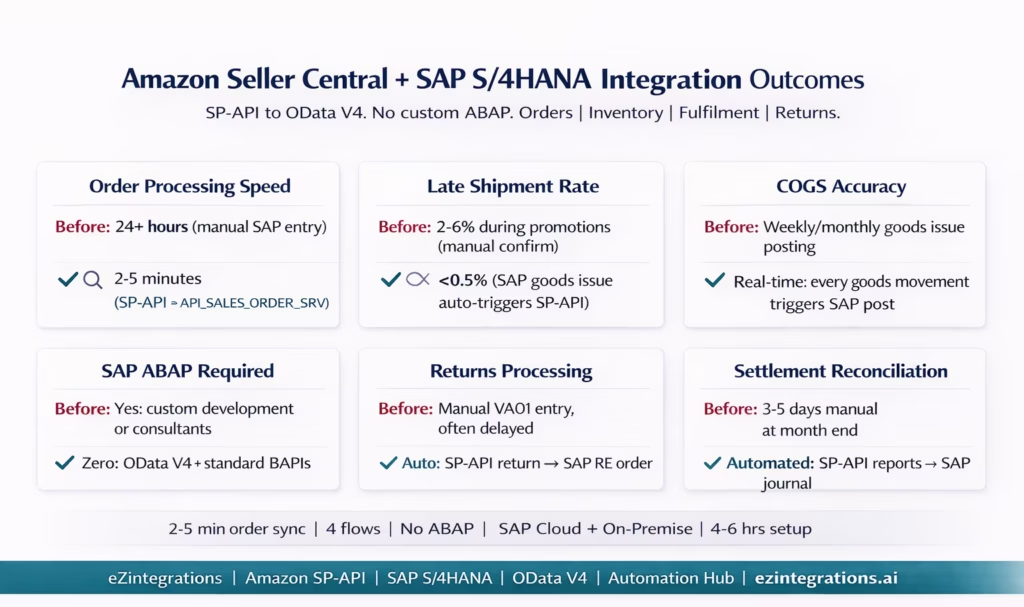
Order processing speed: Amazon orders posted to SAP within 2-5 minutes of placement. Versus 24+ hours for manual entry processes. For a beauty brand processing 200 Amazon orders per day, manual entry represents 30-50 hours per week of SAP data entry work.
COGS accuracy: FBA sell-through goods issues and FBM delivery goods issues posted to SAP in near-real-time mean COGS is reflected accurately in SAP at all times. Manual processes often defer goods issue posting to weekly or monthly cycles, causing COGS distortions in interim financial reports.
Late Shipment Rate: automated SAP goods issue → SP-API confirmation eliminates manual confirmation delays. Beauty brands report LSR rates below 0.5% with automated confirmation versus 2-6% with manual processes during high-volume promotional periods.
Returns accuracy: SAP return sales orders created automatically from Amazon return notifications, with proper reference to the original sales order and correct COGS credit posting. Manual return entry is frequently delayed and often incomplete on original order references.
No ABAP in SAP: the entire integration uses SAP’s published OData V4 APIs (API_SALES_ORDER_SRV, API_MATERIAL_STOCK_SRV, API_OUTBDLVRY_SRV) and standard BAPIs. No SAP ABAP developer is required. No SAP implementation partner is required for the integration layer. SAP Customising (document type configuration, pricing procedure, communication arrangement) is standard administration, not development.
Settlement reconciliation: Amazon settlement reports (fee deductions, advertising spend, FBA fees) are processed via the SP-API Reports API and reconciled against SAP receivables automatically, eliminating the month-end manual reconciliation that typically takes 3-5 days for beauty brands with significant Amazon revenue.
How to Get Started
Step 1: Configure SAP S/4HANA Communication Arrangement
In SAP S/4HANA (Fiori launchpad or S/4HANA Admin), create the Communication Arrangement for the required communication scenarios:
SAP_COM_0109: Sales Order API (enablesAPI_SALES_ORDER_SRV)SAP_COM_0184or equivalent: Material Stock API (enablesAPI_MATERIAL_STOCK_SRV)SAP_COM_0276: Outbound Delivery API (enablesAPI_OUTBDLVRY_SRV)
Create a Communication User with the assigned Communication Arrangement. This provides the OAuth 2.0 credentials for BTP-based authentication. For on-premise SAP: equivalent RFC/service binding configuration. This is standard SAP Basis administration: 1-2 hours.
Separately, configure one-time SAP Customising (transaction VOV8) for the Amazon-specific document types ZAM (FBA) and ZAMB (FBM). Set the delivery type, billing type, and pricing procedure per document type. This is a standard SAP SD configuration: 30-60 minutes.
Step 2: Import the Amazon SAP S/4HANA Integration Template
Go to the Automation Hub and import the Amazon Seller Central SAP S/4HANA Integration template. The template includes all four flows: SP-API order polling with FBA/FBM routing, API_SALES_ORDER_SRV sales order creation, API_MATERIAL_STOCK_SRV inventory sync to Amazon Feeds, API_OUTBDLVRY_SRV goods issue to SP-API shipment confirmation, and return order creation. FBA sell-through and FBA inbound workflows are included in the FBA extension module.
Step 3: Build the ASIN-to-SAP-Material Mapping Table
Export your Amazon inventory list (ASINs, Seller SKUs) from Seller Central. Export your SAP material master list (Material Numbers, descriptions, variants). Build the mapping table: ASIN to SAP Material, with variant codes where applicable. For beauty brands with configurable materials (shade variants), document whether SAP uses a single configurable material or individual material numbers per shade. This is the most time-intensive configuration step: allow 2-4 hours for 50-100 ASINs.
Step 4: Configure Credentials, Mapping, and Test
Add your SP-API credentials (LWA Client ID, Secret, Seller ID, Marketplace ID) and SAP credentials (BTP OAuth client or on-premise RFC connection) to the eZintegrations credential vault. Upload the ASIN-to-Material mapping table. Configure the Amazon-US generic customer code (the SAP Sold-To Party for all Amazon orders). Set SAP document types per fulfilment channel. Run a test: create a test Amazon order, confirm the SAP sales order is created with the correct material, pricing, and document type. Confirm the inventory sync fires. Confirm a test delivery and goods issue triggers the SP-API shipment confirmation.
Total configuration time: 4-6 hours from template import to live Amazon-SAP integration.
FAQs
eZintegrations connects Amazon Seller Central to SAP S 4HANA by polling the Amazon Selling Partner API every two to five minutes to retrieve new orders. Each order item ASIN is mapped to the corresponding SAP material using a reference dataset and a sales order is created in SAP using the API SALES ORDER SRV. FBA and FBM orders follow different document types. FBM orders trigger delivery and shipment confirmation automatically while FBA orders are posted for accounting only. Inventory sync is handled through SAP stock APIs and Amazon Feeds API. Returns are automatically created as SAP return sales orders. No custom ABAP development is required.
Setup typically takes four to six hours from template import to live integration. SAP communication arrangement and configuration takes one to two hours ASIN to material mapping takes two to four hours depending on catalogue size and credential setup testing takes one to two hours. Most of the effort is in building the ASIN mapping table especially for brands with many product variants.
No, the integration uses only SAP standard OData APIs such as API SALES ORDER SRV API MATERIAL STOCK SRV and API OUTBDLVRY SRV along with standard BAPIs for on premises systems. No custom ABAP development is required. All setup is done through standard SAP configuration and communication arrangements handled by SAP Basis or functional consultants.
Amazon orders include a fulfillment channel field which determines processing logic. FBA orders create SAP sales orders for accounting only without delivery as Amazon handles fulfillment. FBM orders create SAP sales orders that generate deliveries and goods issue events which automatically trigger shipment confirmation back to Amazon. FBA sell through is reflected in SAP through goods issue postings based on Amazon inventory changes.
ASIN to SAP material mapping is a reference dataset that links each Amazon product identifier to the corresponding SAP material and variant. Amazon uses ASINs while SAP uses material numbers so this mapping enables correct sales order creation in SAP. For products with multiple variants such as shades each ASIN must be mapped individually. Without this mapping the integration cannot process orders correctly making it a critical configuration step. 1. How does Amazon Seller Central integrate with SAP S 4HANA using eZintegrations
2. How long does it take to set up Amazon SAP S 4HANA integration
3. Does eZintegrations require custom ABAP development in SAP S 4HANA
4. How does the integration handle FBA vs FBM orders in SAP S 4HANA
5. What is the ASIN to SAP material mapping and why is it important
Amazon Speaks SP-API. SAP Speaks OData V4. eZintegrations Translates.
Amazon and SAP do not share a common language. ASINs are not Material Numbers. FulfillmentChannel is not a SAP item category. An Amazon shipping address is not a SAP sold-to party. Settlement reports are not SAP billing documents. Connecting the two is a data transformation challenge at every step.
The connection exists: Amazon’s SP-API is well-documented and REST-based. SAP’s OData V4 APIs are well-documented and REST-based. Both use OAuth 2.0. The translation layer between them is what eZintegrations provides.
No custom ABAP. No SAP implementation partner for the integration layer. No separate tools for Amazon and SAP. One platform, both systems, the full order-to-cash cycle.
Import the Amazon Seller Central SAP S/4HANA Integration Template from the Automation Hub. Or book a free demo with your Amazon Seller ID, SAP system type (cloud or on-premise), and ASIN count. We will walk through the Communication Arrangement setup and ASIN mapping configuration in the session.
For FBA replenishment automation with SAP, see the FBA replenishment automation guide. For multi-channel context (Amazon + Walmart in one SAP), see the multi-channel ERP sync guide.

