
What Is Amazon Seller Central Integration? A Guide for Beauty and CPG Brands
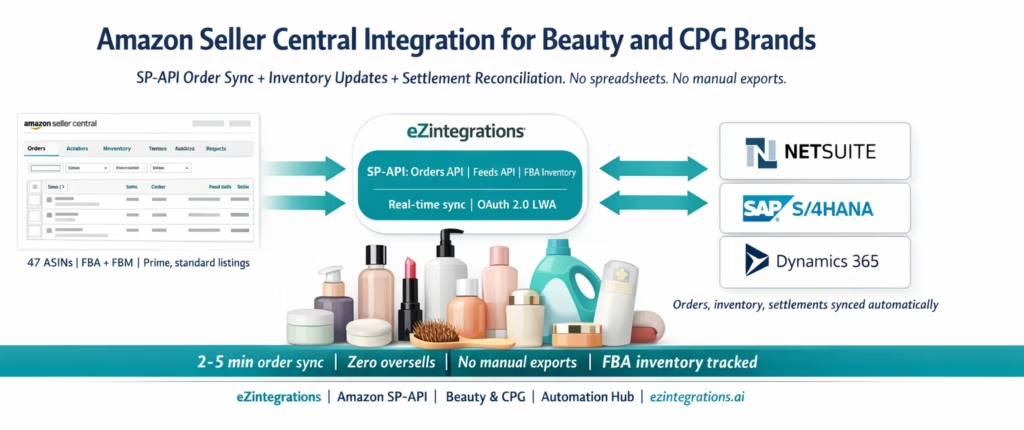
April 10, 2026Amazon Seller Central integration for beauty and CPG brands connects your Amazon Seller account to your ERP (SAP, NetSuite, Dynamics 365) via Amazon’s Selling Partner API (SP-API), syncing orders, inventory levels, FBA stock counts, and returns automatically in both directions without manual data export from Seller Central. A properly built integration pulls new Amazon orders every 2-5 minutes via the SP-API Orders API, updates available inventory in Amazon via the Feeds API when your warehouse ships or receives stock, and reconciles Amazon settlement reports against your ERP accounts receivable, eliminating the oversell risk and reconciliation backlog that comes with manual Seller Central management.
TL;DR
Amazon Seller Central integration connects your Amazon selling account to your ERP or inventory system via the Selling Partner API (SP-API), Amazon’s REST-based developer API that replaced the old MWS API. – For beauty and CPG brands, the four integration flows that matter most: order sync (Amazon orders into your ERP or OMS), inventory sync (your warehouse stock levels into Amazon’s available inventory), FBA inbound/outbound tracking, and settlement and returns reconciliation.
The technical interface: Amazon SP-API, accessed via OAuth 2.0 (LWA tokens) and AWS Signature Version 4. Orders endpoint: GET /orders/v0/orders. Feeds endpoint: POST /feeds/2021-06-30/feeds. FBA Inventory: GET /fba/inventory/v1/summaries. – eZintegrations provides pre-built Amazon Seller Central connectors in the API catalog and Automation Hub templates for each integration flow, connecting to SAP S/4HANA, Oracle Fusion Cloud, NetSuite, and Dynamics 365. – No custom development. Import the template, add SP-API credentials, configure SKU mapping, and go live.
Why Beauty and CPG Brands Need Amazon Seller Central Integration
Your brand has 47 active ASINs on Amazon. Three of them are in your top 10 revenue products. Last quarter, you ran a Prime Day promotion and your best-selling serum sold out on Amazon before your team realised the FBA stock was depleted. The sales were gone. The customer demand was there. The inventory was sitting in your 3PL warehouse but had not been sent to FBA because nobody had pulled the inventory report and checked the levels.
Meanwhile, your e-commerce manager is logging into Seller Central every morning, downloading the orders report, opening a spreadsheet, manually entering the order data into NetSuite, and reconciling the previous day’s FBA shipments against what the 3PL says they sent. This takes 90 minutes every morning before she can do anything else.
That is the beauty brand Amazon management problem. Not the listing, not the advertising, not the product. The operational plumbing between Amazon and your business systems.
Integration solves this. Your ERP receives Amazon orders automatically the moment they are placed. Your Amazon available inventory updates automatically when your warehouse confirms stock. Your settlement report reconciles against your ERP accounts receivable without a spreadsheet. Your team wakes up and works on strategy, not data entry.
What Amazon Seller Central Integration Actually Means
“Amazon integration” means different things depending on who is describing it. This section defines exactly what integration is and is not for a beauty or CPG brand.
What Seller Central integration is: A live, bidirectional connection between your Amazon Seller account and your business systems (ERP, OMS, inventory management, accounting) that automatically moves data between them without manual export, download, or re-entry.
What it is not: – It is not a listing management tool (that is a different integration category: catalog and content management) – It is not an Amazon advertising integration (that uses the Amazon Advertising API, not SP-API) – It is not an Amazon Vendor Central integration (Vendor Central uses a different API, relevant for first-party wholesale relationships with Amazon)
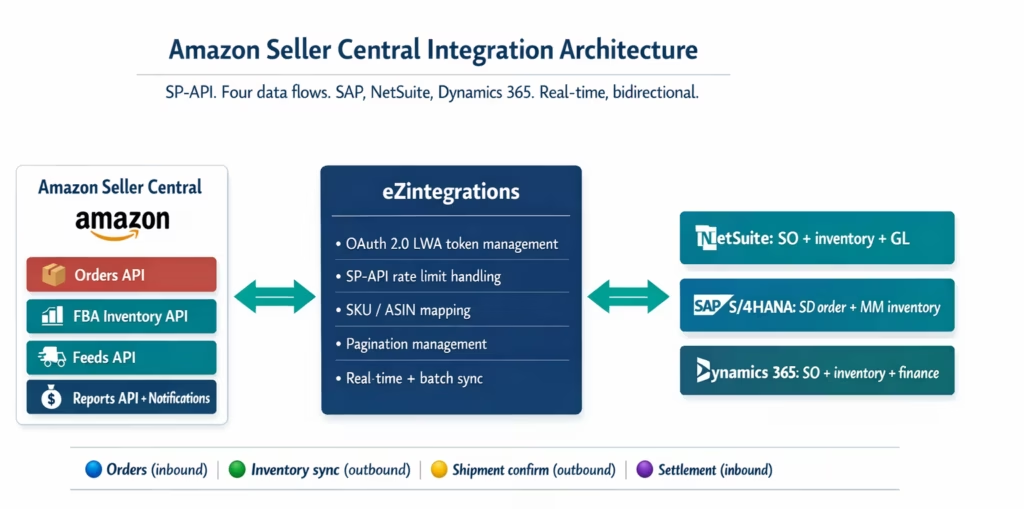
The four data flows:
1. Order ingest: Amazon places an order. Your integration pulls the order via the SP-API Orders API and creates a corresponding order record in your ERP or OMS. This triggers picking, packing, and shipping (for FBM orders) or simply records the revenue (for FBA orders where Amazon ships).
2. Inventory sync: Your warehouse receives stock, ships orders, or processes returns. Your integration updates your Amazon available inventory via the SP-API Feeds API (for FBM) or tracks FBA stock levels via the FBA Inventory API (for FBA). This prevents overselling.
3. Fulfillment confirmation (FBM only): For Fulfilled by Merchant orders, after your 3PL ships, your integration pushes the carrier tracking number and ship date back to Amazon via the SP-API Orders API shipment confirmation endpoint. Amazon needs this within 24-48 hours of ship date.
4. Settlement and returns reconciliation: Amazon pays sellers every 14 days via a settlement report. Your integration downloads the settlement report via the SP-API Reports API, maps the Amazon line items (gross sales, FBA fees, advertising costs, returns) against your ERP general ledger accounts, and creates the accounting entries.
For beauty and CPG brands selling a mix of FBA and FBM, and operating across multiple Amazon marketplaces (US, UK, EU, Canada), all four flows need to run reliably without manual intervention.
The Four Integration Flows That Matter for Beauty and CPG
Flow 1: Order Sync (Amazon to ERP/OMS)
The Amazon side: Amazon’s Orders API (GET /orders/v0/orders) returns orders with status Unshipped or PartiallyShipped, filtered by CreatedAfter timestamp. Order items are retrieved via a second call: GET /orders/v0/orders/{orderId}/orderItems. Each order item contains the ASIN, SKU (your merchant SKU, not Amazon’s ASIN), quantity ordered, item price, and shipping price.
The ERP side: Your integration creates a sales order in NetSuite, SAP SD, or Dynamics 365 for each Amazon order (or a batch of orders grouped by period, depending on your accounting preference). For FBA orders, the fulfillment is handled by Amazon, so the ERP records the sale and deducts the expected inventory from the FBA location. For FBM orders, the ERP creates a fulfillment task that the warehouse processes.
Beauty/CPG specific considerations: – ASIN-to-SKU mapping: Amazon uses ASINs as product identifiers. Your ERP uses internal SKU codes. The integration must maintain a mapping table: ASIN B09XK42P7L = internal SKU SERUM-50ML-VS. This mapping is managed in eZintegrations and syncs changes automatically. – Bundle handling: if you sell a “3-pack” bundle on Amazon that is not in your ERP as a separate product, the integration must explode the bundle into its component SKUs when creating the ERP order. – Gift orders and personalisation: Amazon gift orders include a gift message. Your OMS may need to capture this for the packing slip.
Sync frequency: Amazon SP-API allows polling the Orders API with a 2-minute minimum interval. Most beauty brands configure 5-minute polling for standard periods and 2-minute polling during promotion events (Prime Day, Black Friday).
Flow 2: Inventory Sync (ERP to Amazon)
The problem: Amazon shows 0 available inventory for your FBM listing when you have 3,000 units in your warehouse, because the inventory count in Amazon Seller Central has not been updated. Customer sees “out of stock.” Sale lost.
The solution: every time your ERP inventory changes (sale shipped, return received, inbound stock confirmed), your integration pushes the new available quantity to Amazon via the Feeds API.
The SP-API Feeds API for inventory updates uses a JSON-based inventory feed:
{
  "header": {
    "sellerId": "YOUR_SELLER_ID",
    "version": "2.0",
    "issueLocale": "en_US"
  },
  "messages": [
    {
      "messageId": 1,
      "sku": "SERUM-50ML-VS",
      "operationType": "UPDATE",
      "productType": "PRODUCT",
      "patches": [
        {
          "op": "replace",
          "path": "/attributes/fulfillment_availability",
          "value": [
            {
              "fulfillment_channel_code": "DEFAULT",
              "quantity": 2847,
              "lead_time_to_ship_max_days": "2"
            }
          ]
        }
      ]
    }
  ]
}
FBA inventory tracking: for FBA listings, your inventory is managed by Amazon’s warehouse network. The FBA Inventory API (GET /fba/inventory/v1/summaries) returns real-time FBA stock counts by ASIN/SKU, including afnFulfillableQuantity (available to ship), afnReservedQuantity (reserved for pending orders), and afnUnsellableQuantity (damaged or unsellable). Your ERP updates the FBA location stock count from these values, giving finance an accurate picture of total inventory across locations.
Flow 3: FBM Fulfillment Confirmation
For Fulfilled by Merchant orders, Amazon requires you to confirm shipment within 24-48 hours. The shipment confirmation pushes the carrier name, tracking number, and ship date to Amazon via:
POST /orders/v0/orders/{orderId}/shipment
Content-Type: application/json

{
  "marketplaceId": "ATVPDKIKX0DER",
  "shippingEventList": [
    {
      "carrierCode": "UPS",
      "trackingNumber": "1Z999AA10123456784",
      "shippedTime": "2026-03-18T14:30:00Z",
      "shipFromSupplySourceId": "warehouse-001"
    }
  ]
}
eZintegrations automatically triggers this call when your 3PL or warehouse management system confirms the shipment and provides the tracking number. No manual entry in Seller Central.
Flow 4: Settlement and Returns Reconciliation
Amazon pays sellers on a 14-day cycle. The settlement report contains: gross sales, FBA fees (fulfilment fee, storage fee, long-term storage fee), referral fees, advertising costs, promotional discounts, and returns.
The SP-API Reports API creates and retrieves settlement reports:
POST /reports/2021-06-30/reports
Content-Type: application/json

{
  "reportType": "GET_V2_SETTLEMENT_REPORT_DATA_FLAT_FILE"
}
eZintegrations retrieves the completed report, maps each line item to the correct ERP general ledger account (gross sales → revenue account; FBA fees → fulfilment cost account; referral fees → channel cost account), and creates the accounting journal entry in NetSuite, SAP, or Dynamics 365. Returns generate an inventory credit and a revenue reversal.
The Amazon Selling Partner API (SP-API): What It Is and How It Works
For the non-technical brand operator who needs to understand what their team or integration partner is building, here is a plain explanation of the SP-API.
What it is: Amazon’s official REST-based developer API for programmatic access to your Seller Central data and operations. It replaced the older MWS (Marketplace Web Service) API, which Amazon deprecated in 2022. If your current integration still uses MWS, it is running on a deprecated system and should be migrated.
How authentication works: SP-API uses OAuth 2.0 with Amazon’s Login with Amazon (LWA) service for token generation. Your integration application is registered in Amazon’s developer console. Your Seller Central account grants the application access (the “authorisation” step). The application receives a refresh token and exchanges it for a short-lived access token (valid 1 hour) at each API session. The access token, combined with AWS Signature Version 4 signing, authenticates each API call.
The key API modules:
Orders API: retrieves order data and pushes shipment confirmations.
Feeds API: submits bulk data (inventory updates, listing content changes, price updates) to Amazon asynchronously.
Reports API: requests and retrieves Amazon-generated reports (settlement, inventory health, sales, returns).
FBA Inventory API: queries FBA stock levels in Amazon’s fulfilment network.
Catalog Items API: retrieves product catalogue data (ASINs, attributes, images).
Notifications API: subscribes to real-time push notifications when events occur (new order placed, inventory level change, return initiated)
Rate limits: SP-API has per-endpoint rate limits (e.g., Orders API: 1 request/second with burst up to 6 requests/second). Integration platforms like eZintegrations handle rate limit management automatically, using request queuing and exponential back-off to stay within limits without dropping data.
Regional endpoints: the SP-API uses region-specific base URLs. North America: https://sellingpartnerapi-na.amazon.com. Europe: https://sellingpartnerapi-eu.amazon.com. Far East: https://sellingpartnerapi-fe.amazon.com. For brands selling in multiple marketplaces, each region’s endpoint is called with the specific MarketplaceId parameter.
The Manual Alternative: Why Spreadsheet Seller Central Management Breaks at Scale
Many beauty and CPG brands start their Amazon operations by managing everything in Seller Central manually. This works at 50 orders per month. It breaks at 500.
The manual process that brands outgrow:
Morning Seller Central export: download the orders report (CSV). Open the spreadsheet. Enter each order into the OMS or ERP. Cross-reference the ERP inventory against the FBA inventory report (a separate download). Calculate whether any ASINs need inventory replenishment. Create a replenishment shipment plan. Download the settlement report (another CSV). Reconcile it against last week’s expected revenue in the finance spreadsheet.
Time: 60-120 minutes per day. Per person. Every day.
What breaks first:
Overselling is usually the first major failure. An Amazon order is placed. The FBM inventory in Seller Central is not updated because the overnight batch has not run yet. A second order is placed. Both orders cannot be fulfilled. Amazon tracks late shipment rate and cancellation rate: high rates suppress your listings and can result in selling privileges suspension.
Settlement reconciliation is the second failure. Amazon’s settlement report is dense: dozens of fee types, promotional adjustments, returns credits, and currency conversion entries. Manually matching the settlement to ERP revenue takes 3-4 hours per settlement cycle. Brands that grow past $500K annual Amazon revenue typically cannot close their month-end accounts without a dedicated resource for Amazon reconciliation.
Returns handling is the third. Amazon processes returns and credits the customer. But unless your system is monitoring the SP-API for return notifications, you do not know a return was processed until you see it in the settlement report (14 days later). Your ERP inventory has not been updated. Your team does not know to inspect the returned item or flag it as damaged.
Before vs After: Manual Seller Central vs Integrated
| Process | Manual Seller Central Management | eZintegrations SP API Integration |
|---|---|---|
| Order ingestion | Morning CSV export manual ERP entry | SP API Orders API automated every 2 to 5 minutes |
| Time per order admin | 3 to 5 minutes manual entry per order | 0 minutes fully automated |
| Inventory sync FBM | Manual Seller Central quantity update | Feeds API push triggered on every ERP inventory change |
| FBA stock tracking | Periodic manual report download | FBA Inventory API real time per ASIN or SKU |
| Oversell risk | High sync lag between ERP and Amazon | Near zero inventory pushed within minutes of change |
| FBM shipment confirmation | Manual tracking number entry in Seller Central | SP API shipment confirmation triggered on 3PL confirmation |
| Late shipment rate | Risk from manual delays | Near zero confirmations automated within minutes of shipment |
| Returns processing | Seen in settlement report after 14 days | Notifications API real time return alert with ERP update |
| Settlement reconciliation | 3 to 4 hours per 14 day cycle manual | Settlement report mapped to general ledger automatically |
| Multi marketplace management | Separate manual process per marketplace | Single integration handles North America Europe and Far East regions |
| New ASIN listing | Manual entry in Seller Central and ERP | Catalog Items API and Feeds API sync from ERP product master |
| Bundle SKU handling | Manual component calculation | Bundle explode rule configured once in eZintegrations |
| Daily admin time | 60 to 120 minutes per day | 0-10 min/day (exception review only) |
| Amazon listing suspension risk | Higher due to manual delays and cancellations | Lower confirmations and cancellations automated |
How eZintegrations Connects Amazon Seller Central to Your ERP
eZintegrations provides the complete Amazon Seller Central to ERP integration stack via the SP-API.
Level 1 (iPaaS Workflows): Handles all SP-API connectivity. Manages OAuth 2.0 LWA token refresh automatically. Handles SP-API rate limits with request queuing. Manages pagination for large order and inventory result sets. Translates Amazon’s JSON response format into your ERP’s data structure.
The bi-directional data flows managed by Level 1: – Amazon SP-API Orders API (inbound) → ERP sales order creation – ERP inventory update (outbound) → Amazon Feeds API inventory update – 3PL shipment confirmation → Amazon SP-API shipment confirmation – Amazon Notifications API (real-time) → ERP return and status processing – Amazon Reports API settlement download → ERP accounting journal
SKU mapping: the SKU mapping table maintained in eZintegrations maps Amazon SKUs/ASINs to your internal ERP item codes. Multi-variant products (size, shade, bundle) are managed with individual mapping rules. The mapping table is exportable and importable as a CSV for initial setup from your product master.
Level 2 (AI Workflows, optional): For beauty brands with complex product catalogues, Goldfinch AI Document Intelligence can process supplier invoices and packing lists alongside the Amazon order flow, automating the procurement-to-fulfilment cycle end-to-end.
Level 3 (AI Agents, optional): For brands wanting predictive replenishment, a Level 3 AI Agent can analyse FBA stock levels and Amazon sell-through rates (retrieved via the Reports API), compare against lead times stored in the ERP, and generate replenishment recommendations or trigger inbound FBA shipment creation automatically.
Level 4 (Goldfinch AI): Orchestrates the full Amazon-to-ERP integration as a Workflow Node for autonomous end-to-end data processing. AP and operations managers can query Amazon performance metrics and inventory status in natural language via the Goldfinch AI Chat UI, without logging into Seller Central or running manual reports.
Step-by-Step: An Amazon Order Through the Integration Workflow
Here is the complete automated flow for a single Amazon order placed on an FBM (Fulfilled by Merchant) listing for a beauty brand’s best-selling vitamin C serum.
The scenario: A customer places an order for “Aura Labs Vitamin C Serum 50ml” (ASIN: B09XK42P7L) at 2:14 PM on a Tuesday. The brand fulfils this ASIN from their 3PL warehouse (FBM).
Step 1: SP-API Orders API poll detects the new order. (2:18 PM) eZintegrations polls the Amazon Orders API every 5 minutes:
GET https://sellingpartnerapi-na.amazon.com/orders/v0/orders
  ?MarketplaceIds=ATVPDKIKX0DER
  &OrderStatuses=Unshipped
  &CreatedAfter=2026-03-18T14:14:00Z
Response: one new order, OrderId: 111-4829731-4821401. Status: Unshipped. Order total: $48.95. ASIN: B09XK42P7L. Buyer-selected shipping: Standard (4-day).
Second call:
GET /orders/v0/orders/111-4829731-4821401/orderItems
Authorization: Bearer {lwa_access_token}
Response: 1 item, SellerSKU: SERUM-50ML-VC, quantity: 1, item price: $43.95, shipping price: $5.00.
Step 2: Level 1 translates Amazon order to ERP sales order. eZintegrations looks up the SKU mapping: SERUM-50ML-VC → internal item code AU-SRM-50-VC. Creates a NetSuite sales order: – Customer: eZintegrations-managed Amazon customer record – Ship-to address: Amazon buyer’s shipping address (retrieved from the order, decrypted via SP-API PII data access) – Line item: AU-SRM-50-VC, qty 1, unit price $43.95 – Shipping charge: $5.00 (mapped to shipping revenue account) – Sales channel: AMAZON-US – External ID: 111-4829731-4821401 (for deduplication) – Requested ship date: calculated from ship by date in Amazon order
Step 3: NetSuite creates the pick/pack task. (2:19 PM) The sales order triggers the warehouse fulfilment workflow. A pick ticket is generated in the WMS or sent to the 3PL portal.
Step 4: 3PL confirms shipment at 4:32 PM. The 3PL ships the order and confirms via their portal or API. eZintegrations receives the tracking number: 1Z999AA10123456784, carrier: UPS Ground.
Step 5: SP-API shipment confirmation sent to Amazon. (4:32 PM)
POST /orders/v0/orders/111-4829731-4821401/shipment
Content-Type: application/json

{
  "marketplaceId": "ATVPDKIKX0DER",
  "shippingEventList": [
    {
      "carrierCode": "UPS",
      "trackingNumber": "1Z999AA10123456784",
      "shippedTime": "2026-03-18T20:32:00Z"
    }
  ]
}
Amazon acknowledges shipment. Order status updates to Shipped. The buyer receives an Amazon shipping confirmation email automatically.
Step 6: NetSuite inventory updated. NetSuite commits the inventory: AU-SRM-50-VC available quantity decremented by 1. The FBM available inventory in Amazon is automatically updated via the Feeds API:
{
  "patches": [
    {
      "op": "replace",
      "path": "/attributes/fulfillment_availability",
      "value": [
        {
          "quantity": 2846,
          "lead_time_to_ship_max_days": "2"
        }
      ]
    }
  ]
}
Amazon updates the FBM listing’s available quantity.
Step 7: Amazon confirms delivery. 14-day settlement cycle. The order is delivered. When the settlement period closes, the Reports API retrieves the settlement document. eZintegrations maps: – Gross sale: $43.95 → NetSuite revenue account – Referral fee (15% beauty category): $6.59 → channel cost account – Shipping credit: $5.00 → shipping revenue account – Net settlement: $42.36
NetSuite journal entry posted automatically. Accounts receivable reconciled.
Total team time on this order: 0 minutes (fully automated from order placement to ERP reconciliation).
Key Outcomes and Results
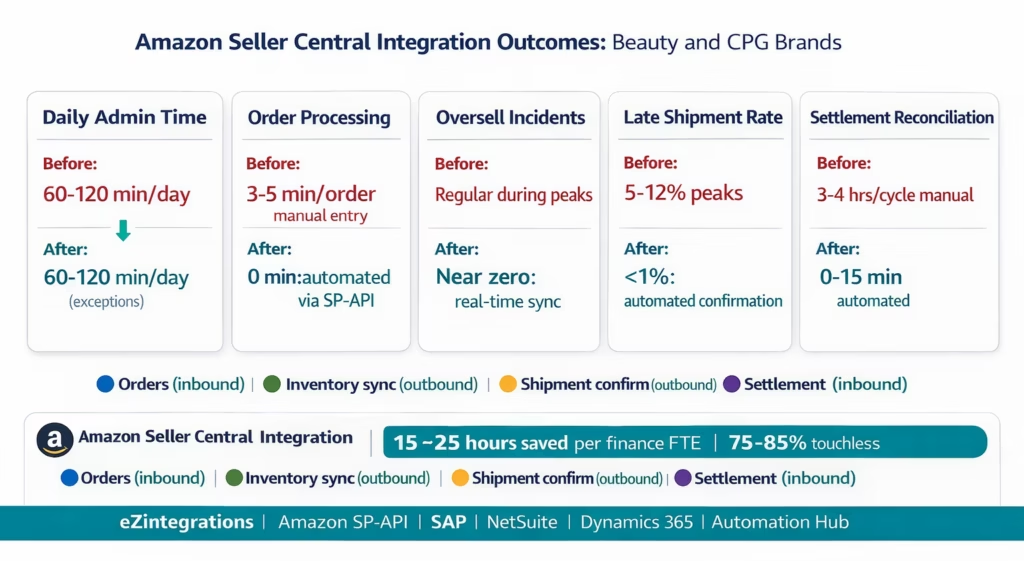
Order processing time: from 3-5 minutes of manual ERP entry per order to 0 minutes for 100% of Amazon orders. At 500 orders per month: 25-42 hours of operations team time recovered per month.
Oversell incidents: near zero with real-time inventory sync. For FBM brands, inventory updates to Amazon Seller Central within 5 minutes of any warehouse inventory change. For FBA brands, eZintegrations monitors FBA stock levels and generates replenishment alerts when stock falls below configurable thresholds.
Shipment confirmation speed: from same-day manual entry (risk of missing the confirmation window) to automated confirmation within minutes of the 3PL confirming shipment. Amazon’s late shipment rate target is under 4%. Manual Seller Central management typically results in 5-12% late shipment rates during volume peaks; automated confirmation typically achieves under 1%.
Returns processing: real-time via the Notifications API. When Amazon initiates a return, eZintegrations receives the notification, creates a return record in the ERP, and updates inventory (marking the returned unit as pending inspection until the brand’s team reviews it). Previously: returns discovered in the settlement report 14 days after the fact.
Settlement reconciliation: from 3-4 hours per 14-day cycle manual reconciliation to 0-15 minutes automated. The automated reconciliation creates the exact GL mapping that finance requires, reducing month-end close time for Amazon-related accounts.
Multi-marketplace scaling: adding a new Amazon marketplace (e.g., Amazon UK when expanding to Europe) requires configuring the European SP-API endpoint and the UK marketplace ID. The same integration workflows apply. No re-building the integration.
Beauty-specific outcome: brands that integrate Amazon Seller Central with their ERP report significantly faster new product launches: new ASINs created in the ERP product master are automatically pushed to Amazon as listings, pre-configured with pricing and inventory. Launch day no longer requires manual Seller Central entry.
How to Get Started
Step 1: Register Your Amazon SP-API Application
Go to the Amazon Seller Central Developer Console (sellercentral.amazon.com > Apps and Services > Develop Apps). Register as a developer and create a new SP-API application. Select the permission roles your integration needs: Order Management, Inventory, Reports, Notifications. Amazon reviews the application (typically 1-5 business days for standard seller applications). Once approved, you receive your Client ID and Client Secret. These are stored in the eZintegrations credential vault.
Step 2: Import the Amazon Seller Central Integration Template
Go to the Automation Hub and import the Amazon Seller Central ERP integration template for your ERP (NetSuite, SAP S/4HANA, Oracle Fusion Cloud, or Dynamics 365). The template includes the SP-API Orders API polling workflow, the Feeds API inventory sync workflow, the shipment confirmation workflow, the FBA Inventory API monitoring workflow, and the settlement report download and GL mapping workflow.
Step 3: Configure Credentials and SKU Mapping
Add your Amazon SP-API Client ID and Client Secret to the eZintegrations credential vault. Complete the OAuth 2.0 LWA authorisation flow: eZintegrations generates the authorisation URL, you open it in your Amazon Seller account, grant access, and the refresh token is stored automatically.
Export your product master from your ERP (item code, description, UPC/EAN). Export your Amazon ASIN/SKU list from Seller Central inventory. Create the SKU mapping CSV: internal item code → Amazon seller SKU. Import this into eZintegrations. Bundle rules: for any bundle ASINs on Amazon that map to multiple internal SKUs, add a bundle explode rule.
Step 4: Configure ERP Credentials and Test with Live Data
Add your ERP API credentials (NetSuite TBA or SuiteQL, SAP BTP Communication Arrangement, Oracle Azure AD OAuth 2.0, or Dynamics 365 Azure AD credentials). In the Dev environment, run the integration with your last 7 days of Amazon orders as test data. Verify that orders are created in your ERP correctly, SKU mapping is accurate, shipment confirmations reach Amazon, and the settlement report maps to the correct GL accounts. Adjust GL account mapping if needed.
Step 5: Set Polling Intervals and Go Live
Configure polling intervals: 5 minutes for standard operation, 2 minutes during major promotion events (configure this as a scheduled switch in eZintegrations). Enable the Notifications API subscription for real-time order and return events as a supplement to polling. Promote to production.
Total configuration time: 6-10 hours from template import to production go-live. SP-API registration and approval: 1-5 business days (concurrent with configuration).
FAQs
From Manual Seller Central to Integrated Operations
Your beauty or CPG brand’s Amazon channel is too important to manage manually at scale. The morning CSV export, the manual ERP entry, the spreadsheet reconciliation: these are not processes that scale to 500 orders per month, 47 ASINs, and Prime Day volume spikes.
The Selling Partner API gives you the technical foundation. eZintegrations gives you the no-code integration layer that connects SP-API to your ERP (NetSuite, SAP, Oracle, Dynamics 365) without custom development. Orders sync in under 5 minutes. Inventory updates push in real time. Shipment confirmations go to Amazon automatically. Settlements reconcile to your GL without manual work.
The Automation Hub has pre-built templates for Amazon Seller Central to NetSuite, SAP, Oracle, and Dynamics 365 integrations. Each template is pre-configured with the SP-API calls, ERP API connections, SKU mapping framework, and the four data flow workflows described in this guide.
Explore the Amazon Seller Central Integration Templates in the Automation Hub. Or book a free demo with your ERP details, Amazon marketplace regions, and current order volume. We will walk through the SKU mapping and SP-API configuration for your specific catalogue in the session.

