
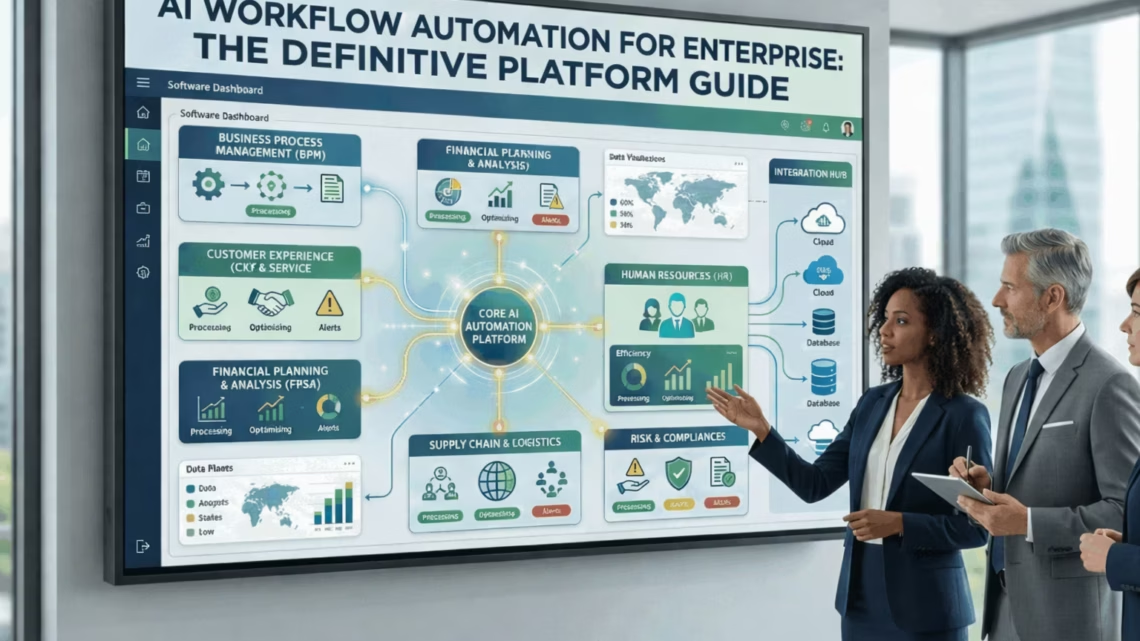
AI Workflow Automation for Enterprise: The Definitive Platform Guide
March 11, 2026AI workflow automation for enterprise uses artificial intelligence to build adaptive data pipelines that transform, route, and enrich data dynamically across business systems. Unlike static rule-based integrations, AI workflows self-correct when data formats change, convert unstructured data like emails and EDI files into structured formats, and replace batch jobs with real-time intelligent processing.
TL; DR
Static rule-based integrations break every time a data format changes. AI workflows adapt automatically, without human intervention. Batch pipelines create data lags that cost enterprises millions in delayed decisions. AI workflows replace them with real-time intelligent processing. eZintegrations AI Workflows include Document Intelligence: email-to-ERP automation, 2/3-way invoice matching, EDI conversion (EDIFACT to JSON, X12 to JSON), anomaly detection, and classification built in natively. Legacy platforms like MuleSoft and Oracle OIC treat AI as a bolt-on add-on. eZintegrations is AI-native from the ground up across all four platform pillars. The world’s largest FMCG company, a global Industrial Goods leader, and a recognized global Pharma company all run AI workflows on eZintegrations today.
What is AI Workflow Automation for Enterprise?
AI workflow automation for enterprise is the use of artificial intelligence to build data pipelines that adapt, transform, and route information dynamically across business systems, without requiring manual reconfiguration when inputs change.
Traditional enterprise integration connects System A to System B using fixed rules. If the data format from System A changes, the pipeline breaks. Someone on your IT team gets an alert, diagnoses the issue, rewrites the mapping logic, and deploys a fix. That cycle repeats every time a vendor updates their API, a supplier changes their EDI format, or a new data source gets added.
AI workflow automation eliminates that cycle. Instead of fixed rules, AI workflows use machine learning models to understand data semantics, infer mapping logic, and adapt to format changes automatically. According to Gartner, by 2026 over 65% of large enterprises will have deployed AI-augmented data integration tools to reduce manual pipeline maintenance.
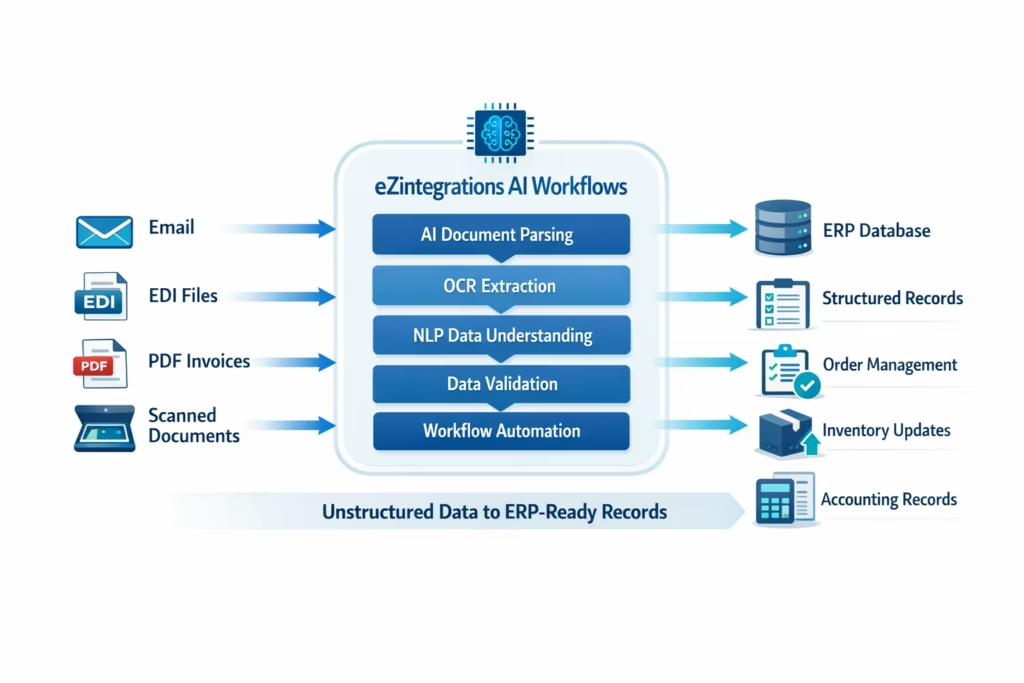
eZintegrations AI Workflows go further than data mapping. They include Document Intelligence capabilities that convert unstructured data like emails, PDFs, and EDI files into structured enterprise data automatically. That means your procurement team’s email becomes a purchase order in your ERP, and your supplier’s EDIFACT file becomes clean JSON, without a developer touching either.
Why Static Rule-Based Integrations Are Failing Enterprise Teams in 2026
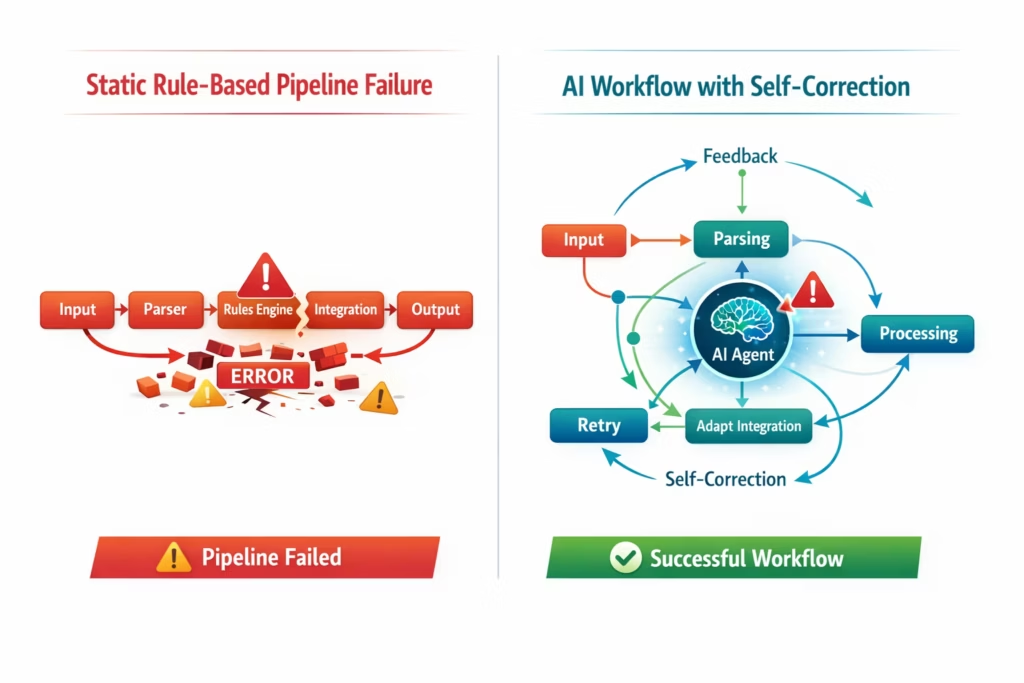
Static rule-based integrations fail at the worst possible moment: when your business is changing fastest, which is exactly when your data pipelines need to be most reliable.
Here’s what failure looks like in practice. Your ERP integration with a key supplier was built 18 months ago. The supplier updates their API. Your pipeline silently drops records for 48 hours before anyone notices. Your operations team discovers a $200,000 inventory discrepancy and spends three days tracing it back to a broken field mapping.
That scenario plays out thousands of times per week across enterprise IT teams. IDC research estimates that integration failures cost enterprises an average of $9.7 million annually in lost productivity and data quality remediation. The root cause in the majority of cases is the same: pipelines built on static rules that can’t adapt to change.
The second failure mode is batch processing. Most legacy enterprise integrations run on overnight schedules. Your warehouse system syncs with your ERP at 2am. Your financial reconciliation runs at midnight. Your CRM updates from your ERP once a day. By the time your teams make decisions, they’re working from data that’s 12 to 24 hours old.
AI workflow automation solves both problems simultaneously. Adaptive pipelines self-correct when formats change. Real-time processing replaces batch jobs. Your teams make decisions on current data, not yesterday’s snapshot.
How AI Workflow Automation Works: The Architecture Explained
An AI workflow automation platform works by replacing fixed transformation rules with AI models that understand data context, infer relationships between fields, and adapt pipeline logic dynamically as inputs change.
Here’s the architecture at a practical level. Your source systems send data to the AI workflow engine through standard connectors: REST APIs, GraphQL, WebSockets, Webhooks, or direct database connections. The AI layer analyzes incoming data, applies learned transformation logic, and routes enriched records to destination systems in real time.
The key difference from traditional iPaaS is what happens inside that AI layer. A traditional iPaaS maps Field A from source to Field B in destination, using a rule your developer wrote. An AI workflow platform learns the semantic relationship between fields, validates data against expected patterns, flags anomalies automatically, and applies the correct transformation even when the source format has changed.
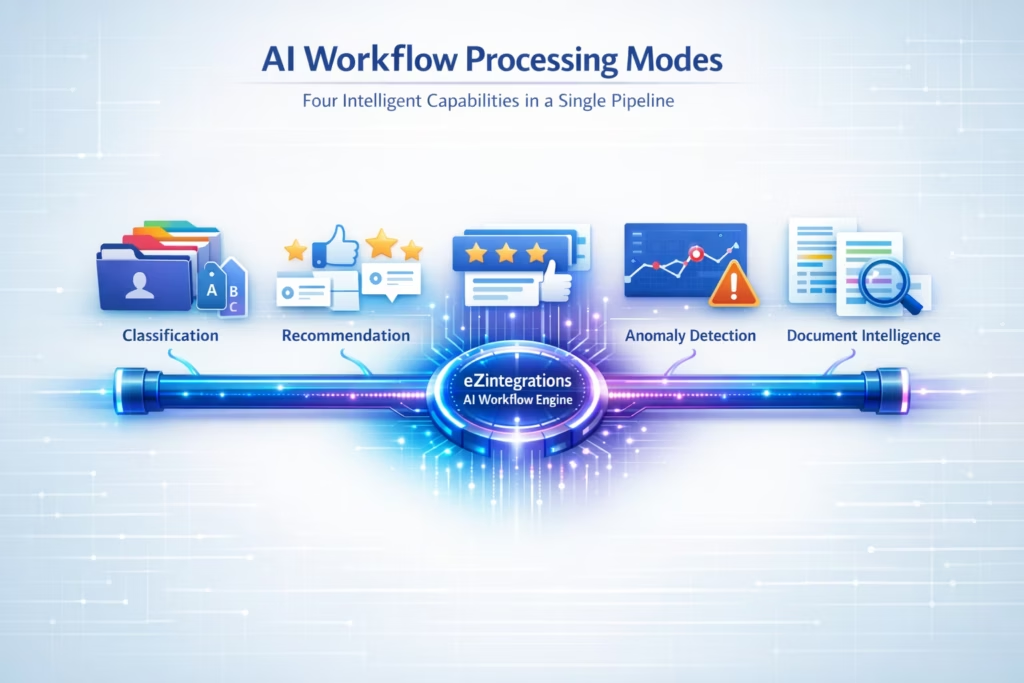
eZintegrations AI Workflows support four intelligent processing modes:
- Classification: Automatically categorize incoming data records by type, priority, or routing destination
- Recommendation: Suggest next actions based on data patterns, approval workflows, or business rules
- Anomaly Detection: Flag records that fall outside expected ranges before they corrupt downstream systems
- Document Intelligence: Extract structured data from unstructured inputs including emails, PDFs, and EDI files
All four modes run natively within the eZintegrations platform. They don’t require a separate AI tool, a data science team, or additional configuration. You build the workflow, and the AI capabilities are available as pipeline components.
Document Intelligence: The AI Workflow Capability Most Platforms Don’t Have
Document Intelligence is the ability to take unstructured enterprise data – emails, PDFs, EDI files, scanned invoices, and automatically convert it into clean, structured records that your ERP, WMS, or financial systems can process without human intervention.
This is the capability that separates genuinely AI-native platforms from platforms that bolt AI on as a feature. MuleSoft, Oracle OIC, and Boomi can move structured data between systems. None of them natively convert an email from a procurement manager into a purchase order in SAP, or automatically validate a supplier invoice against a three-way match without custom development.
eZintegrations AI Workflows handle every major Document Intelligence use case natively:
Email to ERP: Purchase Order Automation
Your procurement team receives hundreds of purchase order requests by email every week. Each email contains the same information your ERP needs: vendor, items, quantities, pricing, delivery terms. Without Document Intelligence, someone reads each email and manually enters that data into your ERP. With eZintegrations, the AI workflow reads the email, extracts the structured data, validates it against your vendor master and product catalog, and creates the purchase order automatically.
The accuracy rate for structured extraction from procurement emails on eZintegrations exceeds 95% for standard PO formats. Exceptions are flagged for human review. Your procurement team shifts from data entry to exception management.
2-Way and 3-Way Invoice Matching
Invoice matching is one of the most labor-intensive processes in enterprise finance. A 2-way match validates an invoice against a purchase order. A 3-way match adds the goods receipt confirmation. Both require pulling data from at least three systems, comparing line items, flagging discrepancies, and routing exceptions for approval.
eZintegrations AI Workflows automate the entire matching process. The AI extracts invoice data, retrieves the matching PO from your ERP, checks the goods receipt confirmation from your WMS, runs the comparison logic, and either auto-approves matched invoices or routes exceptions to the right approver. Finance teams using this workflow report processing times dropping from days to hours.
EDI Format Conversion: EDIFACT to JSON, X12 to JSON
EDI (Electronic Data Interchange) is the language of enterprise supply chains. Your suppliers send EDIFACT or X12 files. Your modern systems speak JSON or REST. Without automation, someone in your IT team writes and maintains custom EDI translation scripts for every trading partner.
eZintegrations AI Workflows convert EDI formats natively:
- EDIFACT to JSON: Converts UN/EDIFACT messages (ORDERS, INVOIC, DESADV) to clean JSON for modern API consumption
- X12 to JSON: Converts ANSI X12 transaction sets (850 Purchase Order, 810 Invoice, 856 Ship Notice) to JSON automatically
- Bidirectional conversion: Converts JSON responses back to EDI format for supplier acknowledgements
New trading partner onboarding that previously took 3 to 4 weeks of custom development now takes hours using eZintegrations EDI templates from the Automation Hub.
Anomaly Detection: Catch Data Problems Before They Reach Your ERP
Anomalous data is expensive. A duplicate invoice that gets approved costs your finance team hours to unwind. A shipment record with an incorrect quantity corrupts your inventory. An order with a pricing error triggers a downstream billing dispute.
eZintegrations AI Workflows run anomaly detection as a pipeline stage before data reaches your destination systems. Duplicate records, out-of-range values, format violations, and pattern deviations are flagged automatically. Clean records flow through. Exceptions route to the right team with full context attached.
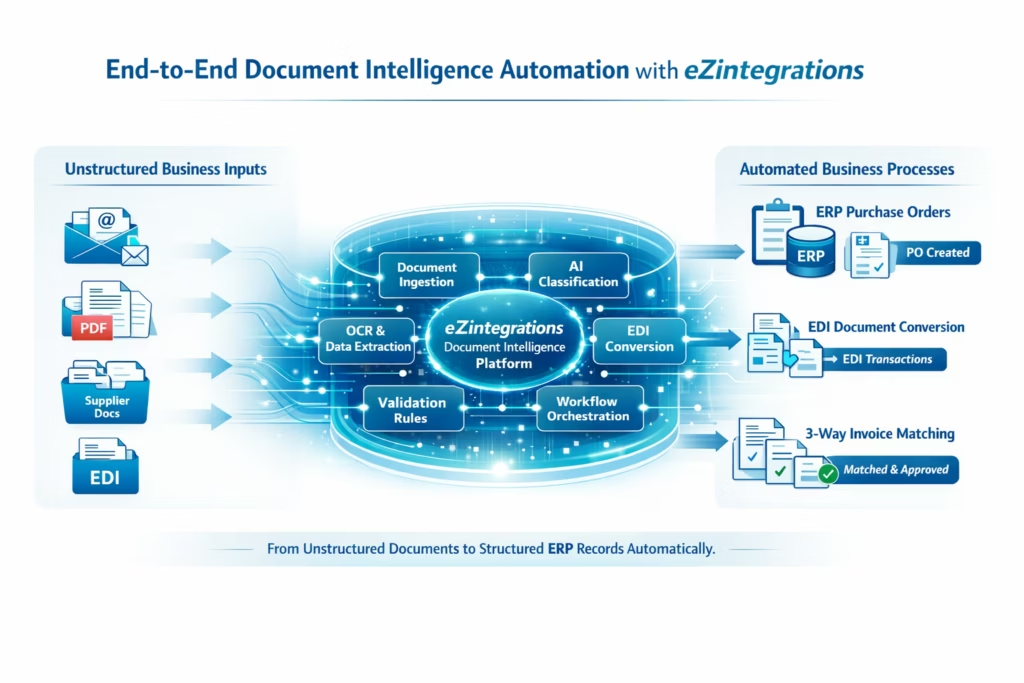
Ready to see Document Intelligence in action? Explore 1,000+ AI workflow templates including pre-built EDI conversion, invoice matching, and email-to-ERP workflows. Go live in hours.
AI Workflow Automation vs Traditional iPaaS: What’s the Real Difference?
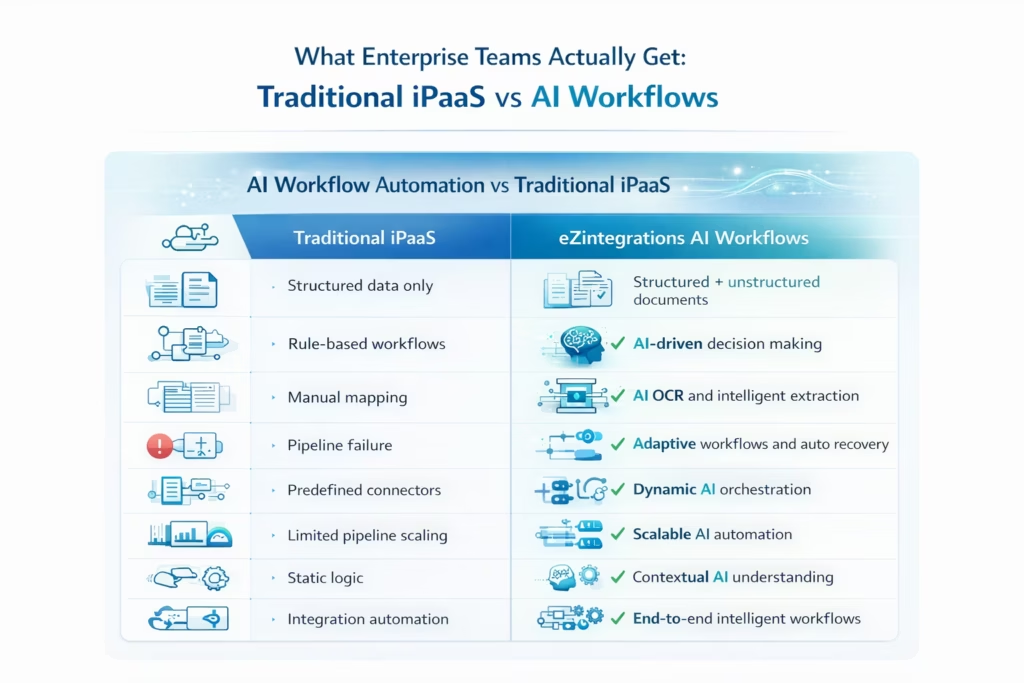
The difference between AI workflow automation and traditional iPaaS is not a feature upgrade. It’s a fundamental architectural shift in how pipelines handle uncertainty, change, and unstructured data.
Traditional iPaaS platforms were designed for a predictable world. System A always sends the same format. Business rules don’t change. Data is always structured. In that world, fixed mapping rules work fine.
Enterprise reality in 2026 is the opposite. Suppliers change their formats. SaaS vendors update their APIs without warning. Business rules evolve quarterly. And a significant portion of your enterprise data is unstructured: emails, PDFs, scanned documents, EDI files, and free-text fields that carry critical business information.
Here’s how the two approaches compare across the dimensions that matter most:
| Capability | Traditional iPaaS | eZintegrations AI Workflows |
|---|---|---|
| Data format changes | Pipeline breaks, manual fix required | AI adapts automatically |
| Unstructured data | Not supported natively | Document Intelligence built in |
| EDI conversion | Custom development required | Native EDIFACT and X12 to JSON |
| Invoice matching | Manual or custom-built | 2-way and 3-way matching native |
| Anomaly detection | Not available | Built-in pipeline stage |
| Real-time processing | Limited, often batch-based | Native real-time across all pipelines |
| AI capability | Bolt-on add-on or not available | Core architecture, four native modes |
| Maintenance | Your team owns it | Fully managed by Bizdata |
According to Forrester Research, enterprises that deploy AI-augmented integration platforms reduce integration maintenance costs by an average of 43% compared to traditional rule-based iPaaS deployments.
The platforms that bill themselves as “AI-powered”, MuleSoft Einstein, Oracle OIC AI features, Boomi Discover use AI primarily for pipeline monitoring and field mapping suggestions. They don’t natively handle unstructured data, run document classification, or execute 3-way invoice matching. Those capabilities require custom development on top of the base platform.
eZintegrations includes all of them natively, without additional modules, additional cost, or additional developers.
How eZintegrations AI Workflows Are Built Differently from Legacy Platforms
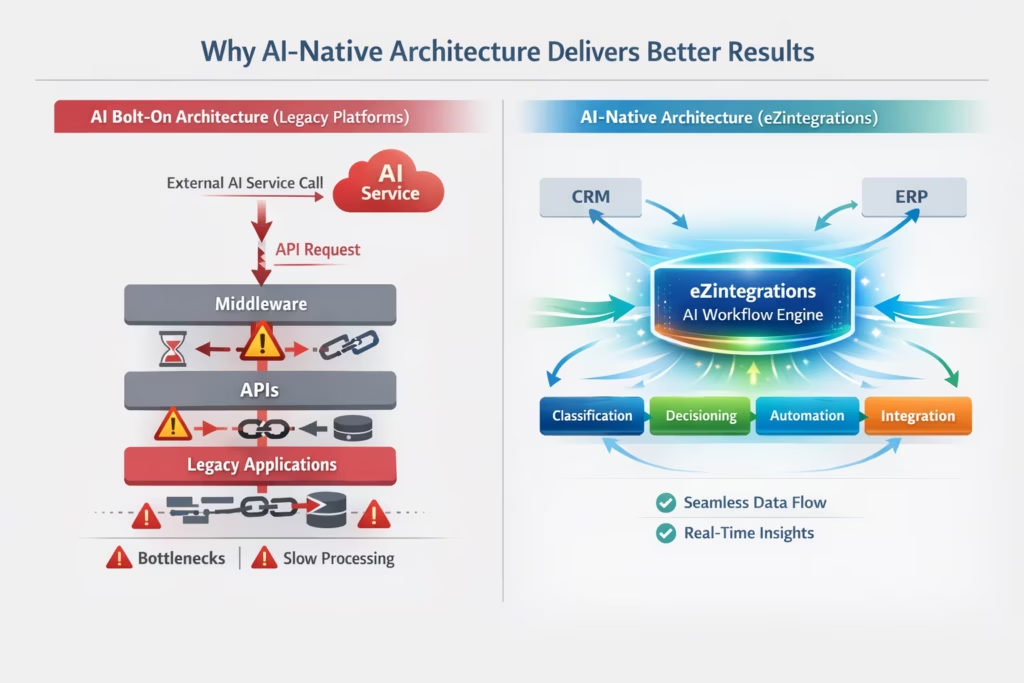
eZintegrations AI Workflows are different from legacy platform AI features in three specific ways: AI runs inside the pipeline rather than alongside it, AI capabilities ship as native components rather than paid modules, and the entire platform is fully managed so your team never touches infrastructure.
This distinction matters because it determines what your team can actually do without a specialist developer on standby.
AI Inside the Pipeline, Not Alongside It
On MuleSoft, if you want AI to do something to your data, you call an external AI service, handle the API response, map the output back to your pipeline fields, and manage error states yourself. The AI is outside the pipeline looking in.
On eZintegrations, AI is a pipeline stage. You drag a Classification component, an Anomaly Detection component, or a Document Intelligence component into your workflow canvas. It processes data inline as part of the execution flow. No external API calls. No custom mapping. No error handling to write.
Native Capabilities, Not Paid Add-Ons
MuleSoft charges separately for Einstein AI features. Oracle OIC AI capabilities require additional Oracle Cloud subscriptions. Boomi Discover is a separate licensed product.
eZintegrations includes AI Workflows, Document Intelligence, anomaly detection, classification, and recommendation as core platform capabilities. They’re available to every customer on every plan. You pay for the platform, not for the individual AI features on top of it.
Fully Managed by Bizdata: No Infrastructure for Your Team
Every AI model update, every platform upgrade, every performance optimization is handled by Bizdata. Your AI workflows don’t degrade as models improve because Bizdata applies updates without downtime. Your team never patches the AI layer, never manages model versions, and never experiences a maintenance window.
eZintegrations carries a 99.9% uptime SLA. Your AI workflows run reliably, automatically, without your IT team managing the infrastructure underneath them.
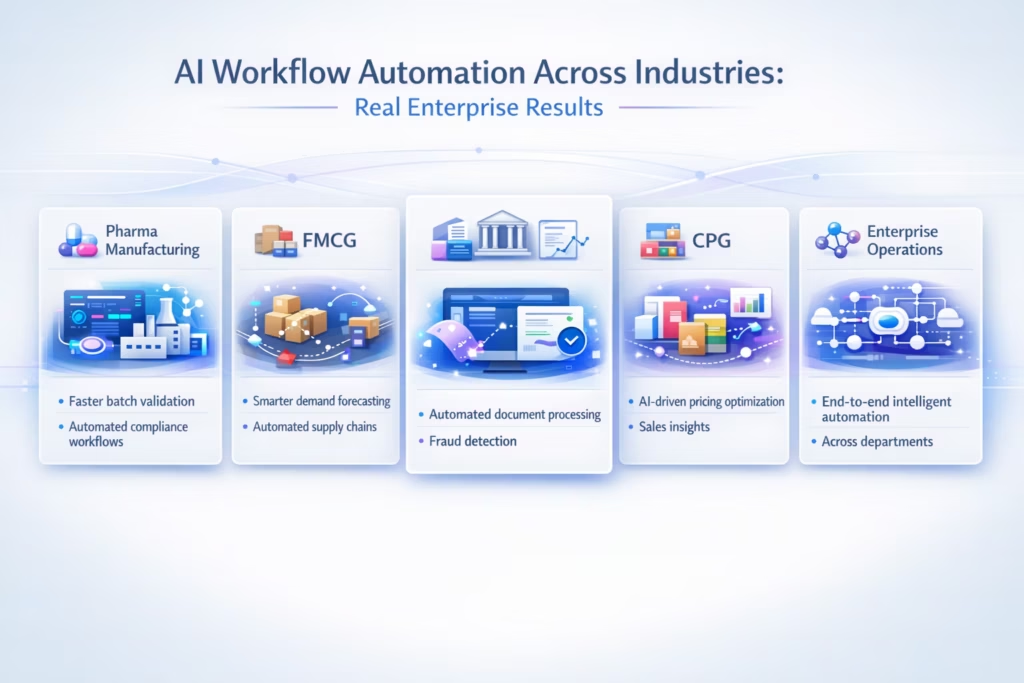
Real-World Use Cases: AI Workflow Automation Across Five Industries
The best way to understand AI workflow automation is to see what it actually eliminates for the teams running it. Here are five industry use cases from eZintegrations customers today.
Pharma and Life Sciences: Regulatory Document Processing
A globally recognized Pharma company processes thousands of regulatory documents, clinical data submissions, and supplier compliance certificates every month. Before AI workflow automation, a team of specialists manually classified each document, extracted key data fields, and entered records into their regulatory management system. The process took 3 to 5 days per submission batch.
eZintegrations Document Intelligence now classifies incoming documents automatically, extracts structured data from PDFs and emails, validates against regulatory schemas, and routes records to the correct system. Submission processing time dropped from days to hours. The specialist team shifted from data entry to compliance review.
Industrial Manufacturing: EDI Trading Partner Automation
A global Industrial Goods company manages hundreds of trading partners, each sending purchase orders and shipment notices in different EDI formats: EDIFACT, X12, and various proprietary variants. Custom EDI translation scripts required 3 to 4 weeks of developer time per new trading partner.
eZintegrations EDI conversion templates handle EDIFACT to JSON and X12 to JSON automatically. New trading partner onboarding now takes hours. The backlog of 40+ pending trading partner integrations was cleared in under two months.
Retail and FMCG: Real-Time Order to Fulfilment
The world’s largest FMCG company processes millions of orders across their retail and distribution network. Their previous batch pipeline ran overnight, creating 24-hour data lags between order receipt and fulfilment confirmation. Inventory discrepancies accumulated silently between batch runs.
eZintegrations AI Workflows replaced the batch pipeline with real-time processing. Orders flow from retail systems to the fulfilment WMS instantly. Anomaly detection flags discrepancies before they reach the ERP. Inventory accuracy improved significantly within the first 30 days of deployment.
Finance and Procurement: 3-Way Invoice Matching at Scale
A Hi-Tech enterprise processes 15,000 invoices per month across 200 vendors. Their AP team spent 60% of their time on manual matching, chasing approvals, and resolving discrepancies. Error rates on manual matching averaged 3%, creating downstream reconciliation work that consumed another 20% of team capacity.
eZintegrations 3-way invoice matching automation extracts invoice data, matches against POs and goods receipts automatically, and routes only genuine exceptions to human review. The AP team now handles 15,000 invoices with 80% less manual intervention. Error rates dropped below 0.5%.
CPG: Email-to-ERP Purchase Order Automation
A Consumer Packaged Goods company receives 500 to 800 purchase order requests by email weekly from retail partners who don’t use EDI. Their procurement team was manually re-keying PO data into SAP, a process that took 2 to 3 minutes per order and introduced frequent keying errors.
eZintegrations email-to-ERP AI workflow reads incoming procurement emails, extracts PO data fields, validates against vendor master and product catalog in SAP, and creates confirmed purchase orders automatically. Manual data entry for standard POs dropped to near zero.
How Fast Can You Deploy AI Workflows? Implementation Reality vs Vendor Claims
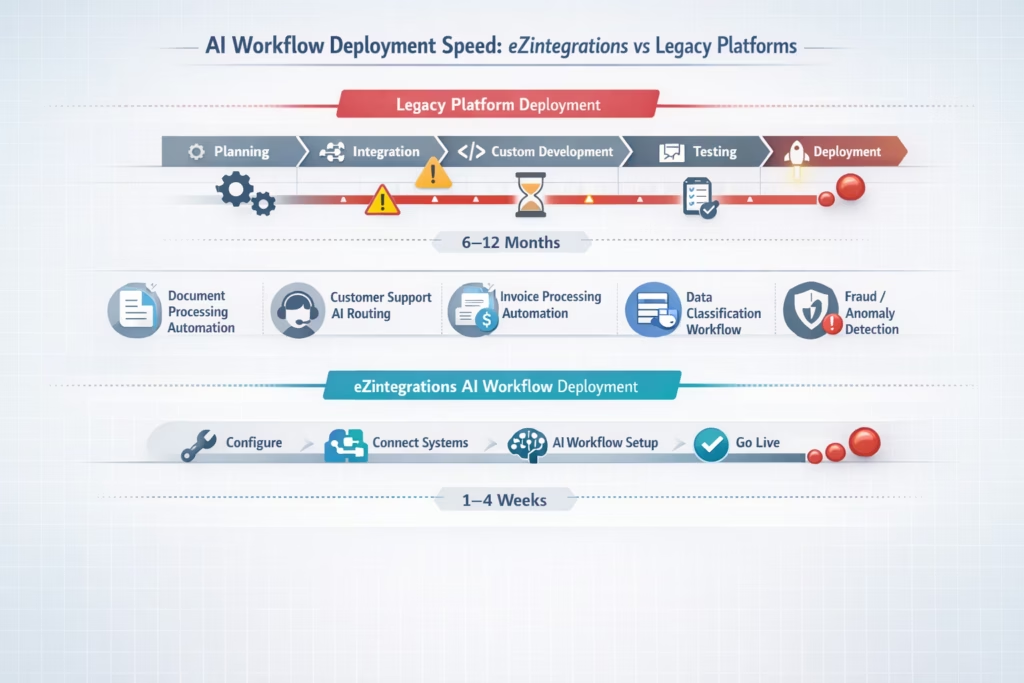
Implementation speed for AI workflow automation ranges from hours on eZintegrations to 6 to 12 months on legacy platforms, and the difference comes down to one thing: whether you start from production-ready templates or a blank canvas.
Most enterprise software vendors claim fast implementation in their sales materials. The reality depends entirely on how much pre-built infrastructure exists before your team starts configuring.
Here’s what deployment timelines actually look like across platforms:
| Use Case | MuleSoft / Oracle OIC | eZintegrations |
|---|---|---|
| Simple API-to-API AI workflow | 4 to 8 weeks | Hours to days |
| EDI to JSON conversion (single format) | 3 to 6 weeks | Hours using templates |
| Email-to-ERP PO automation | 6 to 12 weeks | Days |
| 3-way invoice matching | 8 to 16 weeks | Days to weeks |
| Full Document Intelligence pipeline | 4 to 6 months | Weeks |
The eZintegrations Automation Hub contains over 1,000 production-ready templates across all four pillars: Workflows, AI Workflows, AI Agents, and Agentic AI. Your team imports the template that matches your use case, configures it to your environment, and deploys. The majority of the build work is already done.
For the EDI conversion use cases specifically, eZintegrations ships pre-built EDIFACT-to-JSON and X12-to-JSON templates for the most common transaction sets: ORDERS/850, INVOIC/810, DESADV/856, and ORDRSP/855. Trading partner onboarding that previously required weeks of custom development now takes hours of template configuration.
What Does Enterprise AI Workflow Automation Actually Cost?
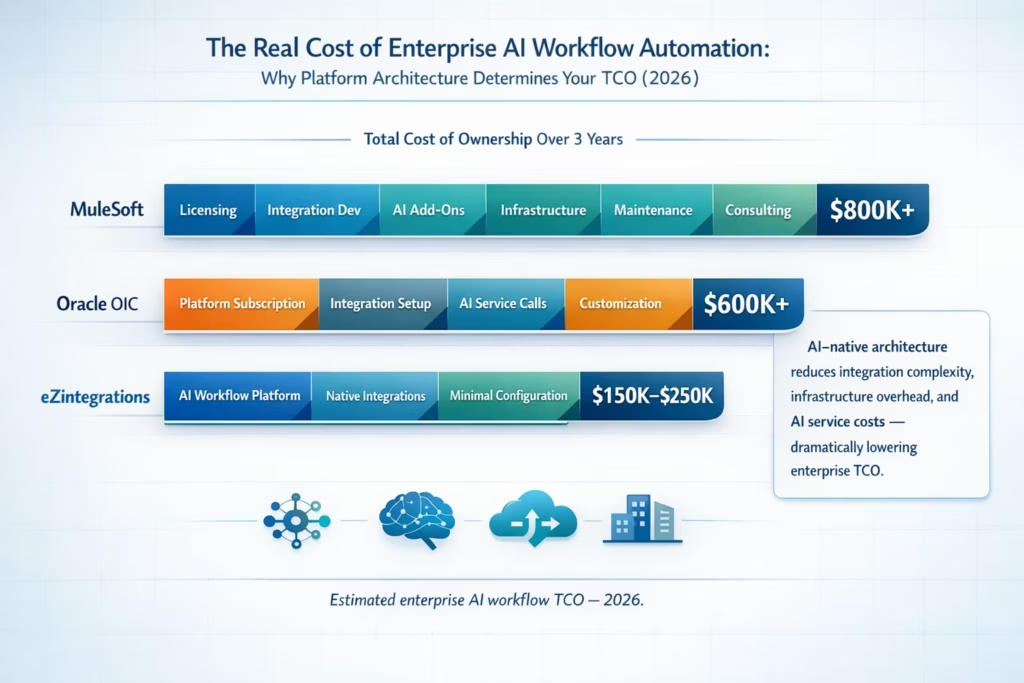
The total cost of AI workflow automation on legacy platforms is significantly higher than their licensing fees suggest, because AI capabilities are sold as separate modules on top of an already expensive base platform.
Here’s what the real cost picture looks like:
MuleSoft with Einstein AI features: – Base Anypoint Platform license: $100,000 to $300,000 per year . Einstein AI add-on: Additional licensing on top of base. Certified MuleSoft developer requirement: $150,000 to $300,000 per year – Custom development for Document Intelligence: $50,000 to $200,000 per project – Maintenance and upgrade overhead: 40% of integration team time. Realistic AI workflow TCO: $400,000 to $900,000 per year
Oracle OIC with AI Services: – OIC subscription plus Oracle AI Services subscription required separately. Certified Oracle developer requirement. Professional services for implementation. Similar TCO range to MuleSoft
eZintegrations: – All AI Workflow capabilities included in platform pricing. No separate AI module licensing. No certified developer required for standard workflows – 1,000+ pre-built templates eliminate custom development cost. Fully managed by Bizdata, zero maintenance overhead. Transparent pricing at ezintegrations.ai/pricing
According to G2 reviews of enterprise AI integration platforms, total cost of ownership is the top reason enterprises switch platforms within 24 months. The gap between licensed AI features and actually deployed AI capabilities is where most of that cost accumulates.
Want to see the real numbers for your team? View eZintegrations pricing and compare your current platform’s true total cost of ownership before your next renewal.
Frequently Asked Questions
1. What is AI workflow automation for enterprise?
AI workflow automation for enterprise uses artificial intelligence to build adaptive data pipelines that transform, route, and enrich data dynamically across business systems. Unlike static rule-based integrations, AI workflows self-correct when data formats change, handle unstructured data natively, and replace batch jobs with real-time intelligent processing without manual reconfiguration.
2. How is AI workflow automation different from traditional iPaaS?
Traditional iPaaS uses fixed mapping rules that break when source data formats change. AI workflow automation uses machine learning models to understand data semantics, adapt to format changes automatically, and process unstructured inputs like emails, PDFs, and EDI files. eZintegrations includes AI as a native pipeline component, not an external add-on.
3. Can AI workflow automation handle EDI files and legacy formats?
Yes. eZintegrations AI Workflows convert EDIFACT to JSON and X12 to JSON natively using pre-built templates. Common EDI transaction sets including ORDERS, INVOIC, DESADV, and their X12 equivalents (850, 810, 856) are supported out of the box. New trading partner onboarding takes hours instead of weeks.
4. What is Document Intelligence in enterprise AI workflows?
Document Intelligence is the capability to extract structured data from unstructured inputs automatically. eZintegrations supports email-to-ERP purchase order automation, 2-way and 3-way invoice matching, PDF data extraction, EDI format conversion, anomaly detection, and document classification natively within the AI workflow pipeline.
5. Do we need AI specialists or data scientists to deploy AI workflows on eZintegrations?
No. eZintegrations AI Workflows are designed for IT generalists and business users. AI capabilities like classification, anomaly detection, and Document Intelligence are available as drag-and-drop pipeline components. No model training, no data science expertise, and no custom development is required for standard enterprise use cases.
6. How does eZintegrations handle AI model updates and maintenance?
Bizdata manages all AI model updates, platform upgrades, and performance optimizations on your behalf. Your AI workflows don't require retraining or reconfiguration when models improve. Updates are deployed without downtime. Your team never touches the AI infrastructure underneath the workflows.
7. Is eZintegrations AI Workflows different from MuleSoft Einstein or Oracle OIC AI features?
Yes, in three important ways. First, eZintegrations runs AI inside the pipeline as a native component. MuleSoft and Oracle OIC call external AI services that your team manages separately. Second, eZintegrations includes all AI capabilities in the base platform. MuleSoft and Oracle OIC charge additional licensing for AI features. Third, eZintegrations is fully managed. You own the maintenance on MuleSoft and Oracle OIC.
Conclusion: Your Integration Stack Either Adapts or It Breaks
Static pipelines made sense when your technology stack was predictable. When your ERP, your suppliers, and your SaaS vendors all changed formats once every few years, fixed rules were manageable.
That world is gone. Your suppliers update their EDI schemas quarterly. Your SaaS vendors push API changes without warning. Your business adds new data sources every month. And your finance, procurement, and operations teams are still waiting on overnight batch jobs to make decisions.
AI workflow automation is not a future capability. It’s the baseline for enterprise integration that works reliably at scale in 2026.
eZintegrations gives your team everything needed to get there: AI-native pipelines that adapt when formats change, Document Intelligence that converts emails and EDI files into clean ERP records automatically, 2-way and 3-way invoice matching that your finance team deploys in days, and EDI conversion templates that onboard a new trading partner in hours, not weeks.
All of it fully managed by Bizdata. All of it built on a 99.9% uptime SLA. All of it available in 1,000+ production-ready templates your team deploys today.
The world’s largest FMCG company chose it. A global Industrial Goods leader chose it. A recognized global Pharma company chose it. They chose it because AI workflow automation that actually works at enterprise scale looks very different from AI features bolted onto a legacy platform.
If your team is still firefighting broken pipelines or waiting on overnight batch jobs, the most valuable hour you can spend is seeing eZintegrations AI Workflows in action.
Book a Free Demo at ezintegrations.ai/book-a-demo
Or start by exploring 1,000+ production-ready AI workflow templates and see how fast your first intelligent pipeline can go live.

