
Agentic AI for Enterprise Integration: How Autonomous Systems Replace Manual Workflows
March 17, 2026Agentic AI for enterprise integration replaces manual workflows by deploying autonomous agents that read from source systems, validate data, make routing decisions, write to target systems, and handle exceptions, all without human touchpoints at each step. Companies report average ROI of 171% and up to 70% cost reduction on automated workflows, with first ROI appearing within 6 to 12 months.
TL;DR
Manual integration workflows, where a human acts as the bridge between two or more enterprise systems, are the primary source of processing delays, data errors, and hidden operational cost in enterprise operations in 2026. Agentic AI replaces the human bridge: autonomous agents perceive system events, validate data, make decisions within configured parameters, write to target systems, and route exceptions to human reviewers with context pre-filled. Companies deploying agentic AI on integration workflows report average ROI of 171%, with 62% exceeding 100% ROI. Finance and procurement workflows show up to 70% cost reduction. HR onboarding cycle times drop by up to 80%. The integration layer, not the AI model, determines deployment success. 80% of enterprise AI implementation effort is data engineering and system connectivity, per MIT Sloan’s 2025 research. – eZintegrations Goldfinch AI is a cloud-native agentic integration platform with 9 native tools, 5,000+ API endpoint coverage, and 1,000+ Automation Hub templates. It provides all three architecture layers: agents, orchestration, and enterprise integration.
Introduction
There is a specific person in almost every enterprise operations team whose job, in whole or in part, is to copy data from one system and paste it into another. Maybe they download a report from the ERP and manually upload the filtered rows to the analytics dashboard. Maybe they check incoming invoices against the PO system, approve the matches, and enter the approved records into the payment queue. Maybe they move a sales opportunity from “qualified” to “proposal sent” in the CRM after the AE confirms the deck went out.
This person is not a bottleneck because they’re slow. They’re a bottleneck because the systems they work with were never connected. They are human middleware. And in 2026, human middleware is both the most expensive and the most replaceable integration architecture in enterprise operations.
Agentic AI replaces it. Not by building another brittle point-to-point integration that breaks when a field changes. By deploying autonomous agents that perceive system events, reason about the right action, execute across multiple systems, and escalate only the genuine exceptions that require human judgment.
This guide covers the mechanics, the ROI evidence, the workflow categories where agentic AI delivers the fastest payback, and the platform requirements that determine whether a deployment makes production or stalls in pilot.
What Is the Hidden Cost of Manual Integration Workflows?
Manual integration workflows cost far more than the visible labour hours on the timesheet. For every dollar of direct labour cost spent on manual document processing and data transfer, enterprises incur an additional $2.30 to $4.70 in hidden costs, according to 2026 research on enterprise document processing economics.
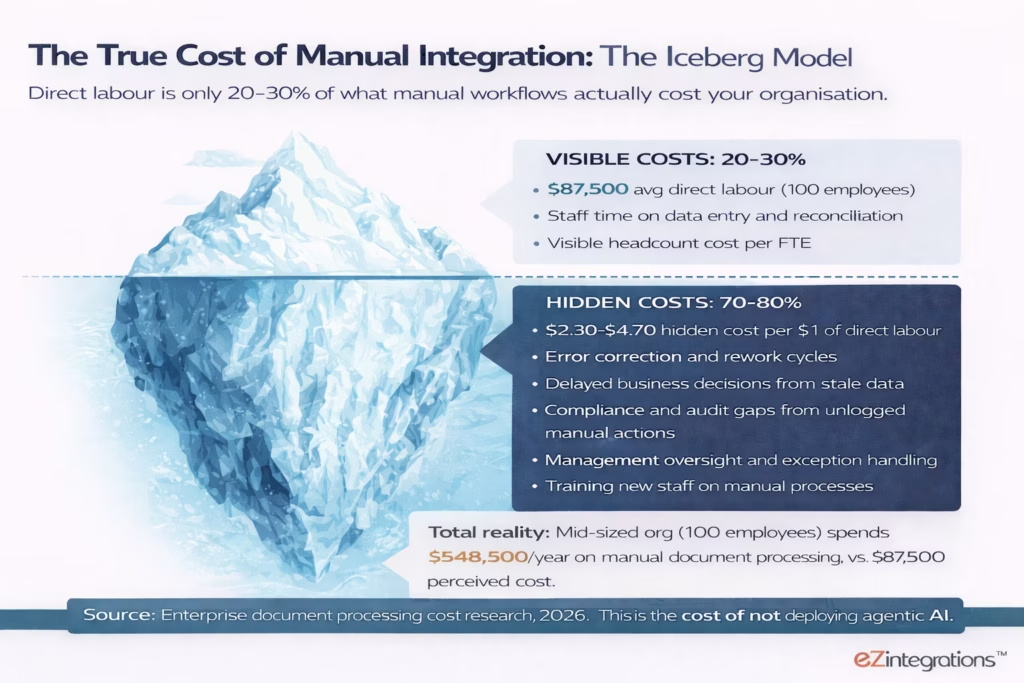
The five specific cost categories that accumulate below the visible line:
Error correction and rework. Manual data entry has a human error rate that creates downstream reconciliation work. Each error typically costs 10 to 30 minutes of correction time. At 500 manual transactions per month, even a 2% error rate means 10 rework cycles per month, each requiring investigation, correction, and re-submission.
Delayed business decisions. When data sync between systems is manual and batched, decisions are made on stale data. An AP team running weekly batch reconciliations is approving or rejecting invoices on last week’s PO data. A sales team that manually updates pipeline data on Fridays is making quota calls on five-day-old CRM records.
Audit and compliance gaps. Manual actions leave incomplete audit trails. Who approved this invoice? When was this record updated? What data was used to make this routing decision? These questions surface in audits and become expensive to answer retroactively.
Opportunity cost. Business leaders who could be spending their time on analysis, strategy, or customer work are spending it on data entry and reconciliation. A 2025 survey found 70% of business owners spend 45 minutes to 3 hours per day on repetitive tasks. At 250 working days per year, that is 112 to 750 hours per leader per year spent on work that agentic AI can handle autonomously.
Scaling ceiling. Manual processes don’t scale with transaction volume. When invoice volume doubles, the AP team headcount must grow proportionally, unless the process is automated. Agentic AI scales with transaction volume at near-zero marginal cost per additional transaction.
The total operational cost of maintaining human middleware in enterprise integration is, in almost every documented case, higher than the cost of deploying agentic AI to replace it. The question is not whether the ROI calculation is positive. It is which workflows to automate first.
What Does “Agentic AI for Enterprise Integration” Actually Mean?
Agentic AI for enterprise integration means deploying autonomous agent systems that replace the human coordination layer between enterprise software systems. These systems perceive events in source systems, reason about the correct action, execute writes to target systems, and handle exceptions, without a human touching each step.
This is a more precise definition than “automation.” Traditional automation follows a fixed script. It executes the same steps in the same order with the same logic every time. When an input deviates from the expected format, traditional automation fails. Agentic AI reasons about the deviation and adapts.
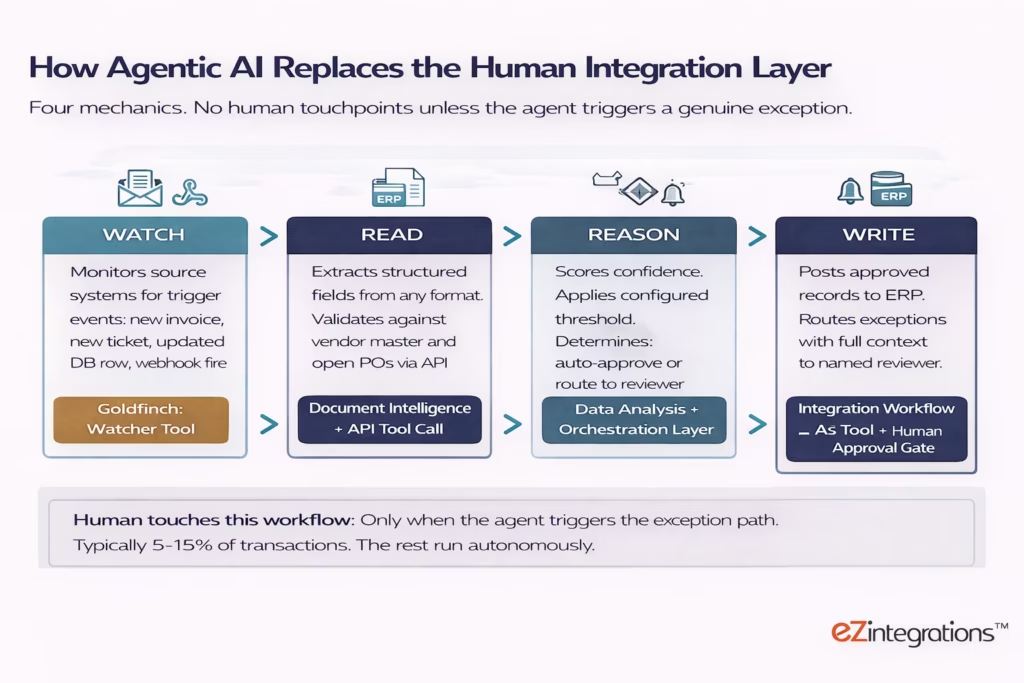
The four mechanics of agentic integration:
Event perception (watching). The agent monitors a source system for a defined trigger condition: a new invoice arrives in an email inbox, a support ticket is created in ServiceNow, a new row is committed to a database table, a webhook fires from a payment gateway. The Watcher Tool in eZintegrations Goldfinch AI provides this monitoring layer for any API endpoint or database source, operating on a configurable schedule or near-real-time event basis.
Data extraction and validation (reading). The agent reads the triggered data, extracts structured fields, and validates them against reference data. For an invoice, this means the Document Intelligence tool reads any invoice format (PDF, image, scanned document) and returns structured field data: vendor, invoice number, amount, line items, due date. The API Tool Call then validates the vendor against the vendor master and matches the invoice to an open PO in the ERP.
Decision and routing (reasoning). The agent scores the confidence of the match, applies the configured decision logic, and determines the outcome: auto-approve and post, or route to the human reviewer. The Data Analysis tool handles the scoring. The orchestration layer applies the configured threshold (for example: auto-approve if confidence is above 88% and the PO match is exact; route if confidence is below 88% or the PO match is partial).
Action and escalation (writing). For auto-approved cases, the Integration Workflow as Tool posts the approved record to the ERP automatically. For exception cases, the agent routes to the designated human reviewer with all the extracted data, the validation results, and the specific reason for the exception, pre-filled. The reviewer makes one decision. The agent executes the outcome.
How Does Agentic Integration Differ from Traditional iPaaS and RPA?
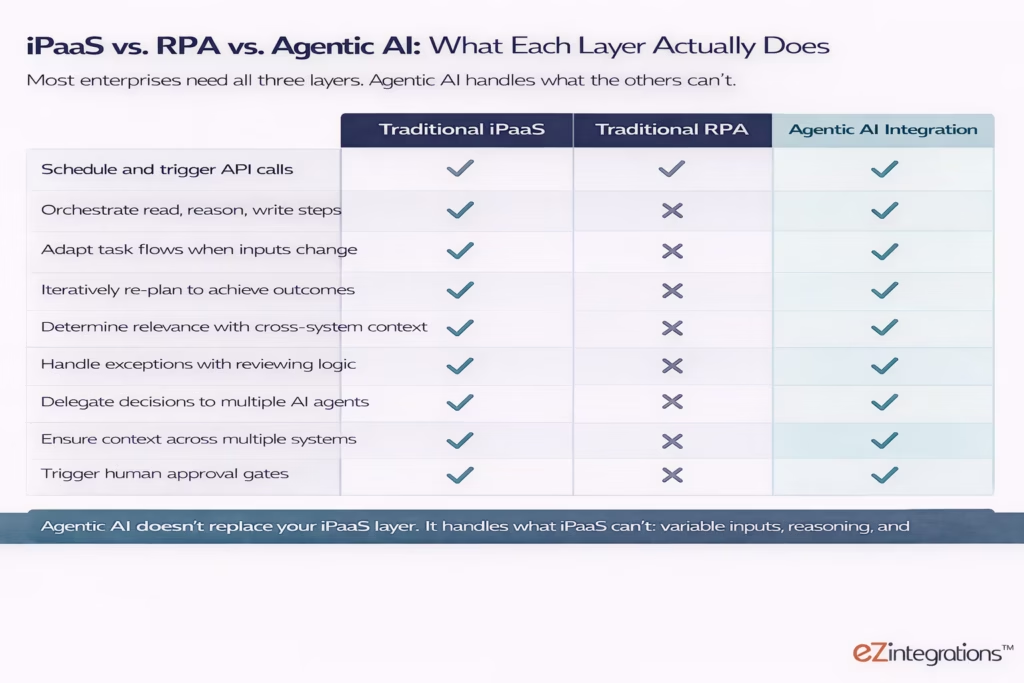
Agentic integration is not an upgrade to traditional iPaaS or RPA. It is a different architecture that handles the work that traditional automation was never designed to handle.
Traditional iPaaS (integration platform as a service) connects systems and moves data between them on a schedule or trigger. It handles structured, predictable data flows reliably: sync the new customer records from Salesforce to NetSuite every hour, or post a notification to Slack when a new support ticket is created in Zendesk. It does not reason about the data. It does not adapt when the data is unexpected. It does not make decisions.
Traditional RPA (robotic process automation) records a set of screen interactions and replays them: click this button, copy this field, paste it there, submit. It works when the screen layout and the input format are identical every time. It breaks when they change. It has no reasoning capability. It cannot handle a PDF invoice in a format it has never seen before.
| Capability | Traditional iPaaS | Traditional RPA | Agentic AI Integration |
|---|---|---|---|
| Handles structured, predictable data flows | Yes | Yes | Yes |
| Handles variable or unstructured inputs (e.g. any invoice format) | No | No | Yes |
| Makes decisions within a workflow (confidence scoring, routing) | No | No | Yes |
| Adapts when inputs deviate from expected pattern | No | No | Yes |
| Coordinates multiple tools in a single goal-directed run | Limited | No | Yes |
| Maintains context across multi-step runs | No | No | Yes |
| Human Approval Gate with pre-filled context on exceptions | No | No | Yes |
| Learns from document patterns without format-specific templates | No | No | Yes |
The 2025-2026 migration pattern in enterprise automation is consistent: organisations move from iPaaS for structured flows, to agentic AI for processes that involve variable inputs, multiple decision points, or cross-system coordination. They don’t replace the iPaaS layer. They add the agentic layer above it.
This is exactly what eZintegrations AI Workflows and Goldfinch AI represent: the iPaaS layer for structured flows, and the agentic orchestration layer for complex, reasoning-required processes, on one cloud-native platform.
What Are the Five Enterprise Integration Workflows That Agentic AI Replaces Today?
The five highest-ROI enterprise integration workflows for agentic AI deployment in 2026 share three characteristics: high transaction volume, cross-system execution, and variable inputs that traditional automation cannot handle reliably.
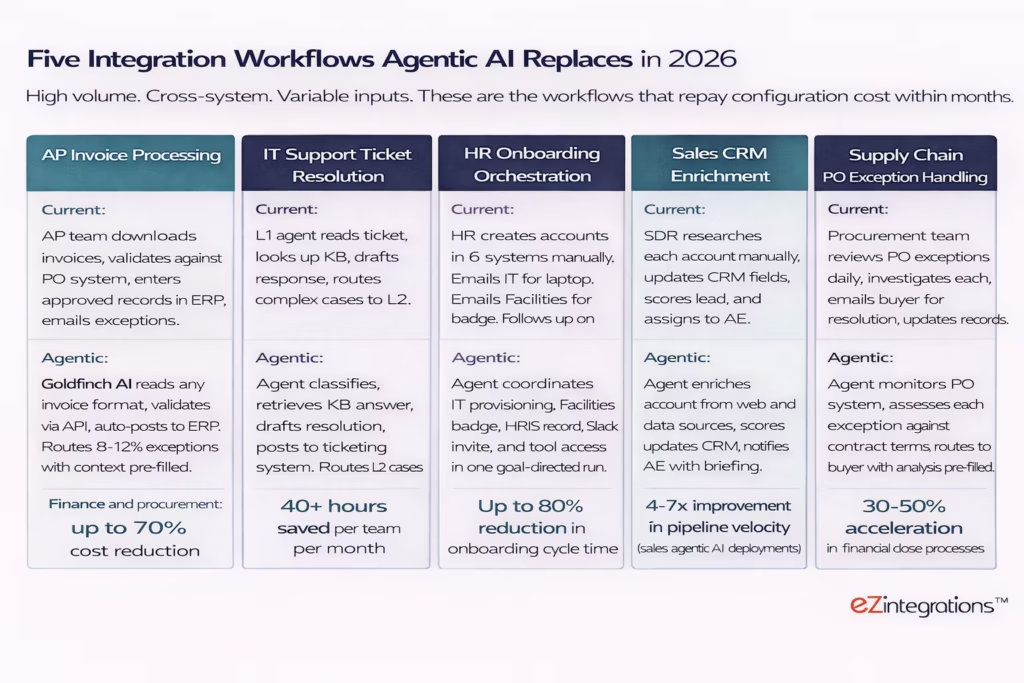
Workflow 1: AP Invoice Processing. This is the most deployment-ready workflow in enterprise operations. Every component is well-defined: invoice arrives (trigger), fields are extracted (Document Intelligence), validated against PO (API Tool Call to ERP), scored for confidence (Data Analysis), auto-posted or routed (Integration Workflow as Tool or Human Approval Gate). Finance and procurement workflows report up to 70% cost reduction on agentic AI deployment. A mid-sized AP team processing 300 invoices per month can automate 85 to 92% of them, with the remaining 8 to 15% handled by reviewers who spend an average of 30 seconds per exception, because the context is pre-filled.
Workflow 2: IT Support Ticket Resolution. High volume, structured input format (ticket JSON), clear routing logic, well-documented KB. IT support is the lowest-configuration-effort agentic integration use case. Enterprises report saving 40+ hours per team per month on ticket triage alone. The agent classifies the ticket, retrieves the relevant KB answer, drafts the first response, posts back to the ticketing system, and flags L2 cases with the diagnostic context already assembled.
Workflow 3: HR Onboarding Orchestration. The most cross-system integration use case of the five. A new hire triggers actions across IT (laptop provisioning, account creation), Facilities (badge access), HRIS (employee record creation), and SaaS tools (Slack, email, project management). Each of those systems has an API. The Goldfinch AI orchestration layer coordinates the sequence, tracks completion status, and notifies the HR business partner when each step is done or when a step has failed. HR onboarding cycle time reductions of up to 80% are reported for full agentic orchestration deployments.
Workflow 4: Sales CRM Enrichment. SDR and BDR teams spend a disproportionate share of their working hours researching accounts and updating CRM fields. An agentic AI agent using the Web Crawling tool and API Tool Call to data enrichment sources can research each account, score it against ICP criteria, update the CRM record, and post a structured briefing to the assigned AE, all without human involvement. Sales agentic AI deployments report 4 to 7 times improvement in pipeline velocity.
Workflow 5: Supply Chain PO Exception Handling. Procurement teams review PO exceptions as a core daily activity, investigating each exception, determining the resolution path, and routing to buyers for approval. An agentic agent monitors the PO system, assesses each exception against contract terms using the Knowledge Base Vector Search tool, and routes to the relevant buyer with the analysis pre-filled. The buyer approves or adjusts in one click. Automated invoicing and exception handling accelerates financial close processes by 30 to 50%.
What Does the ROI Evidence Actually Show?
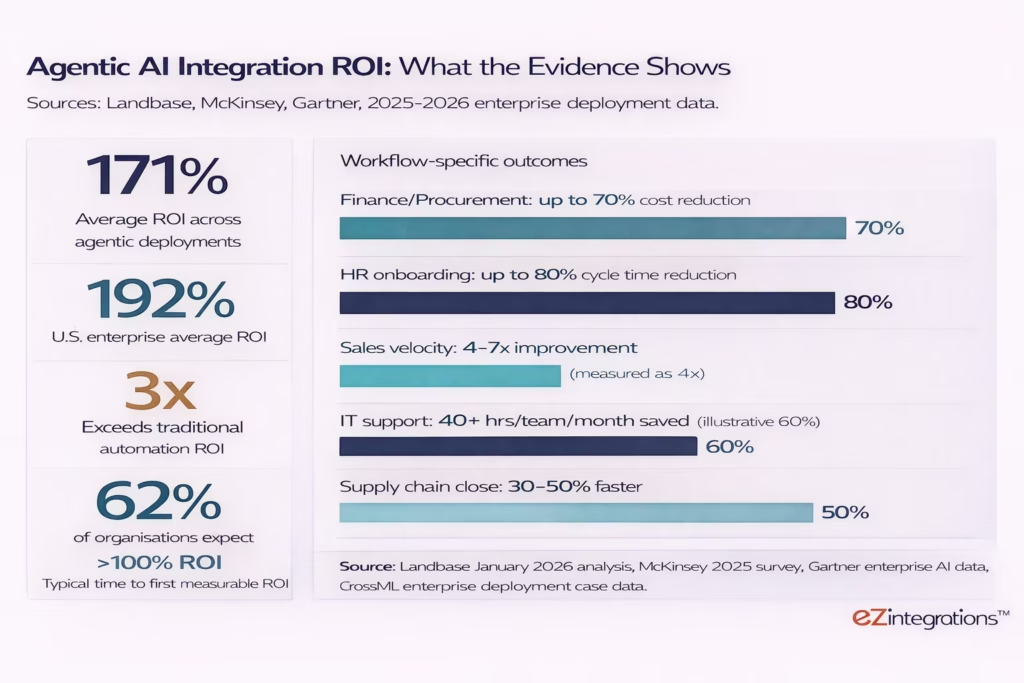
The ROI evidence from agentic AI on enterprise integration workflows is consistent and significant. Companies deploying agentic AI report average returns of 171%, with 62% of organisations exceeding 100% ROI. U.S. enterprises report an average of 192% ROI, which exceeds traditional automation ROI by 3 times.
The time-to-ROI profile is important for budget planning. Enterprises report a consistent three-phase return:
Months 0 to 6: Quick efficiency gains. Faster processing, fewer errors, reduced manual labour hours. These are visible within the first billing cycle of production deployment.
Months 6 to 12: Noticeable cost reductions, better decision accuracy, and enhanced workflow visibility. The financial case becomes auditable and defensible to the CFO.
Month 12+: Predictive improvements, compounding optimisation as agents process more data, and fully autonomous operations across interconnected workflows.
The 34% of projects that reach full production consistently achieve these outcomes. The 40%+ that fail, per Gartner’s projection, do so before reaching production, typically because of infrastructure readiness gaps rather than AI capability limitations.
Deloitte’s agentic AI strategy research notes that leading organisations treat agentic AI like any other production system: with finance partner sign-off on ROI, material risk assessment, and clear governance before deployment. Those organisations see results. Those treating it as an experimentation project do not.
What Are the Three Infrastructure Requirements That Determine Success?
Three infrastructure requirements separate the 34% of agentic integration deployments that reach full production from the 40%+ that are cancelled. None of them involve AI model quality. All of them involve enterprise integration readiness.
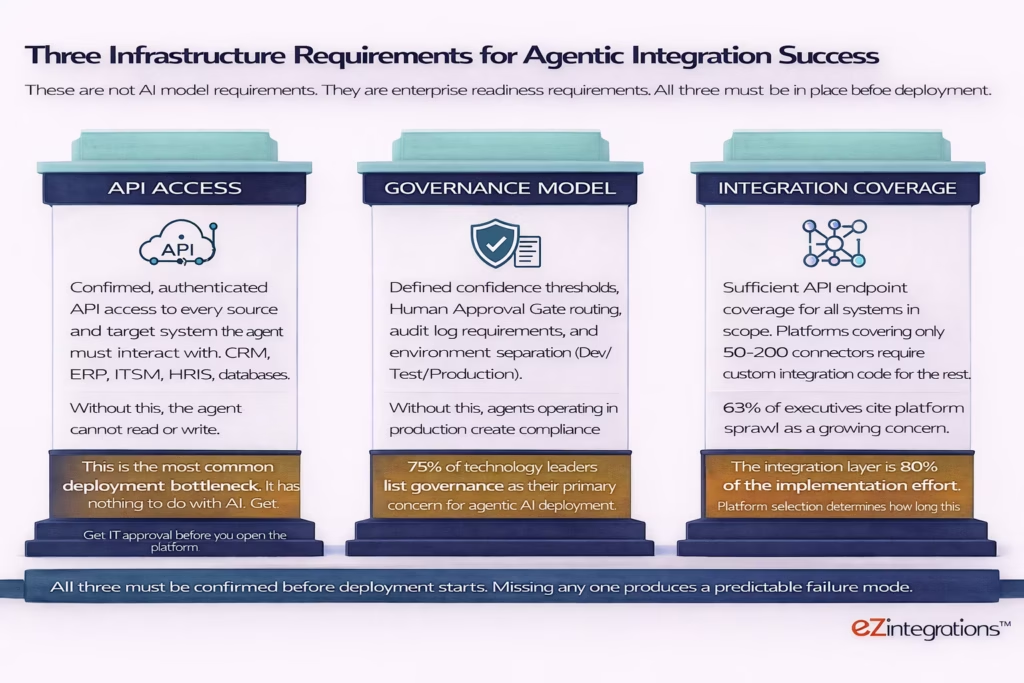
Requirement 1: API Access. Every agent in a Goldfinch AI workflow that reads from or writes to an enterprise system requires confirmed, authenticated API access to that system. This means IT security approval for API credentials, scoped permissions, and firewall rules where necessary. This is the most common deployment bottleneck and the one most frequently underestimated in project planning. Budget for 1 to 5 business days for IT approval per system. Confirm API access for all systems in scope before starting configuration.
Requirement 2: Governance Model. Before deploying agents to production, define the confidence threshold for each workflow (what percentage triggers auto-execution versus human review), the Human Approval Gate routing (which team or individual receives exception notifications, via which channel), the audit log requirements (what level of action logging satisfies compliance, security, and finance audit needs), and environment isolation (Dev/Test/Production separation for all agent configurations). A deployment without a governance model is an unmanaged autonomous process, not a production system. 75% of technology leaders cite governance as their primary agentic AI concern.
Requirement 3: Integration Coverage. The platform you deploy on must have sufficient pre-built API coverage for all systems in your initial scope, without requiring custom integration code for each connection. Platforms covering 50 to 200 pre-built connectors require development work for every enterprise system not on the list. eZintegrations connects via an API catalog of 5,000+ endpoints, with self-service onboarding for any API or database not already in the catalog, so your team configures business logic rather than writing integration code. Integration platform selection determines whether the 80% of effort that MIT Sloan identifies as data engineering and system connectivity takes weeks or quarters.
How Should You Sequence Your First Agentic Integration Deployment?
Start with the workflow that has the highest transaction volume, the clearest decision logic, and confirmed API access to all systems in scope. That combination produces the fastest time to measurable ROI and the clearest evidence base for expanding to the next workflow.
The five-step deployment sequence that produces consistent production results:
Step 1: Select by process characteristics, not by ambition. The right starting workflow is not the most impressive. It’s the most deployment-ready. Choose a process with structured or semi-structured inputs (digital documents, API payloads, form submissions), clear decision logic you can document in plain language, a measurable baseline (current processing time, error rate, staff hours), and API access already confirmed or confirmable within 5 business days. AP invoice processing, IT ticket triage, and expense audit consistently meet all four criteria.
Step 2: Document the decision logic before opening the platform. Write the agent’s decision logic in plain language before you configure anything: “If confidence score is above 88% and PO match is exact, post to ERP. If confidence is below 88% or PO match is partial, route to AP reviewer with all extracted fields and the specific exception reason.” This documentation becomes your Goldfinch AI Knowledge Base content and your confidence threshold configuration.
Step 3: Confirm API access for all source and target systems. This step should be completed before Step 1 is finalised. Raise the IT API access request for each system in scope at the same time you document the decision logic. The approval window and the logic documentation happen in parallel, not in sequence.
Step 4: Build in Dev, test with 20 to 30 representative cases. Import the relevant template from the Automation Hub, configure your API connections, set your initial confidence threshold, and run 20 to 30 test cases that represent the range of inputs you expect in production. Include edge cases: a partially matching PO, an invoice with missing fields, a vendor name that differs slightly from the master record. Observe where the agent routes correctly versus incorrectly. Calibrate the threshold and refine the Knowledge Base content. Repeat until results are consistent.
Step 5: Promote to Production and monitor the first 30 days closely. Once Dev results are consistent across 20+ test cases with no unexpected failures, promote to Production. Monitor the exception rate (what percentage of transactions trigger the human review path), the processing time per transaction, and the error rate in auto-approved outputs. After 30 days, you have a production data set. Use it to adjust the threshold if needed, and to build the ROI case for the next workflow.
How Does eZintegrations Goldfinch AI Deliver Agentic Integration?
eZintegrations Goldfinch AI is a cloud-native agentic integration platform that provides all three infrastructure layers required for production deployment: 9 native agent tools for task execution, multi-agent orchestration with shared context and Human Approval Gates, and 5,000+ API endpoint coverage for enterprise system connectivity.
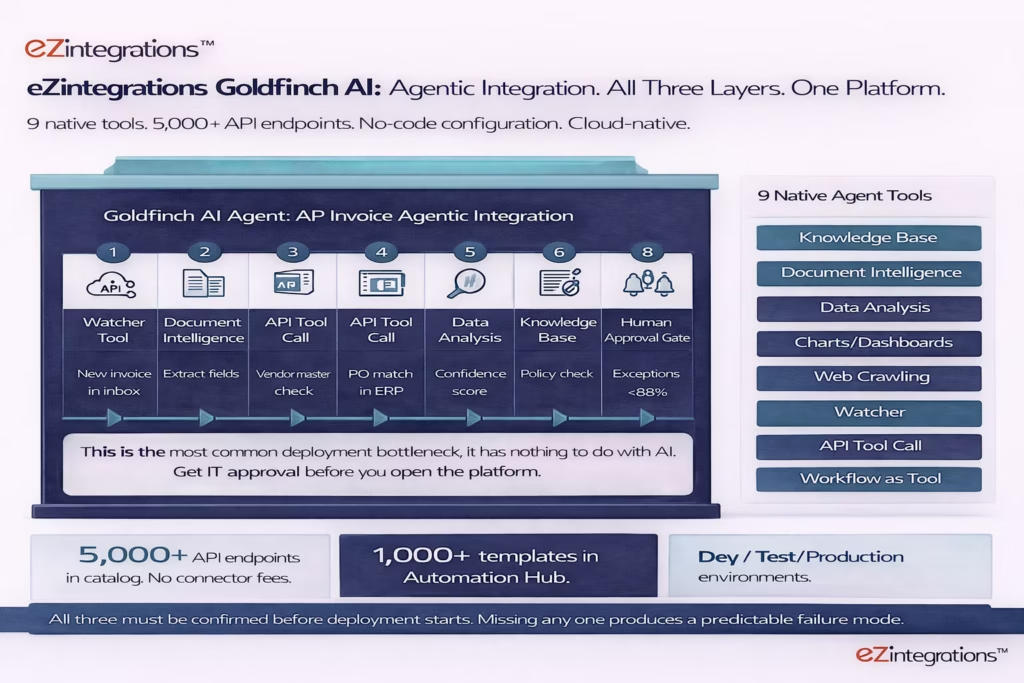
The nine native tools ship with every Goldfinch AI deployment:
- Knowledge Base Vector Search: retrieves relevant policy, contract terms, and playbook content to inform agent decisions.
- Document Intelligence: reads any document format (PDF, scanned image, any invoice layout) and returns structured field data without a format-specific template.
- Data Analysis: performs calculations, confidence scoring, and variance analysis on structured data.
- Data Analytics with Charts, Graphs, and Dashboards: generates visual reporting from agent-processed data.
- Web Crawling: researches external sources and returns structured results for account research, supplier verification, and competitive intelligence.
- Watcher Tools: monitors APIs, databases, and event sources to trigger workflows on defined conditions.
- API Tool Call: reads from and writes to any endpoint in the 5,000+ endpoint catalog, or any self-service onboarded API.
- Integration Workflow as Tool: exposes any existing eZintegrations automation as an agent tool, making every prior workflow immediately available to Goldfinch AI agents without rebuilding it.
- Integration Flow as MCP: converts any workflow into a Model Context Protocol endpoint, allowing external AI agents (Claude, ChatGPT) to invoke your enterprise workflows as tools.
Your team can add further tools as self-service without vendor involvement.
The eZintegrations pricing page shows all plan tiers. LLM/AI automations start at $120/month (plus AI credits), with a $150/month tier, on annual billing. No platform fee. No connector fees. Dev and Test environments at approximately one-third of production cost each. The 1,000+ templates in the Automation Hub mean your team starts from a working configuration, not a blank canvas.
Frequently Asked Questions
1. What is agentic AI for enterprise integration
Agentic AI for enterprise integration replaces the human coordination layer between enterprise software systems. Autonomous agents monitor source systems for trigger events extract and validate data make routing decisions within configured parameters write to target systems and route exceptions to human reviewers with context pre filled. This replaces manual data transfer and validation tasks that previously required human middleware between systems.
2. How long does it take to see ROI from agentic integration
Most enterprises report measurable ROI within 6 to 12 months of production deployment. The first 0 to 6 months produce efficiency gains such as faster processing and fewer errors. Months 6 to 12 produce measurable cost reductions. Beyond 12 months organizations often see compounding improvements as agents process larger volumes of data. The most important factor is reaching production because the 34 percent of deployments that reach full production consistently achieve the reported 171 percent average ROI.
3. What is the difference between agentic AI integration and traditional iPaaS
Traditional iPaaS moves structured predictable data between systems on a schedule or trigger but does not reason about data or make decisions. Agentic AI integration handles variable document formats multi step decision logic and cross system coordination within a single goal directed workflow. It can also adapt routing when inputs deviate from expected patterns. Most enterprises combine both approaches using iPaaS for structured flows and agentic AI for processes that require reasoning.
4. Why do 40 percent of agentic AI integration projects fail
Industry analysis predicts more than 40 percent of agentic AI projects may be cancelled due to unclear business value inadequate governance controls and integration gaps. The most common infrastructure issues are delayed API access to source and target systems lack of governance controls such as confidence thresholds audit logs and approval gates and insufficient integration coverage requiring custom code. These failures are typically caused by integration architecture rather than AI model capability.
5. How many systems does agentic integration typically span
High ROI enterprise agentic workflows typically span three to six systems in a single run. For example an accounts payable invoice workflow may involve the email inbox for document retrieval the vendor master for validation the ERP purchase order system for matching the ERP accounts payable module for posting a notification system for exception handling and an audit log for compliance tracking. Traditional iPaaS flows usually connect two systems while agentic AI coordinates multiple systems to complete a business outcome.
6. What is the minimum viable configuration time for a Goldfinch AI agentic integration
For simple workflows such as IT ticket triage or expense auditing configuration can take two to four hours from template import to a successful development test run assuming API access is confirmed. Mid complexity workflows such as accounts payable invoice processing or CRM enrichment typically require four to six hours. Complex multi system workflows such as HR onboarding orchestration or supply chain purchase order exception handling can take six to eight hours. The critical path is usually API access approval from IT which often takes one to five business days and should be initiated before configuration begins.
Conclusion
The human middleware in enterprise integration is not a resource allocation problem. It is an architecture problem. The systems were never connected, so someone got hired to bridge them. Agentic AI is the architecture that replaces the bridge.
The ROI evidence is consistent and credible: 171% average return across agentic deployments, 192% for U.S. enterprises, 3 times higher than traditional automation. Finance and procurement workflows reach up to 70% cost reduction. HR onboarding drops by up to 80% in cycle time. These are not pilot metrics. They are production outcomes from the 34% of deployments that are built on governed, integration-complete platforms.
The organisations that fail are those that deploy on platforms without sufficient API coverage, without governance controls, or without confirmed API access to the systems the agents need to reach. Fixing those infrastructure gaps is the entire difference between a successful deployment and a Gartner failure statistic.
eZintegrations Goldfinch AI is built for the organisations that are ready to deploy, not just experiment. 9 native tools. 5,000+ API endpoints. 1,000+ Automation Hub templates. Full governance. Cloud-native. Transparent pricing starting at $120/month per agentic automation.
Book a free demo to see a live Goldfinch AI agentic integration build on your specific use case and enterprise system stack. Bring your workflow. We’ll build it in the session.

