
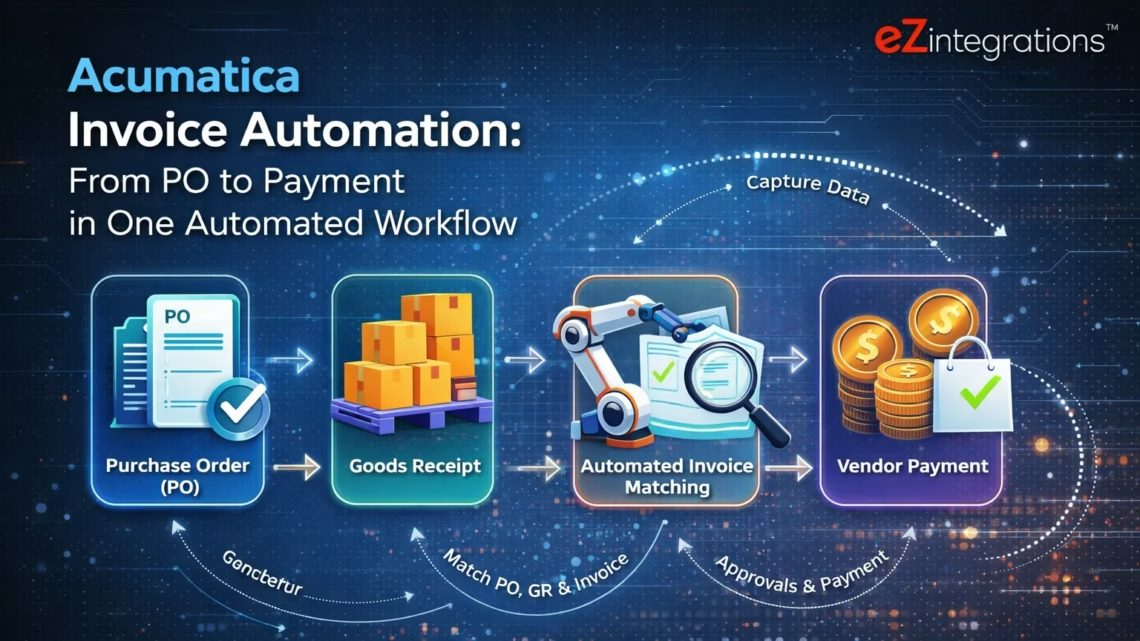
Acumatica Invoice Automation From PO to Payment in One Automated Workflow
April 7, 2026Acumatica invoice automation connects supplier invoice PDFs (extracted by Goldfinch AI Document Intelligence) to Acumatica’s REST API: GET /PurchaseOrder and GET /PurchaseReceipt for 3-way match data, PUT /Bill to create the matched AP bill linked to the purchase receipt, and POST /Bill/{id}/Release to release the bill for payment, completing the full PO-to-payment cycle without manual AP entry. The Acumatica REST API is the cleanest API in the mid-market ERP space: every entity uses the same {"value": ...} field structure, OAuth 2.0 authentication, and the same entity/Default/{version}/ base path, making the integration faster to configure than SAP, Oracle, or Infor equivalents.
TL;DR
Acumatica’s REST API is the most developer-friendly ERP API in the mid-market. Every entity uses {"value": ...} field wrapping, a consistent entity/Default/{version}/ base path, and standard OAuth 2.0. This makes Acumatica the easiest mid-market ERP to automate AP for. The full PO-to-payment cycle in Acumatica uses four endpoints: GET /PurchaseOrder (PO and line data), GET /PurchaseReceipt (goods receipt quantities), PUT /Bill (create AP bill linked to receipt lines), and POST /Bill/{id}/Release (release for payment). eZintegrations adds Goldfinch AI Document Intelligence above the Acumatica REST API to extract invoice data from any supplier PDF format, runs a configurable 3-way matching engine, and creates the Acumatica Bill automatically. Automation Hub template for Acumatica. 5-7 hours to production. The “No custom development” positioning: Acumatica already has a published REST API. No custom endpoints, no third-party middleware, no Acumatica consulting engagement required for the AP automation layer.
The Acumatica AP Gap That Still Exists
Your Acumatica environment is modern. It is cloud-native. It has a REST API that any developer can call with a standard HTTP client. The invoice matching logic is built in: link a Bill to a Purchase Receipt and Acumatica checks the quantities automatically.
And yet your AP team still enters every supplier invoice by hand.
They receive the PDF by email. They open Acumatica’s Bills and Adjustments screen. They type in the vendor name, the invoice number, the invoice date, the line items, the quantities, the unit costs. They navigate to the purchase order to confirm the PO number. They link the bill to the receipt. They release the bill. At 10-15 minutes per invoice, for 250 invoices a month, that is 42-63 hours of your AP team’s time. Every month.
The Acumatica REST API can do all of that programmatically. What it cannot do: read a supplier PDF. That is the gap. Goldfinch AI fills it.

Why Acumatica Is the Best ERP API to Automate Against
Before covering the workflow, it is worth explaining why Acumatica AP automation is faster to build and maintain than equivalent SAP, Oracle, or Infor integrations.
Consistent field structure. Every Acumatica REST API response wraps field values in {"value": ...} objects. Whether you are reading a purchase order, creating a bill, or checking a vendor, the field access pattern is identical:
{
  "VendorID": { "value": "HARTLAND" },
  "OrderNbr": { "value": "PO-2026-1142" },
  "OrderQty": { "value": 100.0 }
}
No product-specific 4-character field codes (SAP M3), no OData V4 entity navigation properties (SAP S/4HANA), no BOD noun wrappers (Infor LN). One pattern. Every entity.
Single versioned base path. All Acumatica entities live under https://{instance}.acumatica.com/entity/Default/{version}/. The latest version as of 2026 is 24.200.001. No program-per-function calls (Infor M3 PPS100MI/APS100MI), no separate API namespaces per module. One base path.
Native OData filtering. Acumatica supports $filter, $expand, $select, and $top on all entity GET calls. Filtering purchase orders by order number: GET /PurchaseOrder?$filter=OrderNbr eq 'PO-2026-1142'. Expanding nested detail lines: &$expand=Details. No separate API call for child records if you expand in the initial GET.
Actions via REST. Acumatica business actions (Release a Bill, Approve a PO) are exposed as POST endpoints. Releasing a bill: POST /Bill/{id}/Release. These are long-running operations: Acumatica returns HTTP 202 with a status URL, and the caller polls until completion. eZintegrations handles this polling automatically.
OAuth 2.0 and a clean discovery endpoint. Acumatica’s OAuth discovery endpoint is at https://{instance}.acumatica.com/identity/. All token parameters (authorization URL, token URL, scopes) are discoverable from this endpoint without reading configuration documentation.
This combination (consistent field structure, single base path, OData filtering, action exposure via REST, clean OAuth) makes Acumatica the fastest mid-market ERP to connect to and the easiest to maintain across version upgrades.
Authentication: Acumatica OAuth 2.0
For server-to-server AP automation (no user present at processing time), use the Resource Owner Password Credentials flow.
Step 1: Register a Connected App in Acumatica. In Acumatica: System > Connected Applications > Add. Select “Resource Owner Password Credentials” as the OAuth flow. Note the generated Client ID and Client Secret.
Step 2: Request an access token.
POST https://{instance}.acumatica.com/identity/connect/token
Content-Type: application/x-www-form-urlencoded

grant_type=password
&client_id={CLIENT_ID}
&client_secret={CLIENT_SECRET}
&username={ACUMATICA_USER}
&password={ACUMATICA_PASSWORD}
&scope=api offline_access
Response:
{
  "access_token": "eyJhbGciOiJSUzI1...",
  "token_type": "Bearer",
  "expires_in": 3600,
  "refresh_token": "CfDJ8N..."
}
Step 3: All subsequent API calls use Bearer authentication.
Authorization: Bearer {access_token}
eZintegrations stores the Client ID, Client Secret, username, and password in the credential vault and handles token refresh automatically before expiry.
The Acumatica PO-to-Payment Cycle: Four API Calls
The complete Acumatica AP matching workflow requires four REST API calls, plus one duplicate-check query before bill creation.
Call 1: Retrieve Purchase Order
GET https://{instance}.acumatica.com/entity/Default/24.200.001/PurchaseOrder
  ?$filter=OrderNbr eq 'PO-2026-1142'
  &$expand=Details

Authorization: Bearer {access_token}
Key response fields:
{
  "OrderNbr": { "value": "PO-2026-1142" },
  "VendorID": { "value": "HARTLAND" },
  "VendorRef": { "value": "HART-Q1-2026" },
  "Status": { "value": "Open" },
  "Details": [
    {
      "LineNbr": { "value": 1 },
      "InventoryID": { "value": "FASTENER-G5" },
      "OrderQty": { "value": 500.0 },
      "UnitCost": { "value": 4.25 },
      "ExtendedCost": { "value": 2125.00 },
      "WarehouseID": { "value": "MAIN" }
    }
  ]
}
Status: "Open" confirms the PO is approved. UnitCost and ExtendedCost are the matching baselines for price tolerance.
Call 2: Retrieve Purchase Receipt
GET https://{instance}.acumatica.com/entity/Default/24.200.001/PurchaseReceipt
  ?$filter=OrderNbr eq 'PR001447'
  &$expand=Details
Or query by PO number:
GET /PurchaseReceipt
  ?$filter=Details/any(d: d/POOrderNbr/value eq 'PO-2026-1142')
  &$expand=Details
Key response fields:
{
  "ReceiptNbr": { "value": "PR001447" },
  "VendorID": { "value": "HARTLAND" },
  "Details": [
    {
      "LineNbr": { "value": 1 },
      "POOrderNbr": { "value": "PO-2026-1142" },
      "POOrderLineNbr": { "value": 1 },
      "ReceiptQty": { "value": 500.0 },
      "UnitCost": { "value": 4.25 }
    }
  ]
}
ReceiptQty is the quantity received per line: this is the goods-receipt-quantity that the invoice must match.
Call 3: Duplicate Invoice Check
Before creating the Bill, the agent checks whether a Bill already exists for the supplier’s invoice number:
GET /Bill
  ?$filter=VendorRef eq 'INV-2026-04721'
           and Vendor eq 'HARTLAND'
If results are returned: duplicate detected. Route to AP supervisor without creating a new Bill.
Call 4: Create the AP Bill (linked to Purchase Receipt)
PUT https://{instance}.acumatica.com/entity/Default/24.200.001/Bill
Authorization: Bearer {access_token}
Content-Type: application/json

{
  "Type": { "value": "Bill" },
  "Vendor": { "value": "HARTLAND" },
  "VendorRef": { "value": "INV-2026-04721" },
  "Date": { "value": "2026-03-18" },
  "DueDate": { "value": "2026-04-17" },
  "Terms": { "value": "NET30" },
  "Hold": { "value": false },
  "Details": [
    {
      "POReceiptNbr": { "value": "PR001447" },
      "POReceiptLine": { "value": 1 },
      "Qty": { "value": 500.0 },
      "UnitCost": { "value": 4.25 }
    }
  ]
}
Note: Hold: {value: false} is critical. When Hold is true, the Bill is saved in on-hold status and will not be released. Setting it to false at creation means the Bill is immediately available for release. The POReceiptNbr + POReceiptLine linkage is what ties the Bill to the purchase receipt in Acumatica’s matching logic.
Call 5: Release the Bill for Payment
After Bill creation, the ID of the created Bill is returned in the PUT response. Release the Bill:
POST https://{instance}.acumatica.com/entity/Default/24.200.001/Bill/{bill_id}/Release
Authorization: Bearer {access_token}
This is a long-running operation. Acumatica returns HTTP 202 with a status URL:
Location: /entity/Default/24.200.001/Bill/{bill_id}/Release
  ?jobId={jobId}
eZintegrations polls the status URL at 2-3 second intervals until the operation completes. On completion, the Bill status in Acumatica moves from “Balanced” to “Open” (released, available for payment run).
Before vs After: Manual Acumatica AP vs Automated
| Process Step | Manual Acumatica AP | Automated with eZintegrations |
|---|---|---|
| Invoice capture | AP clerk monitors shared email inbox | Level 1 email connector routes PDF attachments automatically |
| Invoice data entry | AP clerk opens Bills and Adjustments and keys all fields | Level 2 Goldfinch AI extracts all fields in 8 to 12 seconds |
| PO lookup | AP clerk navigates to purchase order screen | GET /PurchaseOrder?$filter=OrderNbr eq ‘PO-2026-1142’&$expand=Details |
| Receipt check | AP clerk navigates to purchase receipt screen | GET /PurchaseReceipt?$filter=…&$expand=Details |
| Quantity and price match | AP clerk manually compares invoice purchase order and receipt | Matching engine: invoice qty vs ReceiptQty, price vs UnitCost |
| Duplicate check | Visual check or none | GET /Bill?$filter=VendorRef eq ... before creation |
| Bill creation | AP clerk manually links to receipt and enters all fields | PUT /Bill with POReceiptNbr + POReceiptLine linkage |
| Hold field | Manual: clerk must uncheck Hold before release | Hold: {value: false} set at creation |
| Bill release | AP clerk clicks Release action in Acumatica | POST /Bill/{id}/Release with polling until completion |
| Receipt timing mismatch | Acumatica hold and manual monitoring | Watcher polls GET /PurchaseReceipt until ReceiptQty appears |
| Exception routing | AP clerk investigates across multiple screens | Exception report: Acumatica PO + receipt + invoice variance |
| AP manager visibility | Acumatica report navigation | Goldfinch AI Chat UI: natural language AP pipeline query |
Step-by-Step: A Supplier Invoice Through the Acumatica Matching Workflow
Here is the complete PO-to-payment cycle for a supplier invoice in Acumatica.
The scenario: Hartland Building Materials sends a PDF invoice for 500 Grade 5 fasteners delivered against PO-2026-1142. Invoice number INV-2026-04721. Amount $2,125.00. Net 30 payment terms.
Step 1: Invoice email arrives. (10:07 AM) eZintegrations email connector detects the PDF attachment from Hartland. Routes to Goldfinch AI. Time: 2-3 seconds.
Step 2: Goldfinch AI Document Intelligence extracts all fields. (10:07 AM) Extracted: Vendor: "Hartland Building Materials", AcumaticaVendorID: "HARTLAND" (from vendor mapping), InvoiceNumber: "INV-2026-04721", Date: "2026-03-18", POReference: "PO-2026-1142". Lines: InventoryID: "FASTENER-G5", Qty: 500, UnitCost: 4.25, ExtendedCost: 2125.00. Payment terms: Net 30. All fields above 0.94 confidence. Time: 9 seconds.
Step 3: Duplicate check. (10:07 AM)
GET /Bill
  ?$filter=VendorRef eq 'INV-2026-04721'
           and Vendor eq 'HARTLAND'
Response: empty array. No existing Bill with this VendorRef. Proceed. Time: under 1 second.
Step 4: PO retrieved from Acumatica. (10:07 AM)
GET /PurchaseOrder
  ?$filter=OrderNbr eq 'PO-2026-1142'
  &$expand=Details
Response: PO confirmed. VendorID: HARTLAND. Status: Open. Line 1: InventoryID: FASTENER-G5, OrderQty: 500, UnitCost: 4.25. Time: 1-2 seconds.
Step 5: Purchase receipt retrieved. (10:07 AM)
GET /PurchaseReceipt
  ?$filter=Details/any(d: d/POOrderNbr/value eq 'PO-2026-1142')
  &$expand=Details
Response: receipt PR001447. Line 1: POOrderNbr: PO-2026-1142, POOrderLineNbr: 1, ReceiptQty: 500.0. Full quantity received. Time: 1-2 seconds.
Step 6: Matching engine comparison. Invoice qty 500 = ReceiptQty 500: exact match. Invoice unit cost $4.25 = Acumatica UnitCost $4.25: exact match. Invoice total $2,125.00 = Acumatica ExtendedCost $2,125.00: exact match. Tolerance: within 3% threshold. Match result: approved. Time: under 1 second.
Step 7: Acumatica Bill created via REST. (10:07 AM)
PUT /entity/Default/24.200.001/Bill
Content-Type: application/json

{
  "Type": { "value": "Bill" },
  "Vendor": { "value": "HARTLAND" },
  "VendorRef": { "value": "INV-2026-04721" },
  "Date": { "value": "2026-03-18" },
  "DueDate": { "value": "2026-04-17" },
  "Terms": { "value": "NET30" },
  "Hold": { "value": false },
  "Details": [
    {
      "POReceiptNbr": { "value": "PR001447" },
      "POReceiptLine": { "value": 1 },
      "Qty": { "value": 500.0 },
      "UnitCost": { "value": 4.25 }
    }
  ]
}
Acumatica response: Bill created. ReferenceNbr: APB-2026-01847. Status: Balanced. Bill ID: {guid}. Time: 1-2 seconds.
Step 8: Bill released for payment. (10:07 AM)
POST /entity/Default/24.200.001/Bill/{guid}/Release
Authorization: Bearer {access_token}
Acumatica returns HTTP 202. eZintegrations polls the status URL at 3-second intervals. After 8 seconds: operation complete. Bill status moves to “Open”. Acumatica schedules for the next payment run based on Net-30 due date (April 17, 2026). Time: 8-12 seconds.
Total elapsed time: 22-30 seconds from email arrival to released Acumatica Bill. Human involvement: zero.
Receipt timing mismatch scenario: A different invoice references PO-2026-1149 for 200 components not yet received. The GET /PurchaseReceipt query returns no receipt for this PO. The invoice is held in the eZintegrations queue. A Watcher polls GET /PurchaseReceipt?$filter=Details/any(d: d/POOrderNbr/value eq 'PO-2026-1149')&$expand=Details at 30-minute intervals. When the warehouse receives and posts the goods receipt in Acumatica, the next Watcher poll returns ReceiptQty: 200. The matching workflow resumes and the Bill is created and released automatically.
Key Outcomes and Results
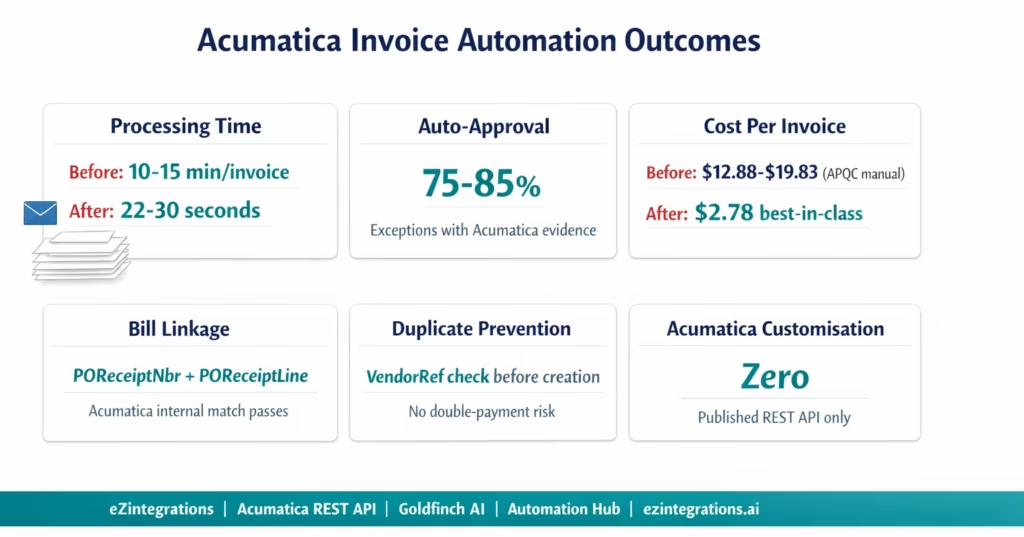
Processing time: 22-30 seconds from supplier invoice PDF arrival to released Acumatica Bill. Versus 10-15 minutes of manual Acumatica AP entry per invoice. At 250 invoices per month: 42-63 hours recovered per month. That is 1-1.5 FTE weeks of AP time monthly.
Auto-approval rate: 75-85% of invoices match automatically and reach released status without AP team involvement. Exceptions (15-25%) are routed with the Acumatica PO data, receipt data, and specific variance flagged, reducing exception investigation from 10-15 minutes to 3-5 minutes.
Bill linkage accuracy: using POReceiptNbr + POReceiptLine in the Bill creation payload links the AP bill directly to the specific receipt line in Acumatica, not just to the PO. This is the correct Acumatica matching approach: Acumatica’s internal 3-way match verifies the receipt-to-bill link and confirms the quantities. Bills created this way pass Acumatica’s own matching checks.
Duplicate prevention: the VendorRef duplicate check before Bill creation prevents double-payment on the same supplier invoice number. Manual AP entry has no systematic duplicate check beyond human memory.
Receipt timing mismatch recovery: the Watcher eliminates manual monitoring of bills where receipt has not yet been posted. For teams with 15-25% of invoices arriving before goods receipt posting, this is a significant recurring time saving.
No Acumatica customisation: the entire workflow uses Acumatica’s published REST API endpoints. No custom Acumatica screens, no Acumatica customisation framework, no Acumatica developer resource required.
Cost per invoice benchmark: APQC 2025 reports $2.78 per invoice for best-in-class automated AP versus $12.88-$19.83 for manual processing. For 250 Acumatica invoices per month: annual savings of $30,150-$50,850.
How to Get Started
Step 1: Register a Connected App in Acumatica
In Acumatica: System > Connected Applications > Add. Set the OAuth flow to “Resource Owner Password Credentials.” Note the Client ID and Client Secret. Create a dedicated Acumatica user account for the integration with AP read/write permissions (purchase orders, purchase receipts, bills). Using a dedicated user (not a named person’s account) ensures the integration is not affected by staff changes.
Step 2: Import the Acumatica AP Invoice Automation Template
Go to the Automation Hub and import the Acumatica AP Invoice Automation template. The template includes Goldfinch AI Document Intelligence, the Acumatica OAuth 2.0 token flow (with auto-refresh), GET /PurchaseOrder with $expand=Details, GET /PurchaseReceipt with PO number filtering, the duplicate check query, PUT /Bill with POReceiptNbr + POReceiptLine linkage, POST /Bill/{id}/Release with status polling, and the Watcher for receipt timing mismatches.
Step 3: Configure Credentials and Vendor Mapping
Add your Acumatica instance URL, Client ID, Client Secret, integration username, and password to the eZintegrations credential vault. The system will verify the OAuth token request against https://{instance}.acumatica.com/identity/connect/token. Add your vendor name mapping: extracted supplier names from PDF invoices mapped to Acumatica VendorID values. This mapping can be imported from an Acumatica vendor CSV export. Average credential and mapping setup: 20-30 minutes.
Step 4: Set Matching Tolerances and Exception Routing
Configure price and quantity tolerance per vendor category (e.g., 3% price tolerance for standard suppliers, 1% for high-value goods). Set the AP supervisor email or Slack channel for exception routing. Configure the Watcher poll interval for receipt timing mismatches (30-60 minutes recommended). Set the release behaviour: auto-release all matched bills, or hold high-value bills (above configurable threshold) for AP manager review before release.
Step 5: Test with Real Acumatica PO Numbers and Promote
In the Acumatica test environment, run the workflow with real PO numbers from your Acumatica instance. Confirm GET /PurchaseOrder returns the correct PO and line data. Confirm GET /PurchaseReceipt returns the correct receipt quantities. Confirm PUT /Bill creates a Bill with the correct POReceiptNbr linkage and that Acumatica’s internal match passes. Confirm POST /Release completes and Bill status reaches “Open”. Test a receipt timing mismatch. Promote to production.
Total configuration time: 5-7 hours from template import to Acumatica production go-live.
FAQs
The Cleanest ERP API in Mid-Market. Now With AI.
Acumatica’s REST API is one of the best-designed ERP APIs available: consistent field structure, a single base path, OData filtering, and standard OAuth 2.0. The PO-to-payment cycle takes four REST calls. The API handles the 3-way match logic once the Bill is linked to the receipt.
The only missing piece is the step before the API: reading the supplier’s PDF and getting structured data into the REST call. Goldfinch AI handles that in 8-12 seconds. The rest happens automatically.
No Acumatica customisation. No Acumatica consulting engagement. No custom endpoint configuration. The integration uses the same published REST API that Acumatica customers use for every other integration.
Import the Acumatica AP Invoice Automation Template from the Automation Hub and go live in 5-7 hours. Or book a free demo with your Acumatica instance URL, monthly invoice volume, and supplier count. We will walk through the Connected App setup and vendor mapping in the session.

