How to use 1 Filter condition and send Data to Datalake
$0.00
| Workflow Name: | With Target as Datalake and 1 Filter Condition |
|---|---|
| Purpose: | Ingest filtered records into Datalake |
| Benefit: | Structured data in Datalake |
| Who Uses It: | Data Teams; Analytics |
| System Type: | Data Integration Workflow |
| On-Premise Supported: | Yes |
| Industry: | Analytics / Data Engineering |
| Outcome: | Filtered records ingested into Datalake |
Table of Contents
Description
| Problem Before: | Manual data ingestion from multiple sources |
|---|---|
| Solution Overview: | Automated ingestion using 1 filter condition |
| Key Features: | Filter; validate; ingest; schedule |
| Business Impact: | Faster; accurate data availability |
| Productivity Gain: | Removes manual ingestion |
| Cost Savings: | Reduces labor and errors |
| Security & Compliance: | Secure connection |
With Target as Datalake and 1 Filter Condition
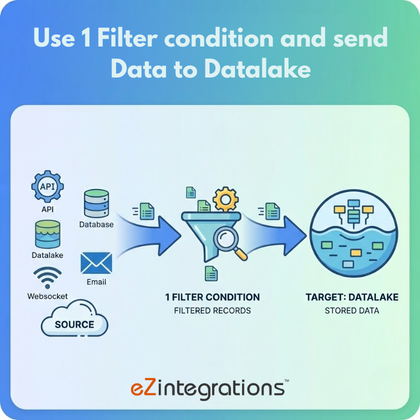
The Datalake 1 Filter Workflow ingests records after applying a single filter condition, ensuring only relevant data is sent to the Datalake. This approach helps maintain clean and structured datasets for downstream use.
Simple Filtering for Clean Datalake Ingestion
The system applies one predefined filter to incoming data, validates the results, and loads the filtered records into the Datalake. This workflow supports data and analytics teams by reducing noise, improving data quality, and enabling reliable analytics and reporting.
Watch Demo
| Video Title: | API to API integration using 2 filter operations |
|---|---|
| Duration: | 6:51 |
Outcome & Benefits
| Time Savings: | Removes manual ingestion |
|---|---|
| Cost Reduction: | Lower operational overhead |
| Accuracy: | High via validation |
| Productivity: | Faster ingestion |
Industry & Function
| Function: | Data Ingestion |
|---|---|
| System Type: | Data Integration Workflow |
| Industry: | Analytics / Data Engineering |
Functional Details
| Use Case Type: | Data Integration |
|---|---|
| Source Object: | Multiple Source Records |
| Target Object: | Datalake |
| Scheduling: | Real-time or batch |
| Primary Users: | Data Engineers; Analysts |
| KPI Improved: | Data availability; ingestion speed |
| AI/ML Step: | Not required |
| Scalability Tier: | Enterprise |
Technical Details
| Source Type: | API / Database / Email |
|---|---|
| Source Name: | Multiple Sources |
| API Endpoint URL: | – |
| HTTP Method: | – |
| Auth Type: | – |
| Rate Limit: | – |
| Pagination: | – |
| Schema/Objects: | Filtered records |
| Transformation Ops: | Filter; validate; normalize |
| Error Handling: | Log and retry failed ingestion |
| Orchestration Trigger: | On upload or scheduled |
| Batch Size: | Configurable |
| Parallelism: | Multi-source concurrent |
| Target Type: | Datalake |
| Target Name: | Datalake |
| Target Method: | API / Batch Upload |
| Ack Handling: | Logging |
| Throughput: | High-volume records |
| Latency: | Seconds/minutes |
| Logging/Monitoring: | ingestion logs |
Connectivity & Deployment
| On-Premise Supported: | Yes |
|---|---|
| Supported Protocols: | API; DB; Email |
| Security & Compliance: | Secure connection |
FAQ
1. What is the 'With Target as Datalake and 1 Filter Condition' workflow?
It is a data integration workflow that ingests records into a Datalake after applying a single filter condition to ensure only relevant data is processed.
2. How does the filtering work in this workflow?
The workflow applies one predefined filter condition on the source data to select only matching records before ingesting them into the Datalake.
3. What types of data sources are supported?
The workflow can ingest data from APIs, databases, or files, applying the filter consistently across supported source types.
4. How frequently can the workflow run?
The workflow can run on a scheduled basis or on-demand depending on data freshness and analytics requirements.
5. What happens to records that do not meet the filter condition?
Records that do not match the filter condition are excluded from ingestion, ensuring only relevant data is stored in the Datalake.
6. Who typically uses this workflow?
Data teams and analytics teams use this workflow to control data quality and ingest only filtered, structured records into the Datalake.
7. Is on-premise deployment supported?
Yes, this workflow supports on-premise data sources and environments.
8. What are the key benefits of this workflow?
It ensures structured, relevant data in the Datalake, reduces unnecessary storage, improves data quality, and supports efficient analytics and reporting.
Case Study
| Customer Name: | Data Team |
|---|---|
| Problem: | Manual ingestion from multiple sources |
| Solution: | Automated filtered ingestion |
| ROI: | Faster workflows; reduced errors |
| Industry: | Analytics / Data Engineering |
| Outcome: | Filtered records ingested into Datalake |