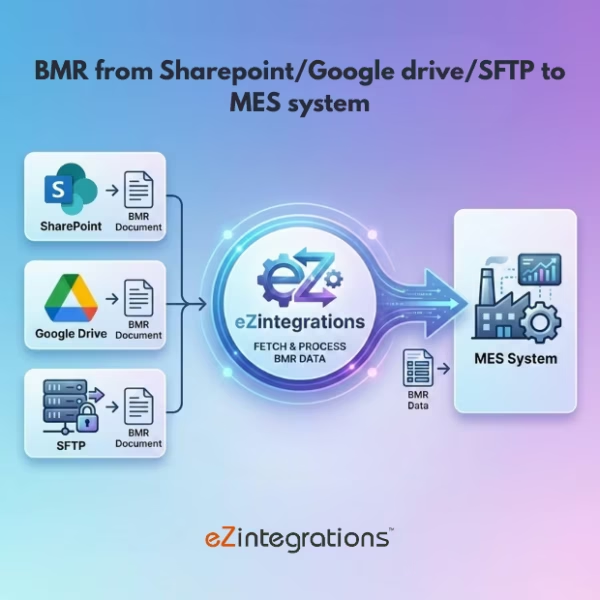
How to Automatically Extract Batch Manufacturing Record (BMR) Data?
$0.00
| Workflow Name: | Batch Manufacturing Record Integration |
|---|---|
| Purpose: | Extract key fields (Yield; Product Details; Batch Number; Production Date) from BMR and sync to target systems |
| Benefit: | Real-time; accurate BMR data transfer without manual intervention |
| Who Uses It: | Production Teams; Quality; IT; Operations |
| System Type: | Document Understanding Workflow |
| On-Premise Supported: | Yes |
| Industry: | Manufacturing / Pharma / Food & Beverage |
| Outcome: | Structured BMR data sent automatically to LIMS; ERP; MES |
Table of Contents
Description
| Problem Before: | Manual extraction caused delays and errors |
|---|---|
| Solution Overview: | Document Understanding automatically extracts structured data from BMRs and sends it to LIMS; ERP; MES |
| Key Features: | OCR/AI extraction; field validation; mapping; automated routing |
| Business Impact: | Faster production data availability and accuracy |
| Productivity Gain: | Eliminates manual data entry and reconciliation |
| Cost Savings: | Reduces labor and transcription errors |
| Security & Compliance: | Encrypted transport; PHI/PII-safe |
Batch Manufacturing Record Integration
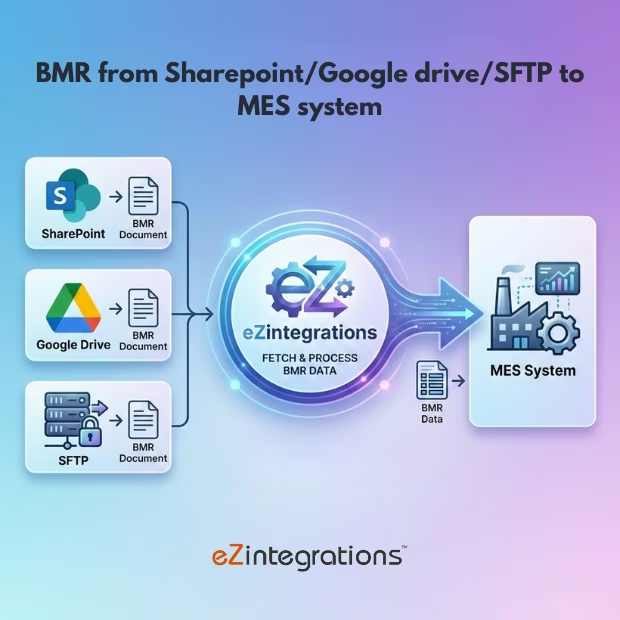
The BMR Integration workflow extracts key fields such as yield, product details, batch number, and production date from batch manufacturing records and syncs them to target systems automatically. This ensures accurate and timely data availability without manual effort.
Automated BMR Data Transfer for Operational Accuracy
The system processes BMR documents using advanced document understanding, validates extracted data, and sends structured records to LIMS, ERP, and MES systems in real time. This workflow helps production, quality, IT, and operations teams maintain accurate manufacturing records, improve reporting, and streamline operations.
Watch Demo
| Video Title: | How to Automate BMR (Batch Manufacturing Record) Data into MES/ERP/LIMS Using AI ? |
|---|---|
| Duration: | 5:58 |
Outcome & Benefits
| Time Savings: | Removes manual extraction |
|---|---|
| Cost Reduction: | Reduces labor and error costs |
| Accuracy: | High via AI validation |
| Productivity: | Faster system updates |
Industry & Function
| Function: | Data Extraction and System Sync |
|---|---|
| System Type: | Document Understanding Workflow |
| Industry: | Manufacturing / Pharma / Food & Beverage |
Functional Details
| Use Case Type: | Batch Data Integration |
|---|---|
| Source Object: | Batch Manufacturing Records |
| Target Object: | LIMS / ERP / MES entries |
| Scheduling: | Real-time or batch |
| Primary Users: | Production; Quality; IT |
| KPI Improved: | Data accuracy; processing time |
| AI/ML Step: | OCR + Field Extraction Model |
| Scalability Tier: | Enterprise-grade |
Technical Details
| Source Type: | SharePoint / Dropbox / Google Drive / SFTP |
|---|---|
| Source Name: | Batch Manufacturing Records |
| API Endpoint URL: | Target system API endpoints (LIMS; ERP; MES) |
| HTTP Method: | POST |
| Auth Type: | OAuth / API Key |
| Rate Limit: | Based on target system |
| Pagination: | Supported |
| Schema/Objects: | Yield; Product Details; Batch Number; Production Date |
| Transformation Ops: | Field extraction; mapping; validation |
| Error Handling: | Log errors; retry failed records |
| Orchestration Trigger: | On file upload or scheduled scan |
| Batch Size: | Single or multiple records |
| Parallelism: | Concurrent file processing |
| Target Type: | LIMS / ERP / MES |
| Target Name: | LIMS / ERP / MES |
| Target Method: | API / Integration |
| Ack Handling: | Response logged |
| Throughput: | Thousands of records/day |
| Latency: | <10 seconds per record |
| Logging/Monitoring: | Extraction and transmission logs |
Connectivity & Deployment
| On-Premise Supported: | Yes |
|---|---|
| Supported Protocols: | REST; HTTPS; SFTP |
| Security & Compliance: | Encrypted transport; PHI/PII-safe |
FAQ
1. What is the Batch Manufacturing Record (BMR) Integration workflow?
It is a document understanding workflow that automatically extracts key fields such as Yield, Product Details, Batch Number, and Production Date from batch manufacturing records (BMR) and syncs them to target systems.
2. How does the workflow extract and sync BMR data?
The workflow uses AI-powered document understanding to extract relevant fields from BMR documents and automatically sends structured data to systems like LIMS, ERP, and MES.
3. What key BMR data is captured?
It captures details such as product yield, product information, batch numbers, production dates, and any additional metadata required for operational and quality systems.
4. Who typically uses this workflow?
Production teams, Quality teams, IT, and Operations use this workflow to ensure accurate and real-time data flow from manufacturing to downstream systems.
5. What are the benefits of automating BMR integration?
Automation ensures real-time, accurate data transfer, reduces manual entry errors, improves compliance, and enhances operational efficiency.
6. Is on-premise deployment supported?
Yes, this workflow supports on-premise deployments, making it suitable for secure manufacturing environments.
7. What systems can the workflow sync data to?
It can sync structured BMR data to LIMS (Laboratory Information Management Systems), ERP systems, and MES (Manufacturing Execution Systems).
8. How frequently does the workflow run?
The workflow can run in real-time as BMRs are generated or on a scheduled basis according to operational requirements.
Case Study
| Customer Name: | Manufacturing / Pharma / Food Plants |
|---|---|
| Problem: | Manual extraction of BMR caused errors and delays |
| Solution: | Automated BMR extraction and system sync |
| ROI: | Faster; accurate batch data processing |
| Industry: | Manufacturing / Pharma / Food & Beverage |
| Outcome: | Structured BMR data sent automatically to LIMS; ERP; MES |