How to sync project from Acumatica to Monday.com in Real Time?
$0.00
| Workflow Name: |
Acumatica to Monday.com Project Management Sync |
|---|---|
| Purpose: |
Sync project data from Acumatica to Monday.com |
| Benefit: |
Real-time project visibility and consistency |
| Who Uses It: |
Project Managers; Finance; IT Teams |
| System Type: |
ERP Integration Workflow |
| On-Premise Supported: |
Yes |
| Industry: |
IT / Professional Services |
| Outcome: |
Projects synced from Acumatica to Monday.com |
Table of Contents
Description
| Problem Before: |
Manual project updates across systems |
|---|---|
| Solution Overview: |
Automatically sync project details via API |
| Key Features: |
API sync; validation; mapping; logs |
| Business Impact: |
Improves project tracking accuracy |
| Productivity Gain: |
Eliminates manual project updates |
| Cost Savings: |
Reduces admin effort |
| Security & Compliance: |
Encrypted APIs |
Acumatica to Monday.com – Project Management Sync
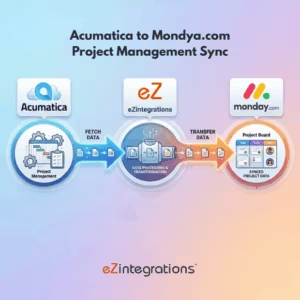
The Project Sync workflow automatically transfers project data from Acumatica to Monday.com, ensuring real-time visibility and consistency across systems. This eliminates manual updates and keeps project information aligned.
Automated Project Data Integration for Better Visibility
The system retrieves project details from Acumatica, validates and maps the data, and syncs it to Monday.com in near real time. This workflow helps project managers, finance, and IT teams maintain accurate project records, improve collaboration, and support efficient project operations.
Watch Demo
| Video Title: |
Why Integrate Acumatica with monday.com? | ERP to Project Management Automation Demo |
|---|---|
| Duration: |
6:12 |
Outcome & Benefits
| Time Savings: |
Removes duplicate data entry |
|---|---|
| Cost Reduction: |
Lower admin costs |
| Accuracy: |
High via validation |
| Productivity: |
Faster project updates |
Industry & Function
| Function: |
Project Data Sync |
|---|---|
| System Type: |
ERP Integration Workflow |
| Industry: |
IT / Professional Services |
Functional Details
| Use Case Type: |
Project Management Integration |
|---|---|
| Source Object: |
Projects |
| Target Object: |
Projects |
| Scheduling: |
Real-time or batch |
| Primary Users: |
Project & Ops Teams |
| KPI Improved: |
Project accuracy; timeliness |
| AI/ML Step: |
Not required |
| Scalability Tier: |
Enterprise |
Technical Details
| Source Type: |
ERP API |
|---|---|
| Source Name: |
Acumatica Projects |
| API Endpoint URL: |
Acumatica Project API |
| HTTP Method: |
POST |
| Auth Type: |
OAuth / API Token |
| Rate Limit: |
Based on Acumatica limits |
| Pagination: |
Supported |
| Schema/Objects: |
Projects; tasks; milestones |
| Transformation Ops: |
Mapping and validation |
| Error Handling: |
Retry and error logs |
| Orchestration Trigger: |
Scheduled or real-time |
| Batch Size: |
Configurable |
| Parallelism: |
Supported |
| Target Type: |
SaaS Platform |
| Target Name: |
Monday.com |
| Target Method: |
Monday.com GraphQL API |
| Ack Handling: |
API response logged |
| Throughput: |
Medium to high |
| Latency: |
Seconds |
| Logging/Monitoring: |
Sync and error logs |
Connectivity & Deployment
| On-Premise Supported: |
Yes |
|---|---|
| Supported Protocols: |
REST; HTTPS |
| Security & Compliance: |
Encrypted APIs |
FAQ
1. What is the Acumatica to Monday.com Project Management Sync workflow?
It is an automated ERP integration workflow that synchronizes project data from Acumatica to Monday.com, ensuring consistent and up-to-date project information across systems.
2. How does this workflow work?
The workflow extracts project-related data from Acumatica, applies necessary mappings and validations, and syncs it automatically to Monday.com using secure APIs.
3. What project data is synced from Acumatica to Monday.com?
The workflow syncs project names, IDs, statuses, timelines, budgets, milestones, assigned resources, and financial metadata required for project tracking.
4. Who typically uses this workflow?
Project Managers, Finance teams, and IT teams use this workflow to maintain real-time project visibility and operational consistency.
5. What are the key benefits of this integration?
It provides real-time project visibility, eliminates manual updates, ensures data consistency between ERP and project management systems, and improves collaboration.
6. Does the workflow support on-premise Acumatica deployments?
Yes, the workflow supports on-premise Acumatica environments through secure connectivity options.
7. Can data mapping be customized?
Yes, field mappings and sync rules can be customized to match specific business and project management requirements.
8. Is the sync one-way or bi-directional?
By default, the workflow supports one-way sync from Acumatica to Monday.com, with options to extend to bi-directional sync if required.
Resources
Case Study
| Customer Name: |
Project-based Organizations |
|---|---|
| Problem: |
Manual project sync across systems |
| Solution: |
Automated Acumatica to GraphQL Monday.com sync |
| ROI: |
Faster delivery; fewer errors |
| Industry: |
IT / Professional Services |
| Outcome: |
Projects synced from Acumatica to Monday.com |