
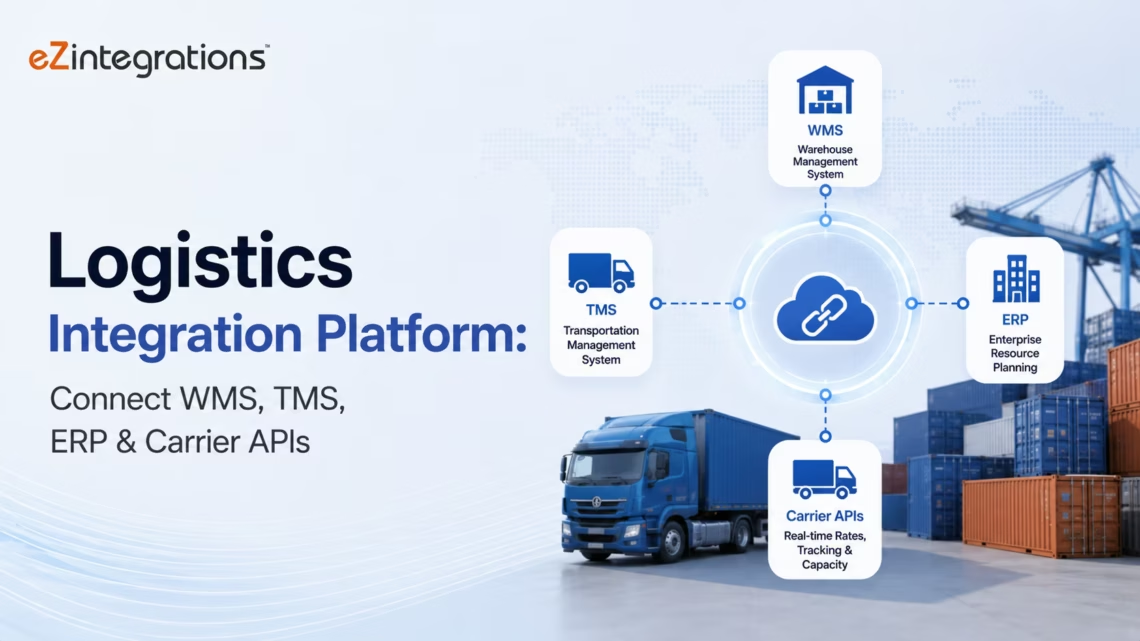
Logistics Integration Platform: Connect WMS, TMS, ERP & Carrier APIs
June 9, 2026A logistics integration platform connects Warehouse Management Systems (WMS), Transportation Management Systems (TMS), ERP systems, eCommerce platforms, and carrier APIs in real time: automating order routing, shipment status updates, inventory synchronisation, freight billing, and exception handling without custom development. eZintegrations provides pre-built logistics integration templates that connect Manhattan, Blue Yonder, SAP EWM, Oracle WMS, Shipbob, ShipStation, UPS, FedEx, DHL, and 1,000+ logistics and supply chain systems in days, not months.
TL;DR
- Logistics operations run on data velocity. An order that sits in a queue waiting for manual entry, a shipment status that updates 4 hours after the carrier scanned the package, an inventory level that does not reflect yesterday’s receipts: each of these delays costs money, customer trust, or both.
- eZintegrations connects your WMS, TMS, ERP, eCommerce platform, and carrier APIs with pre-built templates that go live in days. Real-time order routing, automated shipment tracking, live inventory sync, freight audit automation, and AI-driven exception handling across your full logistics stack.
- The platform covers all four automation levels: Level 1 (iPaaS workflow automation for deterministic logistics processes), Level 2 (AI Workflows for freight invoice exception processing and document extraction), Level 3 (AI Agents for complex shipment exception resolution and carrier claims management), and Level 4 (Goldfinch AI for logistics operations intelligence via Chat UI).
- No custom API development. No middleware to maintain. Templates covering Manhattan WMS, Blue Yonder, SAP EWM, Oracle WMS, SAP TM, Oracle TM, Shipbob, ShipStation, UPS, FedEx, DHL, XPO, and 1,000+ logistics systems.
- CTA: Import a logistics integration template from the Automation Hub today.
The Problem: Logistics Data Fragmentation
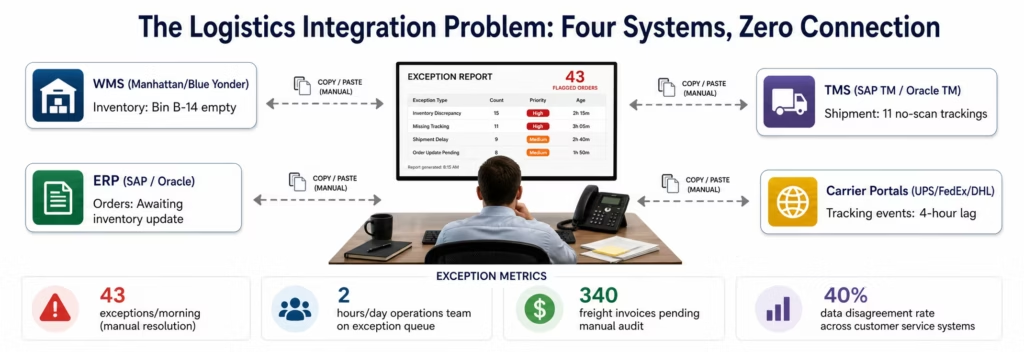
It is 6 AM at a regional distribution centre. The operations manager, Dave, runs the daily exception report. Forty-three orders flagged overnight. Fourteen are stuck because the inventory system shows stock available but the WMS says the bin is empty: last night’s receiving transactions have not posted yet. Eleven carrier tracking numbers came back with no scan: either the carrier API did not update, or the labels were never scanned at pickup. Eighteen orders are showing late for their delivery windows because the TMS routing did not account for a carrier lane capacity change that happened three days ago.
Dave’s team spends the first two hours of every day resolving exceptions that, in a connected logistics operation, would never have occurred or would have been caught and resolved automatically overnight.
Two floors up, the customer service team is fielding calls. “Where is my order?” The rep opens four systems: the eCommerce platform to find the order, the ERP to check the shipment record, the WMS to confirm the pick and pack status, and the carrier portal to find the tracking event. Forty percent of the time, the information in these four systems does not agree. The rep gives the customer the best answer they can, based on the most recent data they can find.
At the accounts payable desk, the freight invoice stack has grown to 340 invoices waiting for audit and approval. The AP team is matching carrier invoices against TMS rate quotes manually: checking each invoice against the contracted rate, identifying variances, and deciding whether to pay or dispute. At 22 minutes per invoice, 340 invoices is 125 hours of work.
This is what disconnected logistics looks like at scale. McKinsey research shows that logistics companies with high data fragmentation spend 3-5x more on exception management than those with integrated operations. Gartner projects that supply chain organisations with real-time system integration reduce operational exceptions by 30-50% within 18 months of full deployment.
The integration gap between a WMS, TMS, ERP, and carrier network is not a technical problem that requires months of custom development. It is a template problem. The connection patterns between Manhattan WMS and SAP, between Blue Yonder TMS and UPS, between an eCommerce platform and a 3PL WMS: these patterns are well-understood and largely standard. eZintegrations’ Automation Hub contains pre-built templates for every major logistics integration pair.
Before vs After: Logistics Integration Transformation
| Process | Before eZintegrations | After eZintegrations |
|---|---|---|
| Order release to WMS | Manual order entry or batched overnight file transfer | Real-time order webhook from eCommerce/ERP triggers WMS order creation in under 60 seconds |
| Inventory sync | Nightly batch from WMS to ERP, 8-18 hour lag | Real-time inventory update webhook from WMS to ERP on every transaction (receipt, pick, ship, return) |
| Shipment tracking | Manual carrier portal checks, 4-hour polling lag | Carrier webhook triggers real-time tracking event push to ERP, TMS, and customer portal |
| Carrier rate shopping | TMS queries carriers manually during order processing | Real-time carrier rate API calls at order release, least-cost carrier selected automatically |
| Freight invoice audit | AP team manually matches 340 invoices/week at 22 min each | AI Workflow extracts invoice data, compares to TMS rate quote, auto-approves within tolerance |
| Shipment exception management | Ops manager reviews exception report each morning, 2+ hours | AI Agent detects exception, identifies cause, routes resolution package to ops team |
| 3PL order routing | Manual order routing between warehouse locations | Automated inventory-based order routing: WMS triggers split-ship or reroute automatically |
| Returns processing | RMA processed manually, WMS and ERP updated separately | Returns webhook triggers simultaneous WMS receipt and ERP inventory/credit update |
| Customer order visibility | Customer service checks 4 systems, 40% disagreement rate | Single API call returns unified order status from WMS + carrier in real time |
| Carrier claims filing | Manual claim documentation assembled from 3 systems, 45-60 min per claim | AI Agent retrieves shipment record, retrieves carrier event history, assembles claim package in 5 min |
How eZintegrations Connects the Logistics Stack
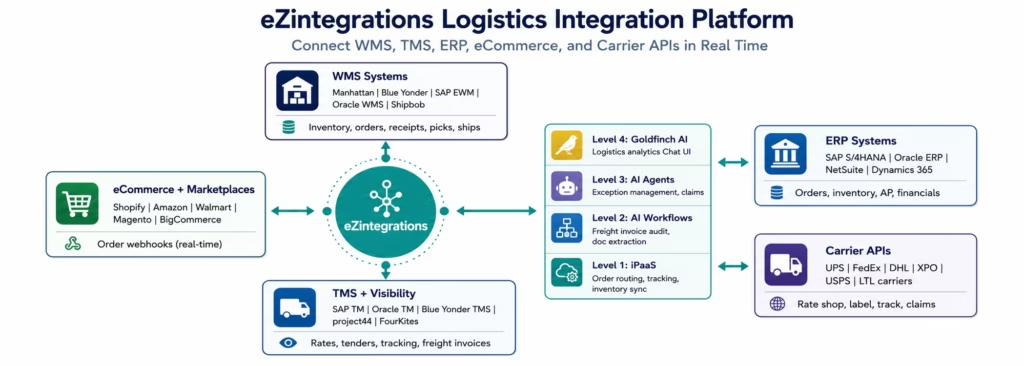
eZintegrations connects every system in your logistics stack through a combination of native connectors, REST API integration, and webhook event processing: covering the full range of logistics technology from legacy on-premises WMS to modern cloud TMS and carrier APIs.
What connects to what:
WMS Integration: Manhattan Associates WMS, Blue Yonder (JDA) WMS, SAP EWM (Extended Warehouse Management), Oracle WMS Cloud, HighJump (Korber), Fishbowl, 3PL Central, Shipbob, ShipHero, and any WMS with a REST or SOAP API, reflecting the broader WMS and logistics technology landscape tracked by ARC Advisory Group.The WMS connector handles the primary logistics data objects: inventory levels, order status, ASNs (Advanced Shipment Notifications), receiving transactions, pick confirmations, pack lists, and BOLs.
TMS Integration: SAP Transportation Management, Oracle Transportation Management, Blue Yonder TMS, MercuryGate, Transplace, project44, FourKites, and any TMS with a REST API. The TMS connector handles: shipment creation and tender, carrier rate shopping, load planning confirmations, shipment status updates, and freight invoice data.
ERP Integration: SAP S/4HANA (native OData V4 with automatic CSRF token management), Oracle ERP Cloud (REST with OAuth assertion), NetSuite (SuiteQL with TBA), Microsoft Dynamics 365, Infor CloudSuite, EPICOR. The ERP connector handles: sales order status, purchase order confirmations, inventory valuation updates, accounts payable posting for freight invoices, and financial accruals.
Carrier API Integration: UPS (Shipping, Tracking, Rating, Address Validation APIs), FedEx (Ship, Track, Rate, Address APIs), DHL (Express, Freight, eCommerce APIs), USPS, XPO Logistics, Echo Global Logistics, C.H. Robinson, J.B. Hunt, regional LTL carriers, and any carrier with a REST API via the universal REST connector. The API Catalog includes pre-configured authentication and rate-limit handling for every major carrier.
eCommerce Integration: Shopify (native webhooks), Magento, BigCommerce, WooCommerce, Amazon Seller Central, Walmart Marketplace, eBay, and any eCommerce platform with order webhooks. Real-time order webhooks fire the WMS order creation workflow the moment an order is placed.
Step-by-Step Workflow: Order-to-Ship Automation
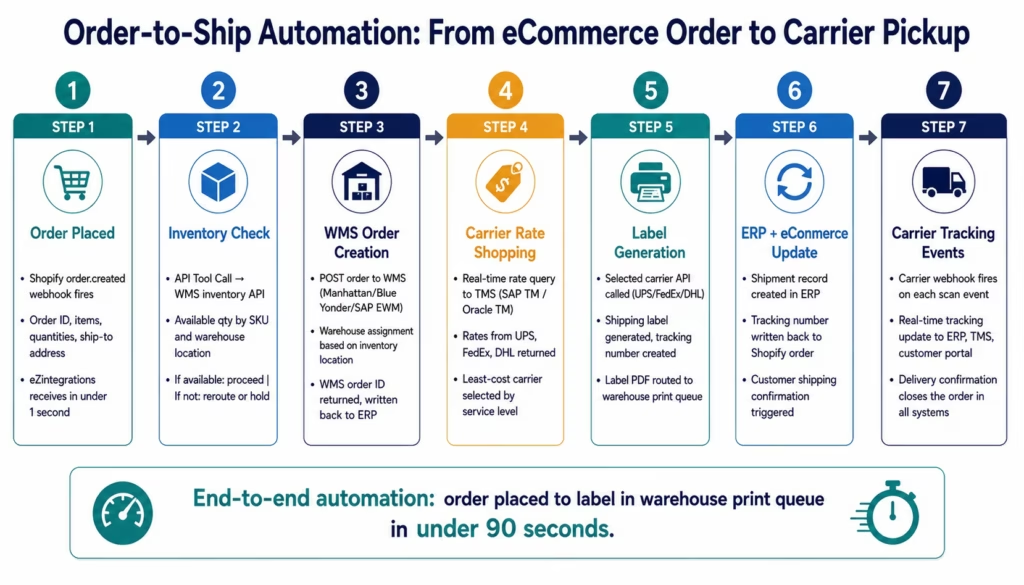
Here is how the most important logistics integration flow: from eCommerce order to carrier shipment: works in eZintegrations. This is the workflow that eliminates the 60-second order release lag, the inventory disagreement, and the manual tracking update.
Step 1: Order Webhook from eCommerce
When a customer places an order on Shopify, Amazon, Walmart, or any connected eCommerce platform, a webhook fires immediately. eZintegrations receives the order event, verifies the signature (HMAC-SHA256 for Shopify), and parses the payload: order ID, line items, SKUs, quantities, shipping address, and requested service level.
For high-volume scenarios (a flash sale generating 500 orders per minute), eZintegrations processes concurrent webhook events without dropping orders.
Step 2: Inventory Availability Check
eZintegrations calls the WMS API to verify available inventory for each SKU in the order. For orders where all SKUs are available at a single warehouse location: the order proceeds to WMS order creation. For orders requiring inventory from multiple locations: the split-ship logic applies, creating separate WMS orders for each fulfilling location. For orders where inventory is insufficient: the order is flagged to the order management team with the specific SKU shortage identified.
Step 3: WMS Order Creation
eZintegrations creates the order in the WMS, passing the order details, line items, ship-to address, service level, and any special handling instructions. The WMS returns an internal order number. This order number is written back to the ERP sales order record and to the eCommerce order record for cross-system traceability.
Step 4: Carrier Rate Shopping
eZintegrations calls the TMS to get real-time carrier rates for the shipment: package dimensions, weight, origin ZIP, destination ZIP, and required delivery date. The TMS returns rates from the contracted carriers. The least-cost carrier meeting the required service level is selected. For shipments with carrier preferences (specific customer contracts, restricted lanes), the selection logic applies those rules.
Step 5: Carrier Label Generation
eZintegrations calls the selected carrier’s Shipping API (UPS API, FedEx Ship API, DHL Express API) to generate the shipping label. The carrier returns a tracking number and a label in ZPL or PDF format. The label is routed to the warehouse’s label printer queue via the WMS. The tracking number is stored for the next step.
Step 6: Update ERP and eCommerce Platform
The shipment record is created in the ERP with the carrier, tracking number, ship date, and freight cost. The tracking number is written back to the Shopify, Amazon, or Walmart order record, which triggers the platform’s automated customer shipping notification.
Step 7: Carrier Tracking Event Routing
The carrier fires webhook events (or eZintegrations polls the carrier tracking API) for each scan: in transit, out for delivery, delivered. Each tracking event updates the ERP shipment status, the TMS load status, and the customer-facing order tracking page in real time. On delivery confirmation, the ERP sales order closes.
Key Logistics Integration Use Cases
Real-Time Inventory Synchronisation
The inventory disagreement problem: WMS shows different inventory than ERP: is almost always a latency problem, not a data accuracy problem. The WMS has the right inventory; it just has not told the ERP yet.
eZintegrations eliminates the latency by triggering inventory updates in real time on every WMS transaction: receipt, putaway, pick, pack, ship, return, adjustment. Each transaction fires a webhook or triggers a scheduled micro-batch (every 5-15 minutes for high-volume warehouses), updating the ERP inventory position in near-real time.
For multi-warehouse and 3PL networks: eZintegrations aggregates inventory positions from multiple WMS instances and 3PL APIs into a single ERP inventory view, with each location’s inventory differentiated by warehouse code.
Freight Invoice Audit Automation
Freight invoice audit is one of the highest-labour manual processes in logistics finance. A 3PL or shipper receiving 300-500 carrier invoices per week spends 20-25 hours on manual rate matching.
eZintegrations’ Level 2 AI Workflows automate this:
- Carrier invoice arrives via EDI 210, email PDF, or carrier portal API
- Document Intelligence extracts: carrier, PRO number, shipment date, origin, destination, weight, accessorial charges, total billed amount
- API Tool Call retrieves the original TMS rate quote for this shipment
- Data Analysis compares the billed amount against the contracted rate, accounting for accessorial rules
- Within tolerance: invoice auto-approved and posted to AP
- Outside tolerance: invoice flagged with the specific variance, routed to AP team for dispute or exception processing
Result: 85-90% of standard carrier invoices auto-approved. AP team handles only the variance cases.
Carrier Claims Management (AI Agent)
When a carrier damages or loses a shipment, filing a claim requires assembling: the original BOL, the carrier pickup confirmation, the delivery exception event from the tracking history, photos of damage (if available), the invoice for the shipment value, and the claim form specific to each carrier.
The Carrier Claims Management Agent in eZintegrations:
- Detects the damage or loss event from the carrier tracking webhook (exception event code: damage, short delivery, loss)
- Retrieves the original shipment record from the TMS via API Tool Call
- Retrieves the carrier tracking event history, identifying the specific exception event and any associated damage notation
- Retrieves the commercial invoice or packing list from the ERP for shipment value documentation
- Assembles the claim package: BOL, tracking history, commercial invoice, and the carrier’s claim form pre-populated with the shipment data
- Routes the assembled claim package to the logistics manager for review and submission in 5 minutes versus the traditional 45-60 minute manual assembly
3PL Order Routing and Exception Management
For shippers using multiple 3PL partners or a network of owned and outsourced warehouses, order routing decisions require real-time inventory visibility and service level matching across all locations.
eZintegrations automates the routing decision: when an order arrives from the eCommerce platform, the routing logic queries inventory availability across all connected WMS instances (owned warehouses and 3PL partners), applies the routing rules (closest warehouse, lowest freight cost, best delivery date), and creates the order in the selected WMS automatically. No manual routing queue. No operations team decision for standard orders.
For exceptions: inventory out of stock at the primary location, carrier capacity constraints on a lane: the AI Agent investigates the alternative routing options and routes a recommended re-routing package to the operations team.
EDI Integration for Retail and B2B Customers
Many retail and B2B customers require EDI (Electronic Data Interchange) integration: EDI 850 (Purchase Order), EDI 856 (ASN), EDI 810 (Invoice), EDI 997 (Functional Acknowledgment). eZintegrations handles EDI transaction processing via its EDI connector or via the REST API connectors to EDI translation services (SPS Commerce, TrueCommerce, DiCentral), transforming EDI transactions into the data formats your WMS and ERP require.
AI-Powered Logistics Exception Management
Standard logistics integration handles the deterministic flows: order routing, inventory sync, tracking updates. AI automation handles the exceptions: the cases where the deterministic rules do not apply and judgment is required.
Level 3 AI Agent: Shipment Exception Investigation
When a shipment enters an exception state (carrier delay, weather hold, customs hold, address exception, attempted delivery failure), the Shipment Exception Agent fires:
- Retrieves the shipment record from the TMS: origin, destination, carrier, service level, promised delivery date
- Retrieves the carrier tracking event history: all scan events, the exception event, and the carrier’s exception code
- Queries the carrier’s delay notification API (where available) for estimated new delivery date
- Retrieves the customer order from the ERP: customer SLA, order value, customer priority tier
- Data Analysis: will the shipment arrive within the customer’s SLA window? What is the financial exposure of a delay?
- Routes a structured exception package to the operations team: the exception type, the current carrier status, the revised delivery estimate, the customer SLA impact assessment, and the recommended action (intercept and reroute, proactive customer notification, carrier claim initiation)
The operations team receives a pre-researched exception package instead of a raw tracking event. Decision time drops from 20 minutes to 2 minutes.
Level 4 Goldfinch AI: Logistics Operations Intelligence
The VP of Logistics asks the Chat UI: “What is our on-time delivery rate by carrier this week, and which lanes are underperforming against contracted SLAs?”
Goldfinch AI queries the TMS and ERP via the Workflow Node, runs the carrier performance analysis, and returns a formatted breakdown with lane-level performance and SLA compliance data: in under 60 seconds, without a BI report request.
The CFO asks: “What is our total freight spend this month versus budget, and which carrier categories are over budget?”
Goldfinch AI queries the ERP freight cost data, compares against the budget allocation, and returns a formatted variance analysis by carrier category.
Key Outcomes and Results
Logistics organisations deploying eZintegrations for WMS-TMS-ERP-carrier integration report measurable improvements within 30-60 days:
Operational Efficiency:
- Order release time: manual entry or nightly batch → real-time (under 60 seconds from order to WMS)
- Daily exception queue: 40-50 exceptions per morning → 5-10 (70-80% reduction from automation)
- Operations team exception resolution time: 2+ hours/morning → 20-30 minutes
- Inventory data lag: 8-18 hour nightly batch → 5-15 minutes (real-time on transaction)
Financial Operations:
- Freight invoice auto-approval rate: 0% (all manual) → 85-90%
- AP team freight audit hours: 20-25 hours/week → 3-5 hours/week
- Carrier invoice variance identification: previously unmonitored systematically → 100% of invoices checked against contracted rates
- Freight overpayment recovery: 1-3% of total freight spend identified as recoverable through systematic audit
Customer Service:
- Customer order status accuracy: 60% (4-system disagreement) → 98%+ (single unified status)
- Customer service call handle time on “where is my order”: 5-8 minutes (4 systems) → 45 seconds (unified API)
- Proactive delay notification: reactive (customer calls in) → proactive (agent detects and notifies before customer asks)
Carrier Claims:
- Claim assembly time: 45-60 minutes per claim → 5 minutes (AI Agent)
- Claims filing rate: previously limited by assembly time → all eligible exceptions filed
- Claims recovery rate: improved through faster and more complete claim documentation

How to Get Started
Step 1: Identify your highest-impact integration gap
Where is the most operational pain today? The order-to-WMS lag? The inventory disagreement between WMS and ERP? The freight invoice audit backlog? The carrier claims manual process? Start with the integration that eliminates the most daily exception volume or the most manual labour hours.
Step 2: Browse the Automation Hub for logistics templates
Visit the Automation Hub and filter by Logistics and Supply Chain. Find templates for:
- eCommerce to WMS order routing (Shopify, Amazon, Walmart to Manhattan, Blue Yonder, SAP EWM)
- WMS to ERP inventory sync (real-time transaction-level updates)
- TMS to carrier API rate shop and label generation
- Carrier tracking webhook to ERP and customer portal
- Freight invoice audit (AI Workflow: carrier invoice to TMS rate comparison)
- Carrier claims management (AI Agent: damage and loss exception to claim package)
Step 3: Connect your WMS and ERP
Import the template for your WMS-to-ERP inventory sync. Configure your WMS API credentials (Manhattan, Blue Yonder, SAP EWM, or your WMS’s REST API endpoint). Configure your ERP connection (SAP OData V4, Oracle REST, NetSuite SuiteQL). Test the inventory update flow with a sample receiving transaction.
Step 4: Connect your carrier APIs
Import the carrier rate shop and label generation template. Configure your carrier API credentials (UPS Developer Portal, FedEx Developer Portal, DHL API credentials). Test with a sample shipment to confirm rate quote and label generation. Configure your carrier tracking webhook endpoints to route tracking events to the TMS and ERP.
Step 5: Activate and monitor
Activate your logistics integration workflows. Monitor the execution dashboard for order volumes processed, exceptions caught, and freight invoices auto-approved. Set up Slack or Teams alerts for exception spikes or workflow failures.
Import a logistics integration template from the Automation Hub and have your first logistics integration live this week.
FAQs
Logistics organisations use eZintegrations for five primary integration patterns: order-to-WMS automation with real-time order routing from eCommerce platforms like Shopify, Amazon, and Walmart into WMS platforms such as Manhattan, Blue Yonder, and SAP EWM; WMS-to-ERP inventory synchronisation with real-time inventory updates after every warehouse transaction; carrier rate shopping and label generation through TMS integration with UPS, FedEx, DHL, and other carrier APIs; carrier tracking event routing using carrier webhooks to update TMS, ERP, and customer portals in real time; and freight invoice auditing using Level 2 AI Workflows to compare carrier invoices against contracted TMS rates and automatically approve invoices within tolerance thresholds.
For standard logistics integration templates from the Automation Hub such as eCommerce-to-WMS, WMS-to-ERP, carrier rate shopping, and tracking integrations, deployment typically takes 3-7 days from template import to production activation. Freight invoice audit AI Workflows take 5-10 days including Document Intelligence configuration, while Carrier Claims AI Agents take 7-12 days including knowledge base setup. A full logistics integration programme covering order routing, inventory sync, carrier integration, and freight audit typically takes 4-8 weeks.
Yes, eZintegrations supports Manhattan Associates WMS via REST API, Blue Yonder WMS via REST API, SAP Extended Warehouse Management through OData V4 with automatic CSRF token management, Oracle WMS Cloud, HighJump/Korber, Fishbowl, 3PL Central, ShipBob, and ShipHero. For WMS platforms not already in the catalog, the universal REST connector or database connector can connect to any system with a REST, SOAP, or database interface.
eZintegrations includes pre-configured carrier API connectors for UPS (Shipping, Tracking, Rating, Address Validation, and Time in Transit APIs), FedEx (Ship, Track, Rate, and Address APIs), DHL (Express and eCommerce APIs), USPS, XPO Logistics, Echo Global Logistics, and regional LTL carriers. Each connector includes authentication management, rate-limit handling, and endpoint configuration. Carrier tracking webhooks are managed through the Webhook connector with HMAC signature verification where supported.
Yes, The freight invoice audit AI Workflow uses Document Intelligence to extract structured data from carrier invoices in EDI 210, PDF, or API format, retrieves the original contracted shipment rate from the TMS, and compares billed charges against contracted rates using configurable tolerance thresholds. Invoices within tolerance are auto-approved and routed to AP, while invoices outside tolerance are flagged with detailed variance analysis such as accessorial discrepancies, incorrect weights, or wrong zones. Typically 85-90% of invoices auto-approve, reducing manual AP workload from 20-25 hours per week to 3-5 hours.
eZintegrations provides three levels of logistics AI automation. Level 2 AI Workflows include freight invoice auditing, carrier claims document extraction, and shipment exception classification. Level 3 AI Agents include the Shipment Exception Investigation Agent, which autonomously retrieves shipment data, carrier tracking history, and SLA context to produce structured exception resolution packages, and the Carrier Claims Management Agent, which assembles complete claims documentation from multiple systems. Level 4 Goldfinch AI provides natural language access to carrier performance, freight spend analysis, and on-time delivery metrics through a Chat UI connected to live TMS and ERP data.1. How does logistics use eZintegrations for WMS and TMS integration?
2. How long does it take to set up a logistics integration in eZintegrations?
3. Does eZintegrations work with Manhattan, Blue Yonder, SAP EWM, and other major WMS platforms?
4. How does eZintegrations handle carrier API integration for UPS, FedEx, and DHL?
5. Can eZintegrations automate freight invoice auditing without manual matching?
6. What AI automation is available for logistics in eZintegrations?
Conclusion: Logistics Moves at the Speed of Data
The fastest carriers, the most efficient warehouses, and the most sophisticated routing algorithms cannot overcome the cost of fragmented systems. When an order sits in a queue waiting for a manual WMS entry, when a freight invoice sits in a stack waiting for a human to match it against a rate quote, when a damage claim sits unassembled because no one has had time to pull together the documentation: the operation is moving at the speed of its integration, not the speed of its logistics infrastructure.
eZintegrations connects your WMS, TMS, ERP, eCommerce platform, and carrier APIs with pre-built templates that go live in days. Real-time order routing. Automated inventory sync. Carrier rate shopping and label generation without manual intervention. AI-powered freight invoice audit that approves 85-90% of invoices automatically. AI Agents that investigate and package shipment exceptions before your operations team arrives in the morning.
The logistics integration gap is not a development problem. It is a template problem. The Automation Hub has the templates.
Import a logistics integration template from the Automation Hub and have your first logistics integration live this week.
eZintegrations is SOC 2 Type II certified, providing enterprise-grade security for logistics data including customer order information, inventory records, and financial data. For healthcare supply chain or pharmaceutical logistics workflows requiring HIPAA compliance, eZintegrations provides a signed BAA for PHI-touching logistics integrations.
Book a free demo and bring your WMS, TMS, and carrier stack. We will map your integration requirements to Automation Hub templates and show you what 30 days of connected logistics looks like for your operation.

