How to Route Data to a API and Datalake Using Multiple Filters
$0.00
| Workflow Name: |
More Than 1 Filter Condition with Database; API; and Datalake as Target |
|---|---|
| Purpose: |
Route multiple filtered records to API & Datalake |
| Benefit: |
Simultaneous data availability in API & Datalake |
| Who Uses It: |
Data Teams; IT |
| System Type: |
Data Integration Workflow |
| On-Premise Supported: |
Yes |
| Industry: |
Analytics / Data Engineering |
| Outcome: |
Filtered records sent to API & Datalake |
Table of Contents
Description
| Problem Before: |
Manual routing to API & Datalake |
|---|---|
| Solution Overview: |
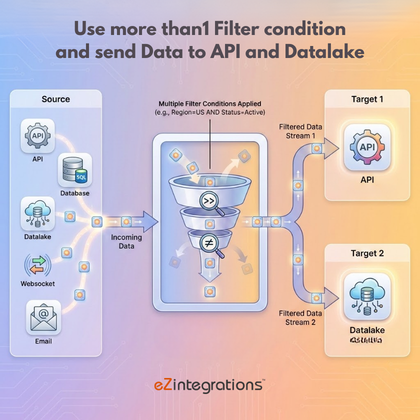
Automated routing of multiple filtered records to API & Datalake using filters |
| Key Features: |
Filter; validate; transform; route |
| Business Impact: |
Faster; accurate multi-target ingestion |
| Productivity Gain: |
Removes manual routing |
| Cost Savings: |
Reduces labor and errors |
| Security & Compliance: |
encrypted transport |
More Than 1 Filter Condition with Database, API, and Datalake as Target
The Multi Filter Workflow routes records after applying multiple filter conditions, sending them simultaneously to the database, API, and Datalake. This ensures high-quality data is available across all target systems in real time.
Advanced Filtering for Multi-Target Data Delivery
The system applies multiple predefined filters to incoming data, validates the results, and distributes the refined records to the database, API, and Datalake efficiently. This workflow helps data and IT teams maintain consistent datasets, improve processing speed, and reduce manual intervention across platforms.
Watch Demo
| Video Title: |
API to API integration using 2 filter operations |
|---|---|
| Duration: |
6:51 |
Outcome & Benefits
| Time Savings: |
Removes manual routing |
|---|---|
| Cost Reduction: |
Lower operational overhead |
| Accuracy: |
High via validation |
| Productivity: |
Faster multi-target ingestion |
Industry & Function
| Function: |
Data Routing & Transformation |
|---|---|
| System Type: |
Data Integration Workflow |
| Industry: |
Analytics / Data Engineering |
Functional Details
| Use Case Type: |
Data Integration |
|---|---|
| Source Object: |
Multiple Source Records |
| Target Object: |
API & Datalake |
| Scheduling: |
Real-time or batch |
| Primary Users: |
Data Engineers; IT |
| KPI Improved: |
Update speed; accuracy |
| AI/ML Step: |
Not required |
| Scalability Tier: |
Enterprise |
Technical Details
| Source Type: |
API / Database / Email |
|---|---|
| Source Name: |
Multiple Sources |
| API Endpoint URL: |
Target API |
| HTTP Method: |
POST |
| Auth Type: |
OAuth / API Key |
| Rate Limit: |
API dependent |
| Pagination: |
Supported |
| Schema/Objects: |
Filtered records |
| Transformation Ops: |
Filter; validate; transform |
| Error Handling: |
Log and retry failures |
| Orchestration Trigger: |
On upload or scheduled |
| Batch Size: |
Configurable |
| Parallelism: |
Multi-source concurrent |
| Target Type: |
API & Datalake |
| Target Name: |
API & Datalake |
| Target Method: |
Insert / POST |
| Ack Handling: |
Response logged |
| Throughput: |
High-volume records |
| Latency: |
Seconds/minutes |
| Logging/Monitoring: |
Ingestion & API logs |
Connectivity & Deployment
| On-Premise Supported: |
Yes |
|---|---|
| Supported Protocols: |
API; DB; Email |
| Security & Compliance: |
encrypted transport |
FAQ
1. What is the 'More Than 1 Filter Condition with Database, API, and Datalake as Target' workflow?
It is a data integration workflow that routes multiple filtered records to a database, API, and Datalake after applying more than one filter condition, ensuring simultaneous data availability across all targets.
2. How do multiple filter conditions work in this workflow?
The workflow evaluates multiple predefined filter conditions on the source data and routes only records that satisfy all conditions to the database, API, and Datalake.
3. What types of sources are supported?
The workflow supports data from APIs, databases, and files, applying all filters consistently before routing data to the targets.
4. How frequently can the workflow run?
The workflow can run on a schedule, near real-time, or on-demand depending on data processing and operational requirements.
5. What happens to records that do not meet the filter conditions?
Records that do not satisfy all filter conditions are excluded and are not sent to any of the targets.
6. Who typically uses this workflow?
Data teams and IT teams use this workflow to ensure filtered, high-quality data is simultaneously available in the database, API, and Datalake for analytics and operations.
7. Is on-premise deployment supported?
Yes, this workflow supports on-premise data sources as well as hybrid environments.
8. What are the key benefits of this workflow?
It enables simultaneous multi-target data availability, improves data quality, reduces manual routing effort, ensures consistency across systems, and supports efficient analytics and operational workflows.
Resources
Case Study
| Customer Name: |
Data Team |
|---|---|
| Problem: |
Manual routing to API & Datalake |
| Solution: |
Automated multi-target routing & transformation |
| ROI: |
Faster workflows; reduced errors |
| Industry: |
Analytics / Data Engineering |
| Outcome: |
Filtered records sent to API & Datalake |