
HIPAA-Compliant Integration Platform: Secure Healthcare Data Workflows
June 8, 2026A HIPAA-compliant integration platform connects healthcare systems (EHR, billing, HRIS, clinical applications) while protecting Health Insurance Portability and Accountability Act Protected Health Information (PHI) through encryption in transit and at rest, immutable audit logs, role-based access control, minimum necessary data access, and a signed Business Associate Agreement (BAA). eZintegrations provides all HIPAA technical safeguards natively, with a BAA available for all healthcare customers, and processes PHI entirely within its own infrastructure: no PHI is sent to external AI providers during AI workflow or AI agent processing.
TL;DR
- Every enterprise integration that touches PHI must operate within U.S. Department of Health and Human Services HIPAA Security Rule technical safeguard framework: encryption, audit controls, access controls, automatic logoff, and integrity controls. The integration platform is a Business Associate that must be covered by a signed BAA.
- Most integration platforms handle the data transmission side adequately: TLS encryption, credential management. The HIPAA gap most platforms create is in AI processing: when an AI workflow step sends a clinical note to OpenAI or Anthropic for processing, PHI leaves your HIPAA-compliant environment and enters a third-party AI provider’s infrastructure without a HIPAA BAA from that provider.
- eZintegrations handles HIPAA compliance at every layer: data transmission, data storage, audit logging, access control, and AI processing. All AI inference: Document Intelligence, LLM classification, agent reasoning: runs natively within eZintegrations’ infrastructure. No PHI is sent to external AI providers.
- A signed HIPAA BAA is provided to all healthcare customers. eZintegrations also operates under GDPR compliance for healthcare organisations processing EU patient data, and SOC 2 Type II certification provides third-party validation of security controls.
- This blog maps every HIPAA technical safeguard to a specific eZintegrations capability, so your compliance and IT teams have the documentation they need.
Why the Integration Platform Is a HIPAA Business Associate
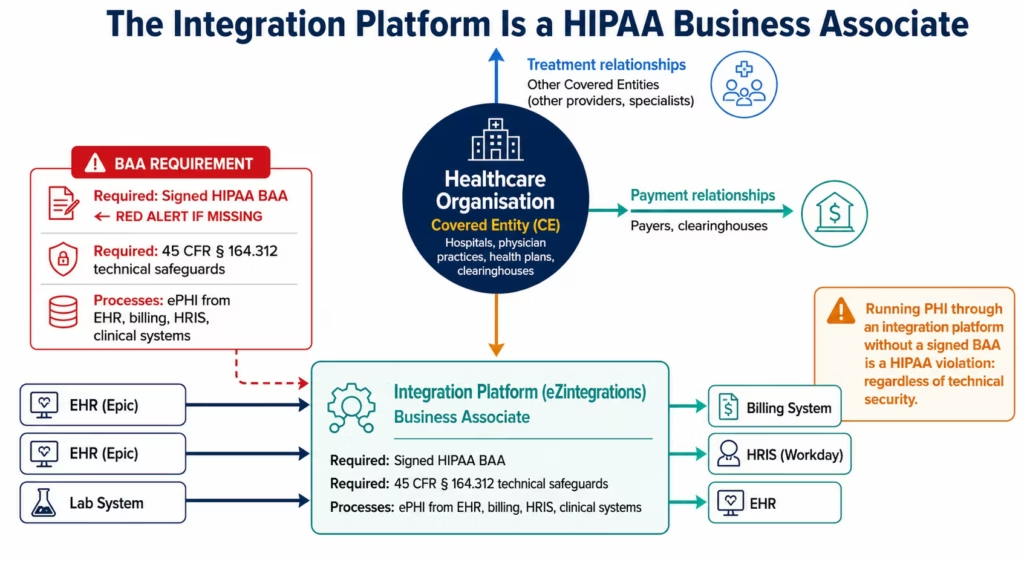
Before evaluating which integration platform to use for healthcare data workflows, the compliance team needs to establish one foundational fact: any platform that processes, stores, or transmits Protected Health Information on behalf of a Covered Entity is a Business Associate under HIPAA.
The definition is broad and intentional. Under 45 CFR § 160.103, a Business Associate is any person or entity that performs a function or activity involving the use or disclosure of PHI on behalf of a Covered Entity. An integration platform that connects your EHR to your billing system and routes patient encounter data between them is doing exactly this: using and disclosing PHI on your behalf.
This has two practical implications:
First: you need a signed BAA. Before any PHI flows through the integration platform, you must have an executed Business Associate Agreement in place. The BAA defines what the Business Associate may do with PHI, what safeguards they must maintain, how they will respond to breaches, and what happens to PHI upon contract termination. Running PHI through an integration platform without a BAA is a HIPAA violation regardless of how securely the data is handled technically.
Second: the platform must implement the HIPAA Security Rule technical safeguards. The integration platform’s infrastructure must comply with 45 CFR § 164.312: the technical safeguard requirements that specify how electronic PHI (ePHI) must be protected. These are not optional for Business Associates.
This means that when you evaluate an integration platform for healthcare use, the evaluation must include: “Will this vendor sign a HIPAA BAA?” and “Does this platform’s architecture satisfy the 45 CFR § 164.312 technical safeguards?” Not just “does it connect to Epic?”
eZintegrations provides a signed HIPAA BAA for all healthcare customers. The sections below map every 45 CFR § 164.312 technical safeguard requirement to a specific eZintegrations capability.
The HIPAA Technical Safeguards: What Your Platform Must Provide
45 CFR § 164.312 specifies four categories of technical safeguards for ePHI. Each contains required and addressable implementation specifications. Here is what each requires and what an integration platform must provide to satisfy it.
Access Controls (§ 164.312(a))
Required: unique user identification, emergency access procedure, automatic logoff, and encryption/decryption.
What this means for an integration platform: every user who accesses the integration platform must have a unique identity. Sessions must time out automatically. PHI accessed through the platform must be encrypted. The platform must be able to provide emergency access procedures.
eZintegrations: role-based access control (RBAC) with unique user accounts for every team member. Sessions time out on configurable inactivity periods. Integration service accounts use unique, non-shared API credentials. Emergency access procedures are documented in the eZintegrations security policy (available under NDA).
Audit Controls (§ 164.312(b))
Required: hardware, software, and procedural mechanisms to record and examine access and other activity in systems containing ePHI.
What this means for an integration platform: every time PHI is accessed, transmitted, or processed by the integration platform, that activity must be logged in a way that can be examined. The log must be tamper-resistant and contain sufficient detail for audit.
eZintegrations: every workflow execution generates an immutable audit log entry containing: timestamp (UTC), workflow ID, source system, destination system, data fields accessed, records processed, service account identity, and execution result. These logs are write-once, tamper-resistant, and retained for the duration configured by your organisation. The full audit log for every PHI access event is available for your compliance team, your internal audit function, or external auditors.
Integrity Controls (§ 164.312(c))
Addressable: electronic mechanisms to corroborate that ePHI has not been improperly altered or destroyed.
What this means for an integration platform: the platform should have mechanisms to detect whether PHI has been altered in transmission.
eZintegrations: TLS 1.2+ encryption in transit provides integrity protection for all data in transmission (TLS includes message authentication codes that detect tampering during transit). Data stored within eZintegrations (workflow execution data, queued records in dead letter queues) is protected by AES-256 encryption with integrity verification.
Transmission Security (§ 164.312(e))
Required: guard against unauthorised access to ePHI during transmission.
Addressable: encryption of ePHI in transit.
What this means for an integration platform: all PHI transmitted between the integration platform and connected systems (EHR, billing, HRIS) must be protected against interception.
eZintegrations: TLS 1.2+ for all API connections between eZintegrations and connected healthcare systems. HTTPS enforced: no unencrypted HTTP connections permitted. Certificate verification enforced for all outbound connections. For on-premises EHR systems accessed via IPSec Tunnel: the tunnel encrypts all traffic between eZintegrations cloud and the hospital network, with no PHI transmitted unencrypted over public internet.
Before vs After: HIPAA-Compliant Integration Transformation
| HIPAA Risk Area | Before HIPAA-Compliant Integration Platform | After eZintegrations |
|---|---|---|
| PHI in transit | Spreadsheet exports via email, unencrypted file transfers between systems | All PHI transmission via TLS 1.2+ encrypted API connections |
| PHI in AI processing | AI workflow steps call external AI APIs: PHI leaves HIPAA boundary | Native AI inference within eZintegrations: PHI never leaves platform |
| Audit trail | Manual logging or no logging for data movements between systems | Immutable audit log for every PHI access, transmission, and processing event |
| Access control | Shared admin credentials for integration middleware | RBAC with unique service accounts, session timeouts, minimum necessary scope |
| BAA coverage | Integration platform vendor declines to sign BAA | Signed HIPAA BAA provided to all healthcare customers |
| PHI in error logs | Exception logs may contain raw PHI (patient names, diagnoses in error messages) | Configurable PHI masking in execution logs: patient identifiers excluded |
| On-premises connectivity | Firewall rules expose EHR ports to internet for integration | IPSec Tunnel: no public internet exposure for on-premises EHR access |
| Minimum necessary access | Integration service account has broad EHR admin access | FHIR scopes configured per workflow: minimum necessary access enforced |
| Third-party subcontractors | Integration platform uses subcontractors for AI/ML processing without BAA chain | All AI processing native: no PHI sent to subcontractor AI providers |
| Breach notification | Unclear responsibility for breach notification if integration causes exposure | BAA defines eZintegrations breach notification obligations explicitly |
eZintegrations HIPAA Safeguard Mapping
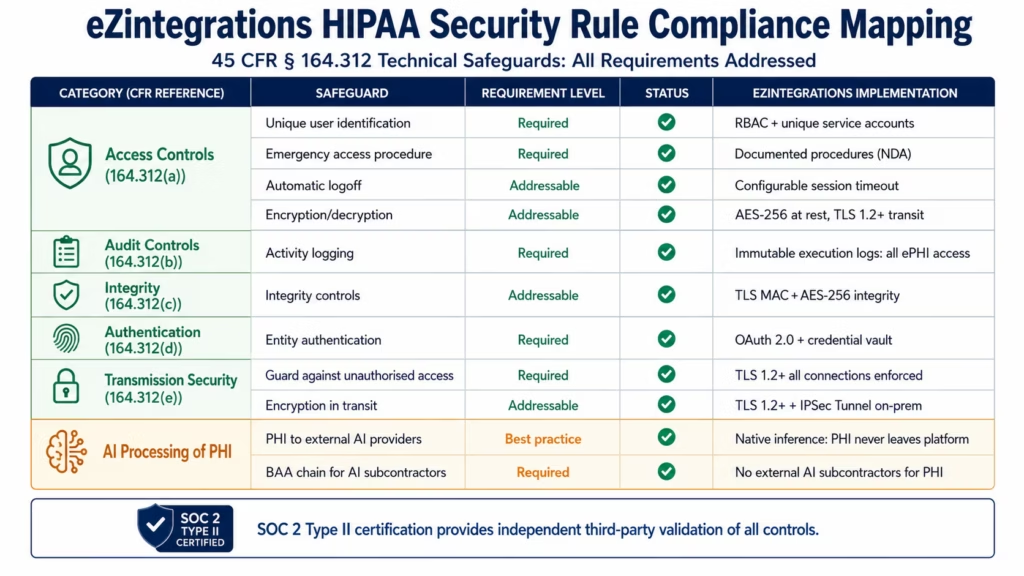
The table below maps every HIPAA Security Rule technical safeguard to the specific eZintegrations capability that addresses it. This is the documentation your compliance team needs for a HIPAA risk assessment or a Business Associate evaluation.
| HIPAA Requirement (45 CFR § 164.312) | Specification Type | eZintegrations Capability |
|---|---|---|
| Unique user identification | Required | RBAC with unique user accounts; unique API credentials per integration service |
| Emergency access procedure | Required | Emergency access procedures documented; available under NDA to healthcare customers |
| Automatic logoff | Addressable | Configurable session timeout; API token expiry with automatic refresh |
| Encryption and decryption | Addressable | AES-256 encryption at rest; TLS 1.2+ in transit; key management in platform |
| Audit controls | Required | Immutable execution logs: timestamp, workflow ID, data accessed, service account, result |
| Integrity controls | Addressable | TLS message authentication in transit; AES-256 with integrity verification at rest |
| Person or entity authentication | Required | OAuth 2.0 for EHR connections; credential vault for all service account credentials |
| Transmission security | Required/Addressable | TLS 1.2+ all connections; HTTPS enforced; IPSec Tunnel for on-premises EHR |
| Access control (minimum necessary) | HIPAA Privacy Rule | FHIR scopes per workflow; field-level selection (_elements parameter) |
| PHI masking in logs | Best practice | Configurable PHI field masking in execution logs |
| Subcontractor BAA chain | Required | All AI processing native: no PHI sent to external AI subcontractors |
| Breach notification | Required (BAA) | BAA defines breach notification obligations and timeline |
| Disposal of PHI | Required (BAA) | BAA defines PHI disposal upon contract termination |
The AI Processing Gap: Where Most Platforms Fail HIPAA
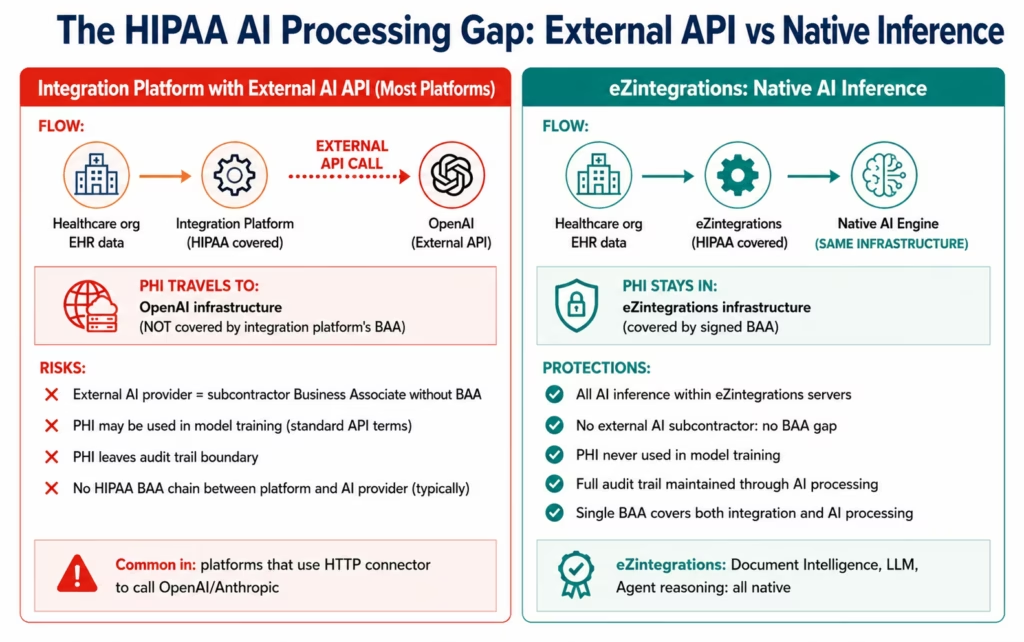
This is the compliance issue that your IT security and compliance teams need to evaluate carefully for any integration platform with AI features. It affects every major integration platform that has added AI capabilities by connecting to external AI providers.
The gap: when an integration platform routes PHI to an external AI provider’s API for processing, that PHI leaves the integration platform’s HIPAA-covered infrastructure and enters the external AI provider’s environment. This creates three compliance problems:
Problem 1: The external AI provider is a subcontractor Business Associate. Under HIPAA, when a Business Associate uses a subcontractor that will access PHI, the Business Associate must have a BAA with the subcontractor. If your integration platform routes clinical notes to OpenAI for processing, OpenAI is a subcontractor Business Associate. Does your integration platform vendor have an executed HIPAA BAA with OpenAI? Most do not: and OpenAI’s standard API terms do not include HIPAA BAA coverage.
Problem 2: PHI in external AI training data. AI providers’ standard terms may allow them to use API input data to improve their models. Clinical notes, patient demographics, and health information sent to external AI APIs may be used for model training unless the provider has explicitly agreed in a BAA not to use the data for this purpose. Most standard API terms do not provide this guarantee.
Problem 3: Encryption boundary. PHI in transit between the integration platform and the external AI provider is encrypted in transit (TLS). But once it arrives at the AI provider’s infrastructure, it is processed within that provider’s environment: outside your BAA-covered infrastructure and outside your audit trail.
How eZintegrations addresses this:
eZintegrations’ AI capabilities: Document Intelligence, LLM classification, semantic matching, and all AI agent reasoning: run as native inference within eZintegrations’ own infrastructure. When the Prior Authorisation Agent reads a clinical note, that note is processed by eZintegrations’ AI engine within eZintegrations’ servers. It is not sent to OpenAI, Anthropic, Google, or any external AI provider.
The result: your PHI never leaves your HIPAA-covered environment during AI processing. The eZintegrations BAA covers both the integration workflows and the AI processing. There are no subcontractor BAA gaps. There is no risk of PHI appearing in external AI training data.
The question to ask any integration platform with AI features:
“When your AI workflow processes a clinical note or patient record, where does that data go during AI processing? Is it sent to an external AI provider’s API, or does it run within your own infrastructure?”
If the answer is external API: ask for the BAA chain documentation: the BAA between them and the AI provider.
If the answer is native: ask for the scope of the BAA and confirm it explicitly covers AI processing operations.
HIPAA-Compliant Workflow Examples
Here is how HIPAA compliance works in practice across the most common healthcare integration workflows in eZintegrations:
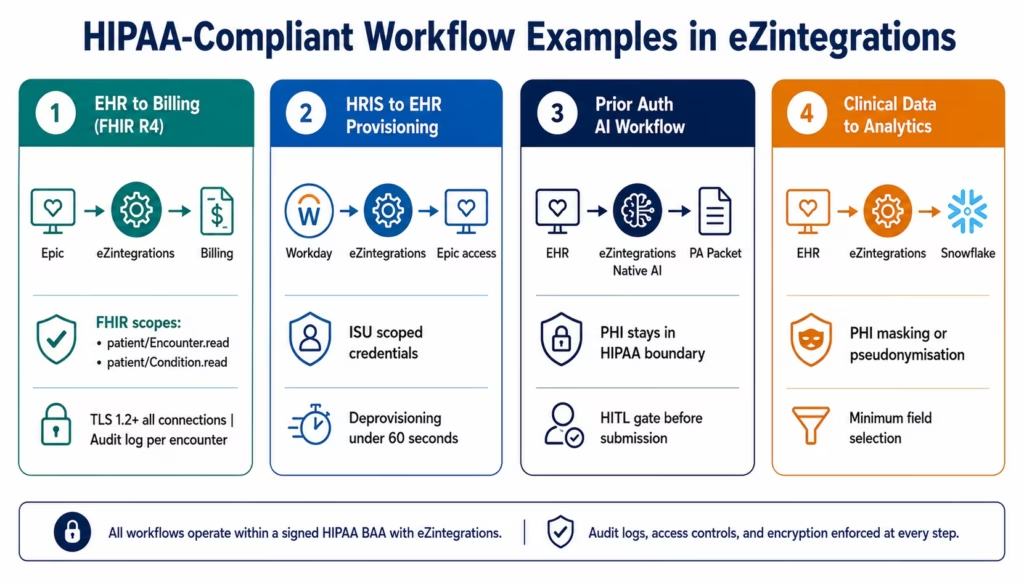
EHR to Billing (FHIR R4)
PHI involved: patient demographics, diagnosis codes (ICD-10), procedure codes (CPT), insurance information, encounter dates and locations.
HIPAA compliance in this workflow:
- FHIR R4 connection uses SMART on FHIR OAuth 2.0, aligned with HL7 FHIR security and privacy considerations. The integration service account has minimum necessary FHIR scopes:
patient/Patient.read patient/Encounter.read patient/Condition.read patient/Procedure.read patient/Coverage.read: no broader EHR access. - All data transmission between eZintegrations and Epic (or Cerner/Athenahealth) is TLS 1.2+ encrypted. The FHIR endpoint uses HTTPS exclusively.
- Every encounter retrieved generates an audit log entry: the patient encounter ID, the FHIR resources accessed, the timestamp, and the billing system destination.
- The billing system connection uses OAuth 2.0 or API key with minimum necessary scope.
- PHI in execution logs is masked: patient names and identifiers are excluded from the operational log while the encounter ID and workflow metadata are retained for troubleshooting.
Workday HRIS to EHR (Staff Provisioning)
PHI involved: employee names, roles, and access levels (indirect PHI: the employee’s access to patient records creates PHI risk).
HIPAA compliance in this workflow:
- Workday integration uses OAuth 2.0 with Integration System User (ISU) credentials scoped to the specific Workday data objects required (Worker, Position, Organisation): no payroll or health benefit data accessed.
- EHR provisioning API calls use minimum necessary scope: access creation only, no patient data access.
- Termination events trigger immediate access revocation, reducing the window of terminated-employee EHR access to under 60 seconds.
- Full audit trail: every provisioning and deprovisioning action is logged with the Workday event ID, the EHR user account affected, and the timestamp.
Prior Authorisation AI Workflow
PHI involved: patient demographics, diagnosis history, clinical notes, procedure details: highly sensitive PHI.
This workflow uses eZintegrations’ Level 1 iPaaS Workflows, Level 2 AI Workflows, and Level 3 AI Agents. All AI inference runs natively within eZintegrations’ infrastructure: whether it is a Level 2 Document Intelligence step, a Level 3 Prior Auth Exception Agent, or a Level 4 Goldfinch AI Chat UI query, PHI never leaves eZintegrations. The HIPAA compliance architecture is consistent across all four automation levels.
HIPAA compliance in this workflow:
- The Prior Auth AI Agent retrieves FHIR resources via API Tool Call with minimum necessary FHIR scopes.
- Document Intelligence processing of clinical notes runs within eZintegrations’ native AI engine. No clinical note content is sent to any external AI provider.
- The PA packet assembled by the agent contains PHI. It is routed to the medical assistant’s review queue within eZintegrations: it does not leave the platform until the medical assistant initiates the payer submission.
- Every step in the AI agent’s investigation is logged: which documents were read, which API calls were made, what data was retrieved, and the confidence score of the agent’s output.
- Human-in-the-loop gate: the agent cannot submit the PA packet to the payer without medical assistant review and initiation. The agent prepares; the human submits.
Clinical Data to Analytics Warehouse
PHI involved: patient-level clinical data destined for a data warehouse (Snowflake, BigQuery, Redshift).
HIPAA compliance in this workflow:
- The data warehouse must also be covered by a BAA (Snowflake, BigQuery, and AWS Redshift all provide HIPAA BAA coverage for their healthcare customers: verify before deploying).
- eZintegrations’ watermark-based incremental pull minimises the volume of PHI processed on each run (only records modified since the last run are retrieved and transmitted).
- Field selection uses FHIR
_elementsparameter or SQL field selection to retrieve only the specific data points required for analytics: not full patient records. - PHI in transit between eZintegrations and the data warehouse is TLS 1.2+ encrypted.
- Consider de-identification or pseudonymisation for analytics use cases where patient-level identifiers are not required: eZintegrations can apply hash-based pseudonymisation to patient identifiers before loading to the analytics warehouse.
The HIPAA Business Associate Agreement
The BAA is not a standard template checkbox. The content of the BAA matters. Here is what a complete HIPAA BAA with an integration platform should include, and what eZintegrations’ BAA provides:
Required BAA elements under 45 CFR § 164.504(e):
| BAA Requirement | What It Means | eZintegrations BAA |
|---|---|---|
| Permitted uses and disclosures | What the Business Associate may do with PHI | Explicitly limits use to providing integration services on the CE’s behalf |
| Prohibited uses | What the BA may not do with PHI | Prohibits use of PHI for BA’s own purposes; prohibits sale of PHI |
| Appropriate safeguards | BA must implement HIPAA Security Rule safeguards | Technical, administrative, and physical safeguard commitments documented |
| Subcontractor obligations | BA must obtain BAA from any subcontractor accessing PHI | Addresses eZintegrations’ AI processing: native inference, no PHI to external AI providers |
| Reporting obligations | BA must report security incidents and breaches | Breach notification within 60 days; security incident reporting as required |
| Access and amendment | BA must support individual rights to access and amend PHI | Procedures for responding to individual access requests routed through the CE |
| Accounting of disclosures | BA must support accounting of disclosures | Audit log provides disclosure accounting data to the CE |
| Termination provisions | PHI returned or destroyed at contract end | Procedure for PHI disposal upon BAA termination documented |
| Survival | Obligations survive contract termination | BAA obligations for existing PHI survive termination |
eZintegrations’ HIPAA BAA is available for review before contract execution. Healthcare procurement teams can request the BAA template during the demo process for legal review prior to commitment.
SOC 2 Type II and Third-Party Validation
A signed BAA and HIPAA technical safeguards represent your contractual and operational protection. SOC 2 Type II certification represents independent validation that those commitments are being met in practice.
What SOC 2 Type II means:
SOC 2 Type II is an audit performed by an independent CPA firm against the AICPA’s Trust Services Criteria: Security, Availability, Processing Integrity, Confidentiality, and Privacy. A Type II report covers a defined audit period (typically 6-12 months) and tests whether the platform’s controls are operating effectively throughout that period: not just whether they exist.
Why SOC 2 Type II matters for HIPAA integration vendors:
Healthcare organisations are required to perform due diligence on Business Associates. SOC 2 Type II provides third-party evidence that your integration platform vendor is operating the security controls they claim to operate. It does not replace the BAA, but it provides assurance that the BAA commitments are backed by independently validated operational controls.
eZintegrations SOC 2 Type II:
eZintegrations holds SOC 2 Type II certification. The SOC 2 report is available for review under NDA by qualified healthcare customers during the procurement process. The report covers:
- Security controls (CC series): access control, logical access, encryption, vulnerability management, incident response
- Availability controls (A series): uptime, disaster recovery, backup procedures
- Processing integrity controls (PI series): workflow execution accuracy, error handling, exception management
- Confidentiality controls (C series): PHI handling, data classification, disposal
For HIPAA compliance due diligence, the SOC 2 Type II report is the primary documentation that demonstrates ongoing operational effectiveness of security controls, beyond the contractual commitments in the BAA.
How to Get Started
Step 1: Request the HIPAA BAA and SOC 2 report
Before any PHI flows through eZintegrations, your legal and compliance team needs to review and execute the HIPAA BAA. Request the BAA template during the demo process. Simultaneously, request the SOC 2 Type II report under NDA for your information security team’s review. Both are available before contract execution.
Step 2: Identify your HIPAA-covered integration workflows
Not every integration workflow involves PHI. A workflow that syncs non-patient operational data (equipment inventory, staff schedules without patient assignments) may not require the same PHI safeguards as an EHR-to-billing workflow. Classify your integration requirements by PHI involvement so you can apply appropriate controls to each workflow.
Step 3: Configure minimum necessary access for each EHR connection
When configuring your FHIR R4 connection for Epic, Cerner, or Athenahealth, specify the minimum necessary FHIR scopes for each integration use case, aligned with U.S. Department of Health and Human Services HIPAA minimum necessary guidance. The eZintegrations FHIR connector configuration explicitly defines which resource types and operations are permitted. Do not use broad EHR admin credentials for integration service accounts: create dedicated integration system users with scoped access.
Step 4: Configure PHI masking in execution logs
In the eZintegrations workflow configuration, enable PHI field masking for execution logs. Specify which fields contain PHI (patient name, date of birth, MRN, diagnosis codes, insurance IDs) and configure the masking rule (hash, truncate, or exclude). The workflow ID, encounter ID, timestamp, and system response data are retained for troubleshooting; patient identifiers are excluded from the operational log.
Step 5: Import HIPAA-compliant healthcare templates and activate
Import your first healthcare integration template from the Automation Hub. Each healthcare template is pre-configured with HIPAA-appropriate defaults: minimum necessary FHIR scopes, PHI masking in logs, TLS enforcement, and audit logging. Review the default configuration against your organisation’s specific HIPAA policies and adjust where needed.
Book a free demo and bring your compliance team. We will walk through the BAA, the SOC 2 report, the technical safeguard architecture, and the AI processing compliance structure: and answer your specific compliance questions.
FAQs
A HIPAA-compliant integration platform must: have a signed Business Associate Agreement (BAA) covering all PHI processing; implement 45 CFR § 164.312 technical safeguards including unique user identification, audit controls, automatic logoff, transmission encryption (TLS 1.2+), and integrity controls; enforce minimum necessary access through FHIR scope restrictions and field-level data selection; maintain immutable audit logs for all PHI access events; protect PHI in error logs through masking or exclusion; and manage any subcontractor BAA chain if external AI providers process PHI. eZintegrations satisfies all six requirements, with native AI processing that keeps PHI inside the platform and SOC 2 Type II certification validating security controls.
Yes, eZintegrations provides a signed HIPAA BAA for all healthcare customers before any PHI flows through the platform. The BAA covers all transmission, storage, and processing functions performed by eZintegrations, including AI processing such as Document Intelligence, LLM classification, and AI agent reasoning running natively within eZintegrations' infrastructure. The BAA is available for legal review before contract execution and can be requested during the demo process.
For healthcare integration templates from the Automation Hub (EHR-to-billing, HRIS provisioning, clinical alerting), deployment typically takes 5-10 days from template import to production activation. This includes BAA execution (3-5 business days depending on legal review), FHIR R4 connection configuration and EHR sandbox testing (2-3 days), PHI masking configuration (1 day), and production validation (1-2 days). Complex multi-system HIPAA-covered integrations typically take 2-4 weeks.
PHI processed by eZintegrations AI remains entirely within eZintegrations' infrastructure. Document Intelligence, LLM classification, and AI agent reasoning run natively inside the platform and do not send data to OpenAI, Anthropic, Google, or any external AI provider. This means PHI stays within the HIPAA-covered environment during AI processing, no subcontractor BAA gap exists, external AI providers cannot access the data for model training, and every processing step remains inside the immutable audit trail.
When a workflow execution fails, eZintegrations logs the error and system response. PHI masking configuration allows administrators to exclude or hash fields such as patient names, MRNs, dates of birth, diagnosis codes, and other identifiers within execution logs. Non-PHI metadata such as workflow ID, encounter reference, error code, and system response details remain available for troubleshooting. PHI masking is configured at the workflow level and automatically applies to all related execution logs.1. What makes an integration platform HIPAA compliant?
2. Does eZintegrations provide a HIPAA Business Associate Agreement?
3. How long does it take to set up a HIPAA-compliant integration in eZintegrations?
4. Does eZintegrations work with Epic, Cerner, and other EHR systems in a HIPAA-compliant way?
5. What happens to PHI when eZintegrations AI processes a clinical document?
6. How does eZintegrations handle PHI in workflow error logs?
Conclusion: HIPAA Compliance Is a Platform Architecture Decision
Your compliance team checks whether the integration platform will sign a BAA. Your IT security team checks whether the platform encrypts data in transit. Your legal team reviews the BAA terms. These are necessary checks: but they do not catch the compliance gap that most healthcare organisations discover after deployment.
The gap is AI processing. The moment your integration platform routes a clinical note, a prior auth letter, or a denial document to an external AI provider for processing, PHI leaves your HIPAA-covered environment. That external AI provider is a subcontractor Business Associate. Does your integration platform vendor have a HIPAA BAA with OpenAI? With Anthropic? With Google? For most platforms that have added AI features through external API calls, the answer is no.
eZintegrations was built for healthcare’s compliance requirements from the architecture level up. All AI processing is native. PHI stays within the HIPAA boundary during every workflow step: including AI steps. The BAA covers the full platform. SOC 2 Type II provides independent validation that the security controls are operating as documented.
For healthcare organisations that need to automate workflows touching PHI: connecting EHR to billing, HRIS to EHR provisioning, clinical systems to analytics: eZintegrations provides the integration capability and the compliance architecture in a single platform, without asking your compliance team to evaluate and manage a subcontractor BAA chain for every AI feature.
Book a free demo and bring your compliance team. We will walk through the BAA, SOC 2 report, technical safeguard architecture, and native AI compliance structure together.
Import a HIPAA-compliant healthcare template from the Automation Hub and start your first secure healthcare integration today.

